8
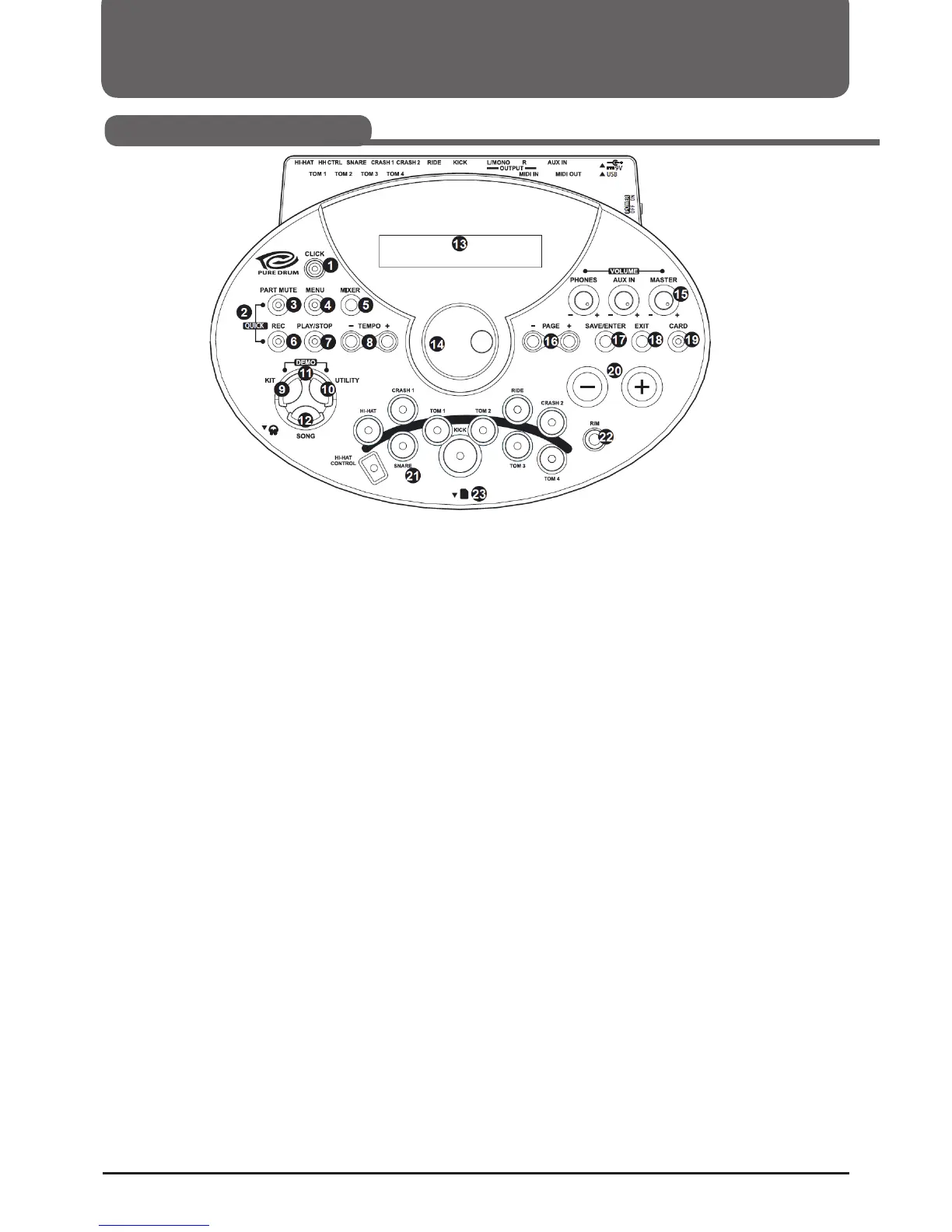
1. [CLICK] Button
Click switch.
2. [REC] + [PART MUTE] Button
Quick record for quickly recording drum part.
3. [PART MUTE] Button
Part mute switch.
4. [MENU] Button
Enter current mode's menu to set parameter; Hold [MENU]
button then press [PART MUTE] or [CLICK] buttons, would
enter mute or click setting menu.
5. [MIXER] Button
Enter MIXER menu, adjust master volume including Kit volume,
SONG Volume or Card-midi Volume, Click Volume.
6. [REC] Button
Enter the Record menu.
7. [PLAY/STOP] Button
Control the play of a song or a Card midi song, or start/stop
recording.
8. [TEMPO+] / [TEMPO-] Buttons
Adjust current tempo of Song, Click, etc; Press [TEMPO+]
and [TEMPO -] buttons simultaneously to reset to default
tempo.
9. [KIT] Button
Enter Kit Mode to select a Kit.
10. [UTILITY] Button
Adjust the parameters of global setup, such as trigger sensiti-
vity, trigger curve, Effect, MIDI setup, etc.
11. [UTILITY] + [KIT] Buttons
Go to DEMO mode and start DEMO.
12. [SONG] Button
Enter Song Mode to select a song.
13. Display
14. Data Dial
15. [MASTER] / [AUX] / [PHONES] Volume Knob
Mater Volume knob, control the volume of output jack.
16. [PAGE+] / [PAGE-] Buttons
Page Buttons, Scroll through the menu pages, or move the
cursor left/right when naming.
17. [SAVE/ENTER] Buttons
Enters the Save menu when available; enter the current folder
or confirm current operation.
18. [EXIT] Button
Exit from the current sub-menu back to the superior level menu.
19. [CARD] Button
Enter SD card menu, load, delete, play or format the SD card.
20. [+] / [-] Buttons
Increase or decrease the current parameter.
21. Pad selection keys and indicators (11)
Use these buttons to adjust the sounds of the individual pads
in the Kit/Mixer/Utility menu. In the Kit/Mixer/Utility menu
you can use this buttons to select the Pad you want to edit. The
Indicators show the selected pad. In the Song/Demo mode,
the indicators show which pad is currently being used is used
to play the rhythm.
22. [RIM] Button
Allows access to the edge voice for dual-zone triggers
(Snare, Hi-Hat, Tom, etc.)
23. SD Card Slot
SD card slot located at the front panel.
Panel & Display Description
Front Panel



 To Next Page