Machine description
4812158701_G.pdf2019-10-01
No Designation Symbol FunctionNo Designation Symbol Function
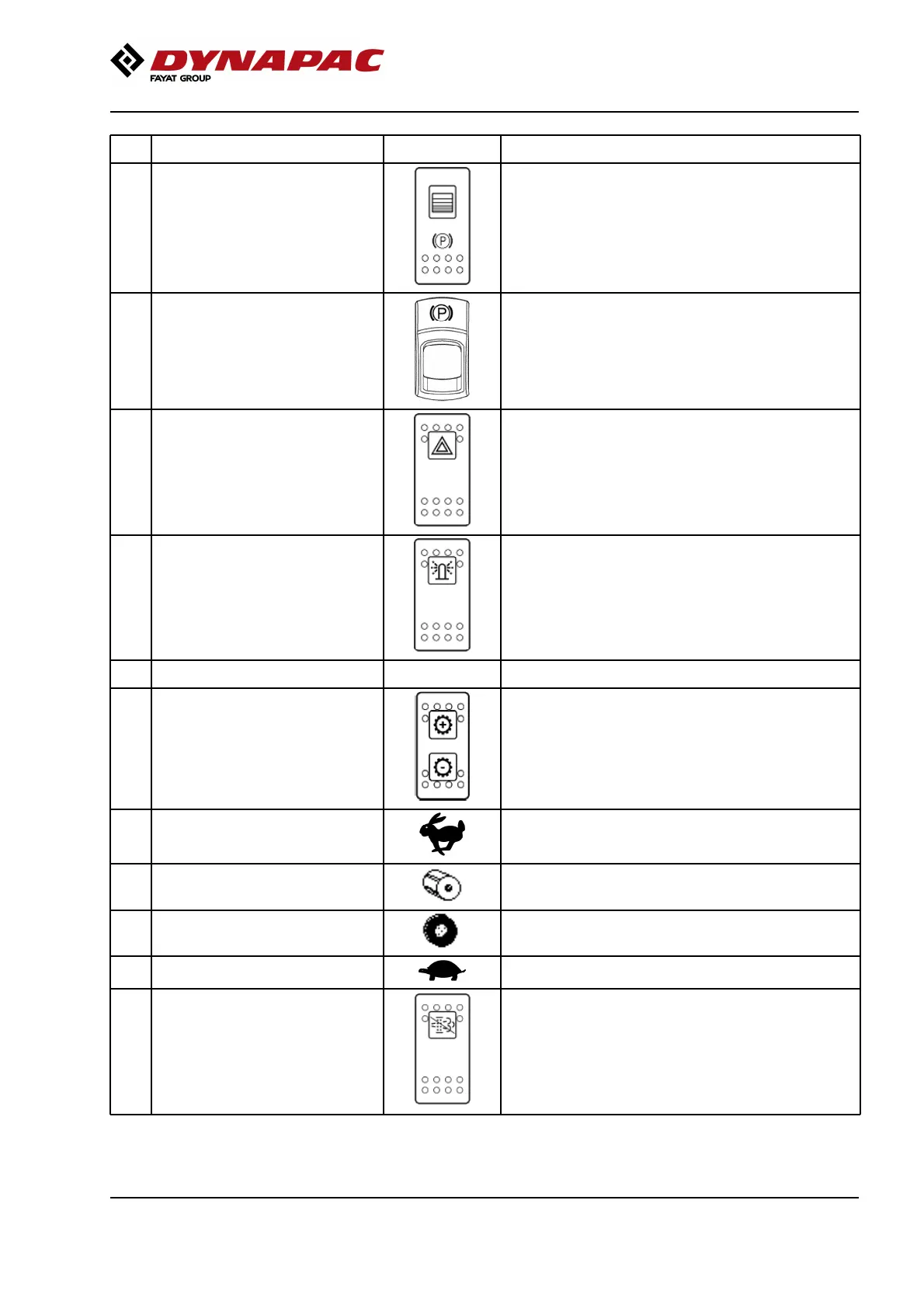
25 Parking brake When pressed, the parking brake is activated.
To release the brakes, slide the red part backwards
(towards you) and change the position of the lever.
NB! When starting the machine, the parking brake
must be activated.
25 Parking brake When pressed, the parking brake is activated.
To release the brakes, slide the red part backwards
(towards you) and change the position of the lever.
NB! When starting the machine, the parking brake
must be activated.
To activate the brakes, press the top of the switch to
change the position of the switch.
To disengage the brakes, press down the red part at
the same time as the switch, and change the position
of the switch.
NOTE! When starting the machine, the parking brake
must be activated.
To activate the brakes, press the top of the switch to
change the position of the switch.
To disengage the brakes, press down the red part at
the same time as the switch, and change the position
of the switch.
NOTE! When starting the machine, the parking brake
must be activated.
26 Hazard indicators (Optional) Activate the hazard warning light by depressing the
button.
26 Hazard indicators (Optional) Activate the hazard warning light by depressing the
button.
27 Rotating beacon (Optional) Activate the rotating beacon by pressing the switch. (If
the machine has two rotating beacons, both are
activated)
27 Rotating beacon (Optional) Activate the rotating beacon by pressing the switch. (If
the machine has two rotating beacons, both are
activated)
28 Reserve28 Reserve
29 Gear position switch, Dip Activates the four different gear positions. (1) Hare, (2)
Drum spin, (3) Wheelspin and (4) Tortoise. The current
gear position is shown in the display by means of the
following figures.
29 Gear position switch, Dip Activates the four different gear positions. (1) Hare, (2)
Drum spin, (3) Wheelspin and (4) Tortoise. The current
gear position is shown in the display by means of the
following figures.
1: Transport mode1: Transport mode
2: Used if the drum is slipping.2: Used if the drum is slipping.
3: Used if the rear tires are slipping.3: Used if the rear tires are slipping.
4: Working mode.4: Working mode.
30 Burnout delay DPF Filter (Tier
IIIB/4i)
Delay burnout of the DPF filter (approx. 20 min.) by
pressing and holding the switch for 3 sec.
30 Burnout delay DPF Filter (Tier
IIIB/4i)
Delay burnout of the DPF filter (approx. 20 min.) by
pressing and holding the switch for 3 sec.
37




 To Next Page