Machine description
4812163801.pdf 2019-04-30
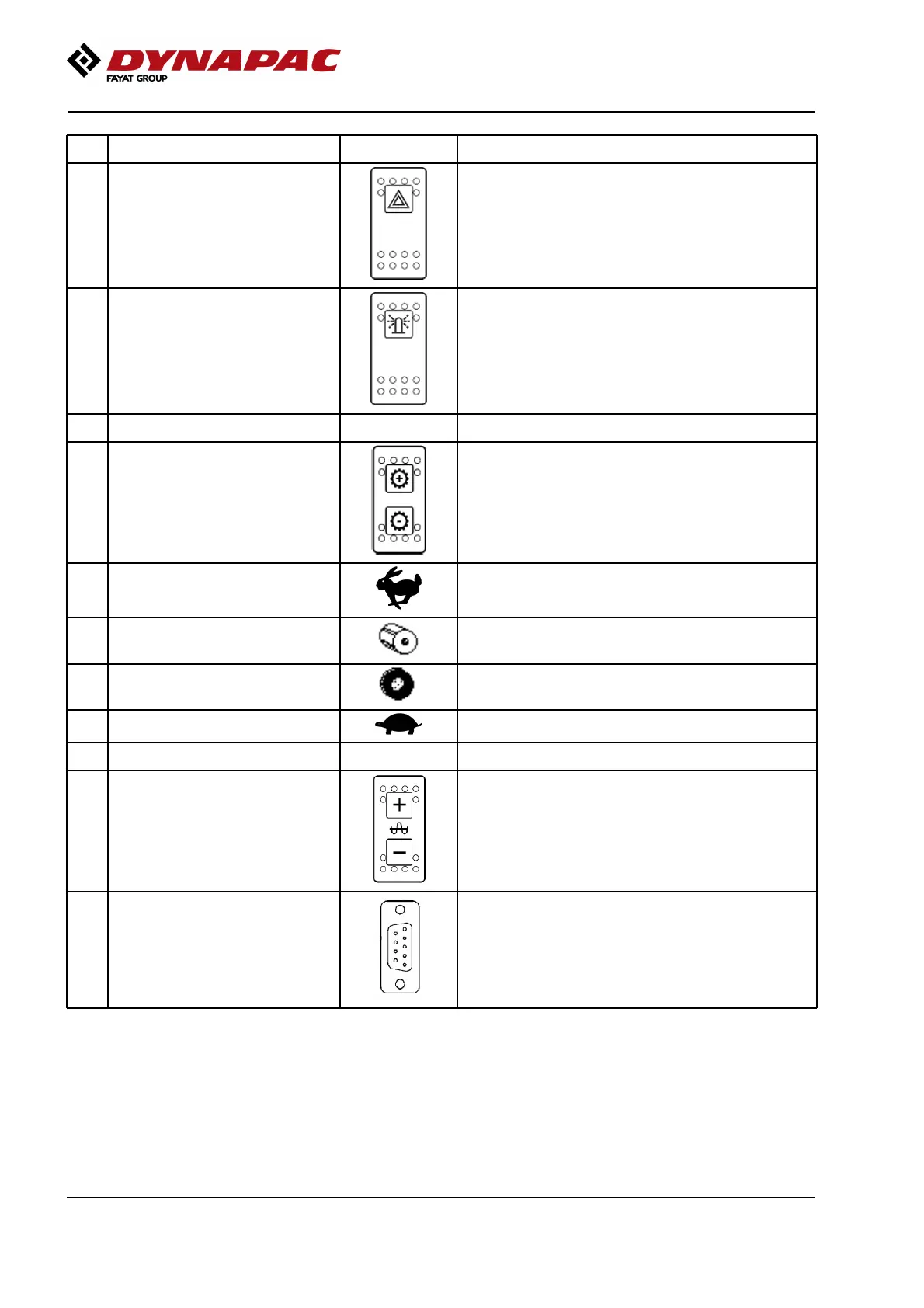
No Designation Symbol FunctionNo Designation Symbol Function
26 Hazard indicators (Optional) Activate the hazard warning light by depressing the
button.
26 Hazard indicators (Optional) Activate the hazard warning light by depressing the
button.
27 Rotating beacon (Optional) Activate the rotating beacon by pressing the switch. (If
the machine has two rotating beacons, both are
activated)
27 Rotating beacon (Optional) Activate the rotating beacon by pressing the switch. (If
the machine has two rotating beacons, both are
activated)
28 Reserve28 Reserve
29 Gear position switch, Dip Activates the four different gear positions. (1) Hare, (2)
Drum spin, (3) Wheelspin and (4) Tortoise. The current
gear position is shown in the display by means of the
following figures.
29 Gear position switch, Dip Activates the four different gear positions. (1) Hare, (2)
Drum spin, (3) Wheelspin and (4) Tortoise. The current
gear position is shown in the display by means of the
following figures.
1: Transport mode1: Transport mode
2: Used if the drum is slipping.2: Used if the drum is slipping.
3: Used if the rear tires are slipping.3: Used if the rear tires are slipping.
4: Working mode.4: Working mode.
30 Reserve30 Reserve
31 Amplitude selector (DCO) Only for machine equipped with "Compaction
Optimizer".
31 Amplitude selector (DCO) Only for machine equipped with "Compaction
Optimizer".
35 Service socket Diagnostic socket.
Gateway is connected here to read the CAN-Open
system.
35 Service socket Diagnostic socket.
Gateway is connected here to read the CAN-Open
system.
40



 To Next Page