9 |
ECOTRONIC Plus
© Ferroli 08164 ECOTRONIC Plus.monen.indd
2.3 Menu structure
main menu
1. Meas. values
2. reports
3. Solar
4. Arrangement
5. WMZ
6. manual operation
7. user code
8. Expert
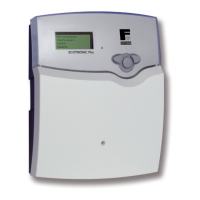
The clear-text display shows a 4-line part of the selected
menu.
2.4 User code
Adjustment and control of the controller are carried out via
the menu. When the controller is commissioned, the display
level is in the main menu. In the first line of each submenu
you will find the option “back”, by means of which it is possi-
ble to get to the former menu level. In the following diagrams
you will find the complete menu contents; since some of the
menu points depend on the system, option or message, in
some cases not all of the shown text lines are indicated.
Main menu is shown on the display in the initial state. A
selection can be made between 8 submenus.
Note: The choice of adjustment values and options depends
on different functions and the user code. Some only appear
in the display if they are available for the adjusted system
parameters.
1. Expert Code 262 (factory setting)
All menus and adjustment values are shown
and all values can be altered.
2. User Code 077
The expert level is shown, parameter access
is restricted.
3. Customer Code 000
The expert level is not shown, adjustment
values (solar) can be changed partly; modi-
fication of options, parameter and balance
values is not possible.
For safety reasons, the user code should ge-
nerally be set to “000” before the controller
is handed to the customer!
Note:
After the menu point “user code” has been choosen, enter
the user code!




 To Next Page