Reproduction forbidden without Fibocom Wireless Inc. written authorization - All Rights Reserved.
FM350-GL Hardware Guide Page 40 of 67
WOWWAN#
The WOWWAN# signal is used to wake the Host (AP) when there comes the data request. The definition
of WOWWAN# signal is as follows:
Pull low 1s then pull high (pulse signal).
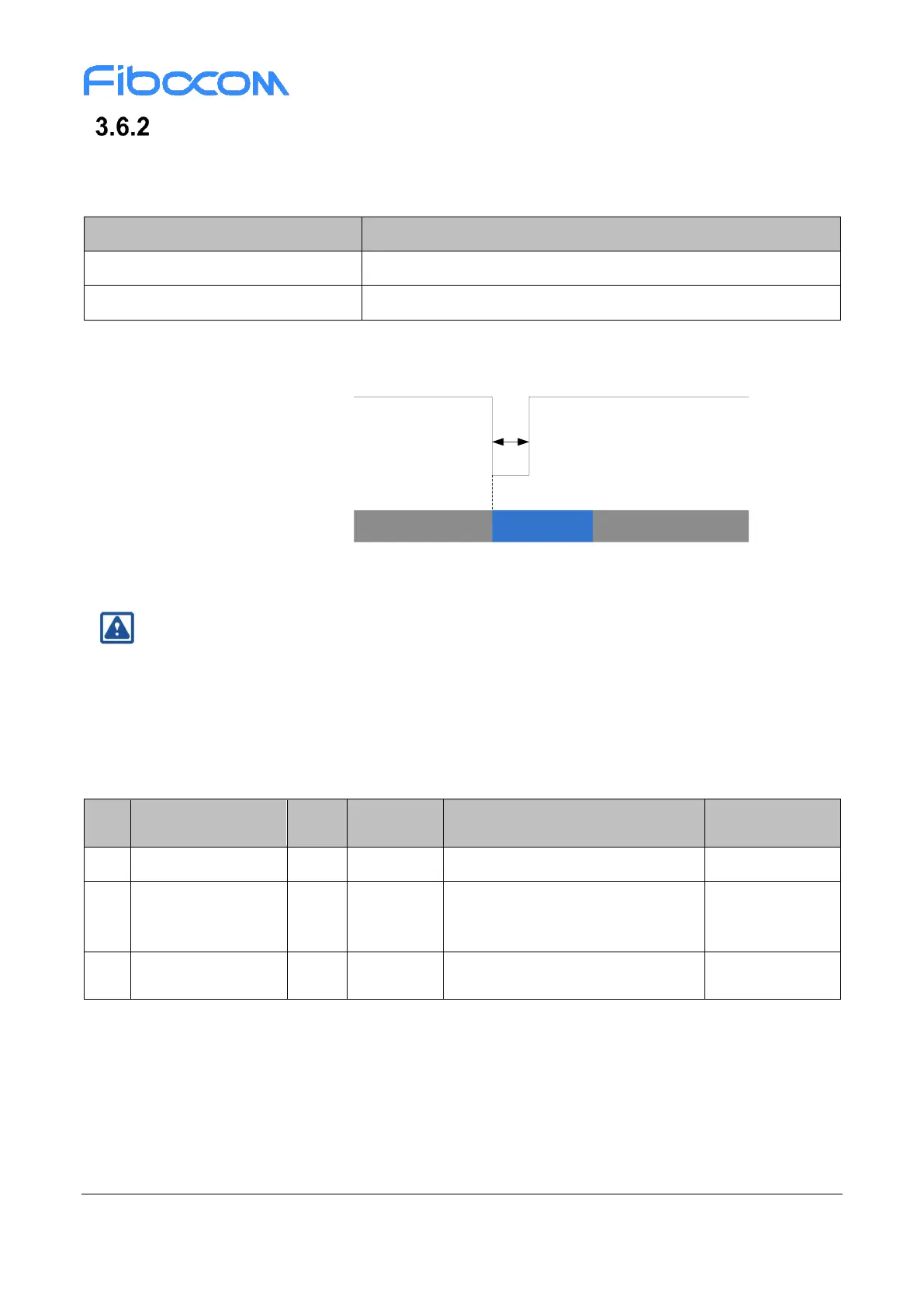
The WOWWAN# timing is shown in Figure 3-19:
WOWWAN#
1S
Idle/Sleep
Call/SMS/Data
Idle/Sleep
Status
Figure 3-19 WOWWAN# timing
Note:
WOWWAN# is disabled in default, it can be enabled by AT CMD: AT+GTWAKE=1 and restart
module.
3.7 Interrupt Control
The FM350 module provides four interrupt signals, and the pin definition is as follows:
Enable/Disable RF network
Dynamic Power Reduction - Body
SAR control signal
(SAR_BACK_OFF)
GNSS Disable signal
Reserved



 To Next Page