EN
137
8.11 “Registration website” and “Admin Plus token”
In order to obtain the security token needed to obtain the “Admin
Plus” privileges in the web user interface, it is necessary to go
through the following stages:
Stage 1 - Collection of information relating to the inverter.
Collect the following information relating to each inverter for which
you wish to have the security token:
• S/N - Serial number of the inverter. This information can be found
on the product label giving the identity details of the inverter.
The serial number consists of 6 digits (the last 6 in models with a
label giving a 10-digit S/N).
• WK - Production week. This information can be found on the
product label giving the identity details of the inverter.
The production week consists of 4 figures, indicating the week
(first 2 digits) and the year of production (last 2 digits).
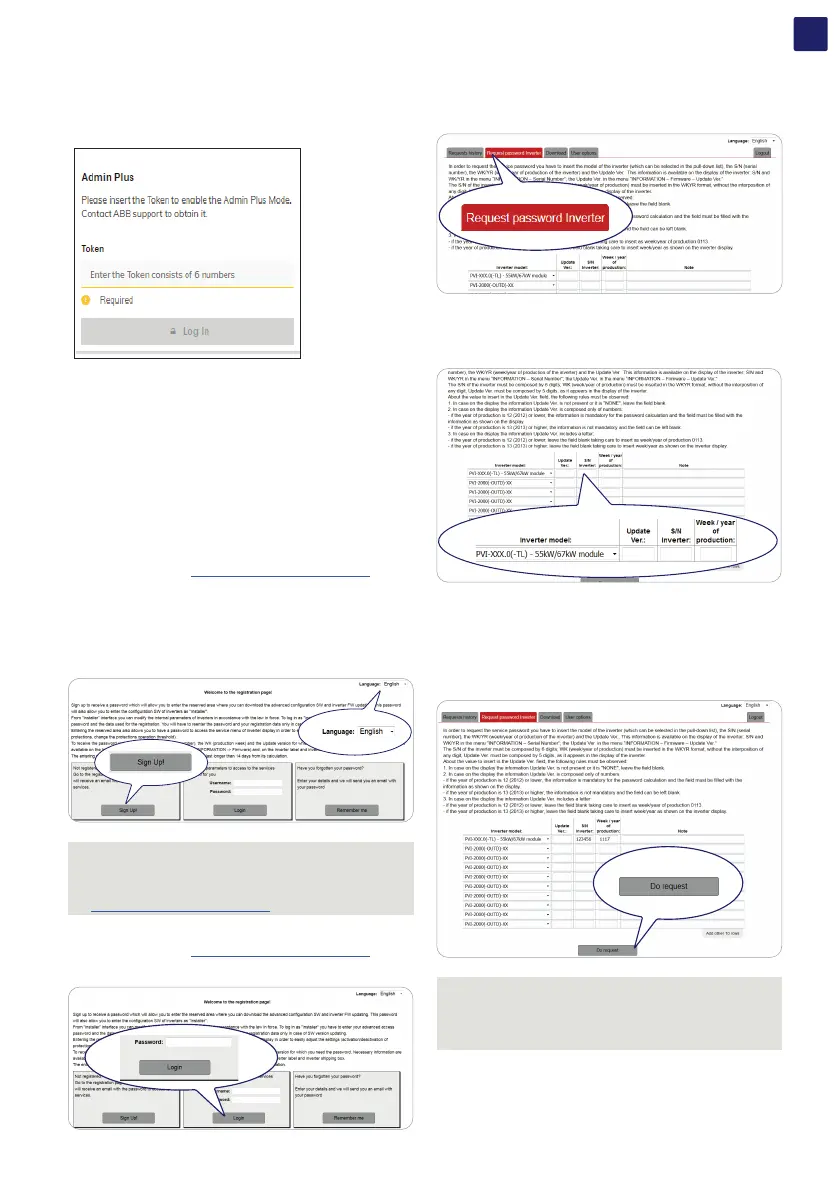
Stage 2 - Registration on https://registration.solar.fimer.com
• Go online and access https://registration.solar.fimer.com
• Set the desired language and click on the specific icon to start
registration.
• Insert the personal data requested and end the registration stage.
• An email will be sent to the email address used with a link to
complete the registration process.
• Once the registration process is over, a further email will be sent
with the password to access the website.
NOTE – D The security token obtained enables access also to
the advanced “Installer” mode present on the configuration
software for inverters. The configuration software can
be downloaded in a specific section of the website
https://registration.solar.fimer.com
Stage 3 - Request for the security token
• Go online and access https://registration.solar.fimer.com
• Insert the Username (corresponding to the email used during
registration) and the Password obtained at the end of Stage 2.
• Access the section dedicated to requesting the security token.
• Choose the inverter model from the drop-down list and insert
Serial Number and Week of Production of the inverter which were
obtained previously (Stage 1).
• Click on icon to request the security token.
If there is an error in entering data, the fields containing the
error will be highlighted in red. If, on the other hand, the data are
correct, the passwords will be shown in a new window and at the
same time sent to the email address used for registration.
NOTE – D The security token enables the “Admin Plus”
privileges which allows the inverter’s sensitive parameters
to be changed. Proceed to changing the aforementioned
parameters only when requested by the grid operator or by
customer assistance.



 To Next Page