EN
91
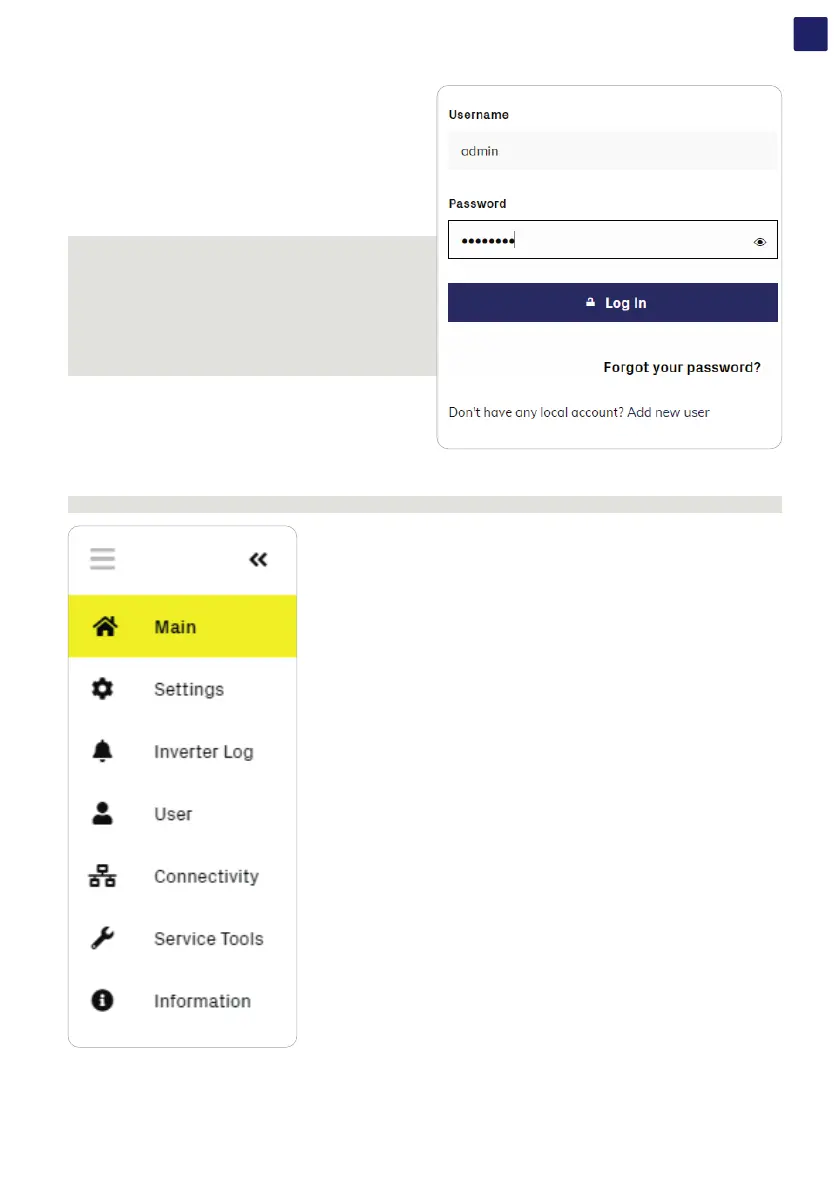
7.4.2 Web UI - Login page
• After you have connected the device to the inverter and you access
to the login page, login with the username and password created
during the commissioning phase.
NOTE – D User and password are CASE SENSITIVE.
NOTE – D If the Password is lost click on “Forgot your
password?” to obtain the access to the Web User Interface
(and it will be possible to change the password) by entering the
PRODUCT KEY (printed on the “Communication Identification
label” and applied during the commissioning phase to the plant
documentation).
NOTE – D The language of the wizard could be changed by
clicking on the upper status bar.
7.5 Web User Interface menu structure
NOTE – D The following screenshots are related to a laptop visualization and may differ from smartphone or tablet visualization.
The Web User Interface is divided in sections, available on the left sidebar:
MAIN: Main section of Web User Interface dedicated to viewing the summary information
related the status and the production information of the inverter and photovoltaic plant.
SETTINGS: Section dedicated to AC and DC line parameters configurations.
INVERTER LOG: Section dedicated to viewing Alarms and Warnings event log.
USER: Section dedicated to User management.
CONNECTIVITY: Section dedicated to inverter communication settings and configurations.
SERVICE TOOLS: Section dedicated to main service tools configurations.
INFORMATION: Section dedicated for general information about the Web User Interface.



 To Next Page