EN
98
7.5.5 CONNECTIVITY menu
In the CONNECTIVITY section it’s possible to access the following sub-menus:
LAN
WLAN
RS485
DEBUG SETTINGS
MODBUS
LAN
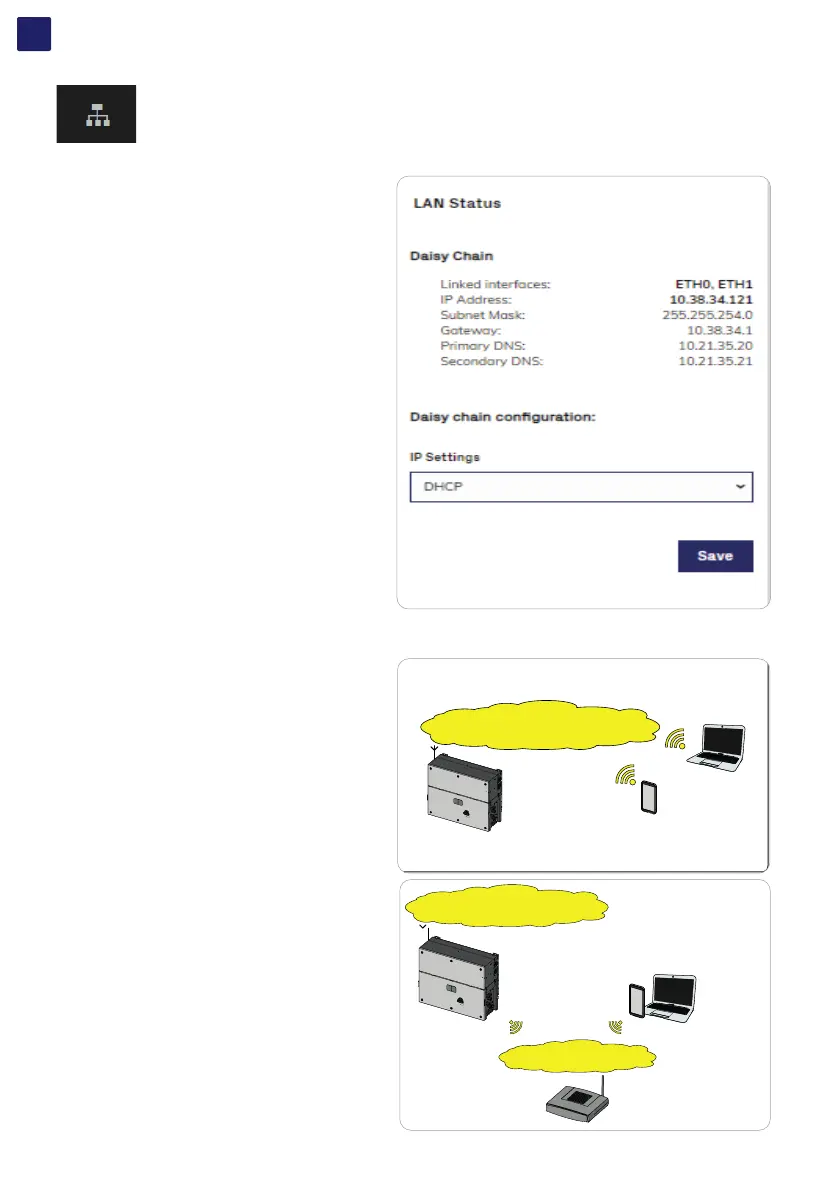
In the LAN sub-menu it’s possible to view the status and
change the daisy chain configuration of the two ethernet ports
(39) (40) of the inverter.
• Daisy chain configuration: DHCP or Static:
By selecting the DHCP function (default setup) the router will
automatically assign a dynamic IP address to the inverter
whenever it tries to connect to the user network.
With Static, the user can assign a fixed IP address to the
system. The data which has to be entered in order for IP static
address assigning to take place will appear. Complete the
additional fields at the bottom of the screen (all the fields are
mandatory with the exception of the secondary DNS server).
WLAN
In the WLAN sub-menu it’s possible to view the status of the two wireless channels of the inverter, and to disconnect the channel 2.
Channel 1: “Access Point mode”: Only local communication
is enabled in this mode; In particular, the WLAN acts like an
«access point» generating a wireless network to which the user
can connect locally, configure the inverter/photovoltaic system,
using the direct access to the Web User Interface.
Channel 2 “Station Mode”: In this operating mode it is possible
to connect the inverter to a WI-Fi router; in this condition remote
monitoring is enabled by accessing to Aurora Vision® CLOUD
platform.
Wireless connection - “ACCESS POINT MODE” COMMUNICATION
Internal Webserver
User Interface
(IP 192.168.117.1)
Direct Access
SSID: ABB-XX-XX-XX-XX-XX-XX
(XX-XX-XX-XX-XX-XX= Inverter MAC address)
IP given by inverter
DHCP server
IP given by inverter
DHCP server
PVS-120.0
Aurora Vision Plant Viewer™
Aurora Vision Plant Viewer for Mobile™
Aurora Vision Plant Portfolio Manager™
Customer SSID
IP given by router
DHCP server
IP given by router
DHCP server
Direct Access
SSID: ABB-XX-XX-XX-XX-XX-XX
(XX-XX-XX-XX-XX-XX= Inverter MAC address)
PVS-120.0



 To Next Page