EN
99
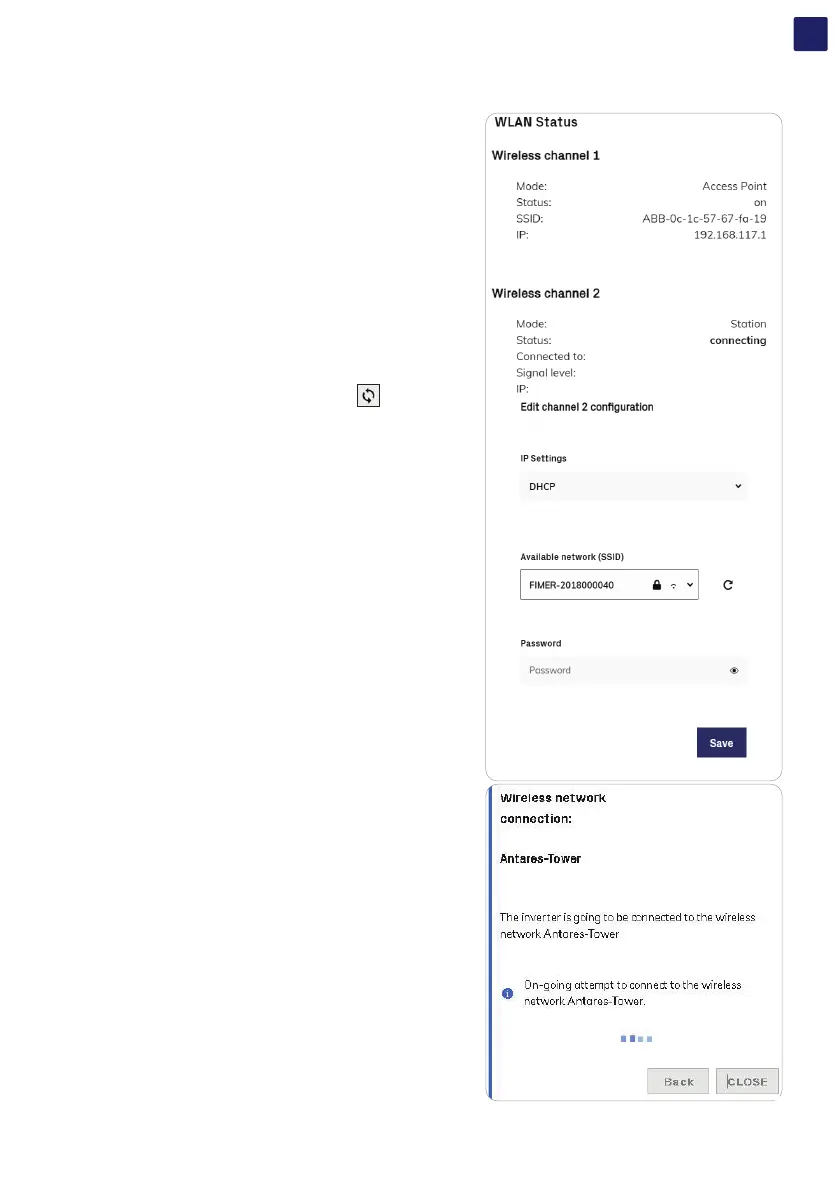
In case of connection to channel 2 (“Station Mode”), it will be required to enter the wireless network parameters (set on the router) and
follow the subsequent procedure:
• IP Selection Mode: DHCP or Static:
By selecting the DHCP function (default setup) the router
will automatically assign a dynamic IP address to the
inverter whenever it tries to connect to the user network.
With Static, the user can assign a fixed IP address to the system. The data
which has to be entered in order for IP static address assigning to take place
will appear. Complete the additional fields at the bottom of the screen (all
the fields are mandatory with the exception of the secondary DNS server).
• SSID (name of wireless network):
Identify and select your own wireless network from all those
shown in the SSID field (you can carry out a new search of the
networks that can be detected with the Update button
).
Once the network has been selected, confirm.
• Password (wireless network password):
Enter the password for the destination network (if necessary) and start the
connection attempt (it will take a few seconds).
• Click on “Save”
• Once the inverter is associated with a wireless network, the user must switch
the tablet/smartphone/PC to the same wireless network which the inverter is
connected.



 To Next Page