EN
100
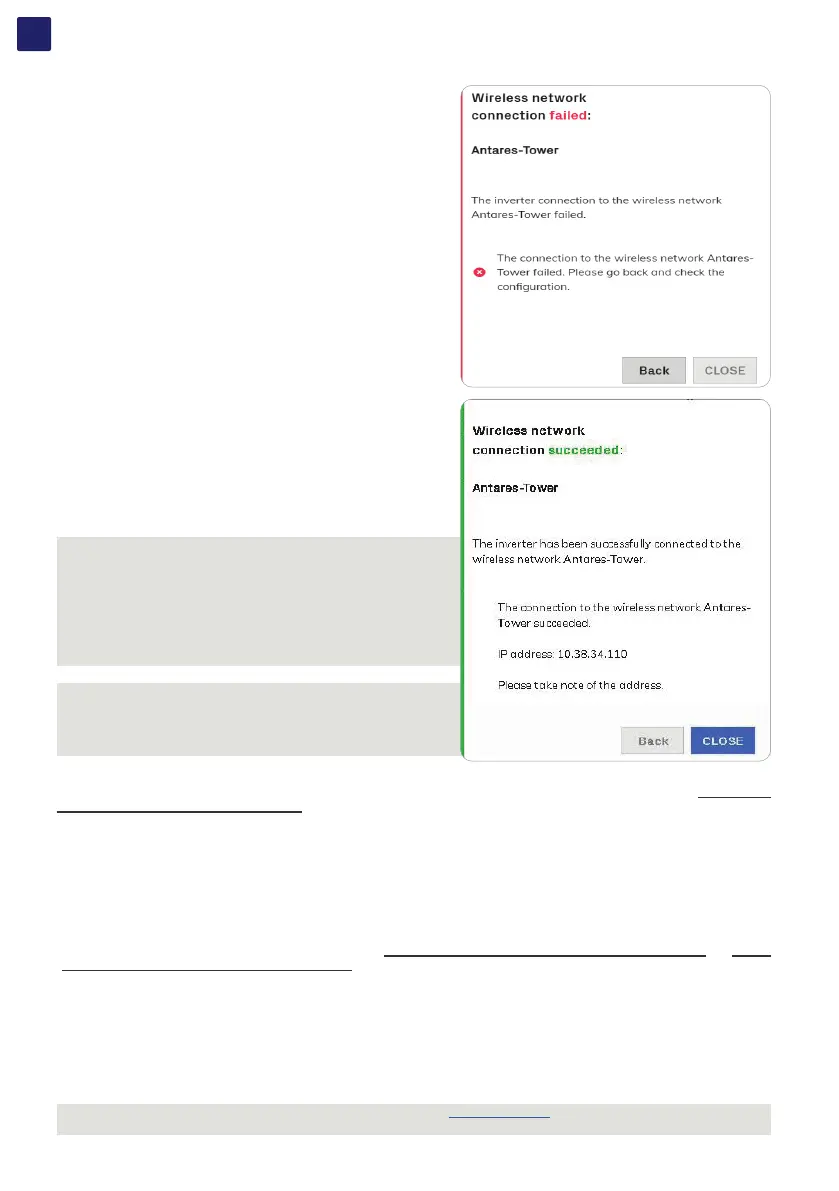
• The connection can fail due to a wrong wi-fi network and/or a password.
In this case click “Back”.
• Once the tablet/smartphone/PC device is switched to the local wireless
network a new message will confirm that the connection is acquired.
• Click the “Close” button” to complete the setup of “Station Mode”
NOTE – D In order to use the “Host Name” as an alternative to the
dynamic IP address, the Wi-Fi router to which the inverter is connected
(when operating in “Station Mode”) must provide the Domain Name
System (DNS) service (contact the network administrator for further
information regarding the presence or absence of the DNS service in
the Wi-Fi router or how to enable it). In this way, even if the IP address
assigned to the inverter should change over time, (dynamic IP), it will
always be possible to use the same “Host Name” which will remain
unchanged over time.
NOTE – D The IP address assigned may vary for reasons connected to
the wireless router setup (for example, a very brief DHCP lease time).
If verification of the address is required, it is usually possible to obtain
the client list (and the corresponding IP addresses) from the wireless
router administration panel.
RS485
In the RS485 sub-menu it’s possible to adjust the settings relating to the RS485 main communication port (38) (refer to the “Connection
of the communication and control signals” paragraph for further information about the port connection). In particular it is possible to
set:
• RS485 Node address: It allows you to sets the address (any value from 2 to 63 is allowed).
• RS485 Baud Rate: It allows you to sets the Baud Rate (2400/4800/9600/19200/34800/57600/115200).
• RS485 Parity Mode: It allows you to set the Parity bit (No Parity, Even Parity, Odd Parity).
• RS485 Protocol Type: It allows you to sets the communication protocol to be used for the RS485 line when the port is set as SLAVE or
to enable the port itself to work in MASTER mode (refer to the “Serial communication connection (RS485-Slave mode)” and “Serial
communication connection (RS485-Master mode)” paragraphs for further information on SLAVE and MASTER operating modes).
In particular it is possible to select among the following values:
- “Modbus SunSpec Server”: SunSpec complaint Modbus RTU communication protocol enabling monitoring and controlling of the
inverter by Fimer as well as third party systems (SLAVE operating mode).
- “Device Acquisition”: Enables polling and logging of data from Fimer supported accessories directly connected with the RS485 port like
VSN800 Weather Station, digital environmental sensors, meters (MASTER operating mode).
NOTE – D Please refer to official SunSpec Alliance documentation at https://sunspec.org, for details on SunSpec communication
protocol.



 To Next Page