16
POWERVIEW (CONTINUED)
FACEPLATE
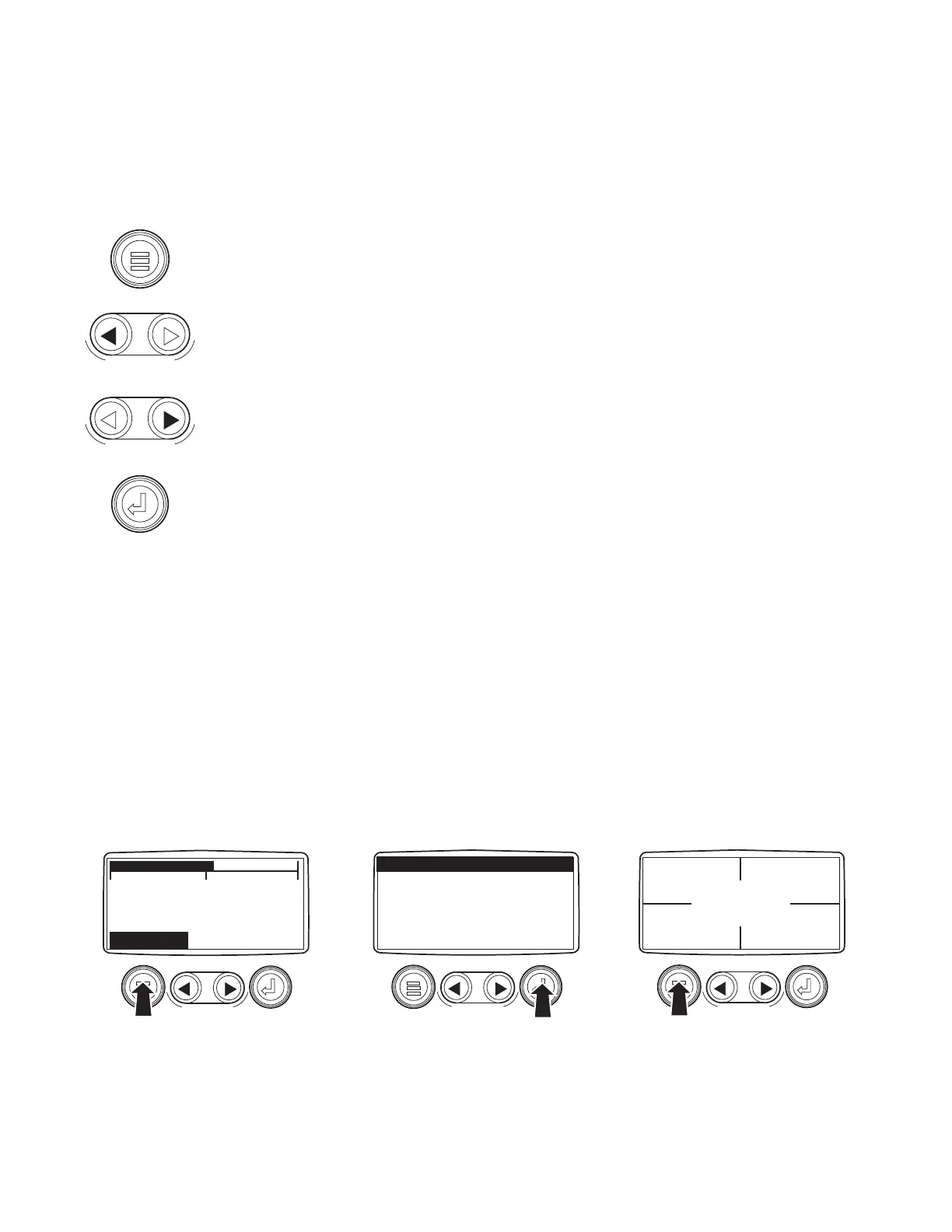
The keypad on the PowerView is a capacitive touch sensing system. There are no mechanical
switches to stick or wear out. It can be operated in extreme temperatures, while wearing gloves,
through ice, snow, mud, grease, etc. When the key is touched, feedback is provided by flashing the
screen. The keys on the keypad perform the following functions (refer to Figure 7):
Menu Key
Menu Key is used to either enter or exit the menu screens.
Left Arrow Key
Left Arrow Key is used to scroll through the screen, either moving the parameter selection
toward the left or upward.
Right Arrow Key
Right Arrow Key is used to scroll through the screen, either moving the parameter
selection toward the right or downward.
Enter Key
Enter Key is used to select the parameter that is highlighted on the screen.
POWERVIEW OPERATION
PowerView Menus (First Time Start-Up)
1. Once the engine has been started and the keyswitch is turned to RUN, the ENG RPM
parameter is displayed
(Figure 8).
2. To toggle through the various engine parameters, touch either the left or right arrow key.
3. To switch to the 4-Up Display, touch the Menu Key to display the first seven items of the Main
Menu (Figure 9).
4. Since the first menu item listed is GO TO 4-UP DISPLAY, touch the Enter Key to select the
four-parameter display.
0 2000 4000
1800 RPM
ENG RPM COOL TEMP
MENU
KEY
Figure 8 – 1–Up Display
GO TO 4-UP DISPLAY
ENGINE CONFGURATION
STORED FAULT CODES
ADJUST BACKLIGHT
ADJUST CONTRAST
SELECT UNITS
SETUP 1-UP DISPLAY
ENTER
KEY
Figure 9 – Main Menu
0 RPM
ENG RPM
0 PSI
OIL PRES
46F
COOL TEMP
12.3 VDC
BAT VOLT
MENU
KEY
Figure 10 – 4–Up Display


 To Next Page