Audio Command Center Series Manual — P/N 51889:E1 6/8/2010 107
MS-9600, MS-9200UDLS and MS-9200UD Programmed Activation by FACP
3. Set DIP Switches 1, 2, and 3 on Switch S1 of the ACC-ZPMK for operation with the MS-9600,
MS-9200UD, MS-9200UDLS FACP and switches 6, 7, and 8 for the number of ACC-
25/50DAZS panels.
4. Set Switch SW1 on the ACC-ZSM for one or two Audio Amplifier (ACC-AAM25)
configuration.
5. Set Switch SW2 on the ACC-ZSM for Style Y (Class B) or Style Z (Class A) speaker circuit
wiring.
6. Set DIP switches 1, 2, and 3 on Switch S3 of the ACC-25/50ZS or ACC-25/50ZST
motherboard for Single Zone with activation of 2-5 messages.
7. Record any new messages into the ACC-25/50ZS or ACC-25/50ZST.
8. Enable ACS communication to address 01 and assign messages (1-5) to audio zones (32-56) in
the FACP.
9. ACC-25/50ZST with remote FFT location annunciation:
MS-9200UDLSMS-9200UDLS - Enable ACS address 07 or address 05 (for version 4 and
higher) and program SLC points 75-98.
MS-9600 - Enable ACS address 07 and program SLC loop #1 points 135-158.
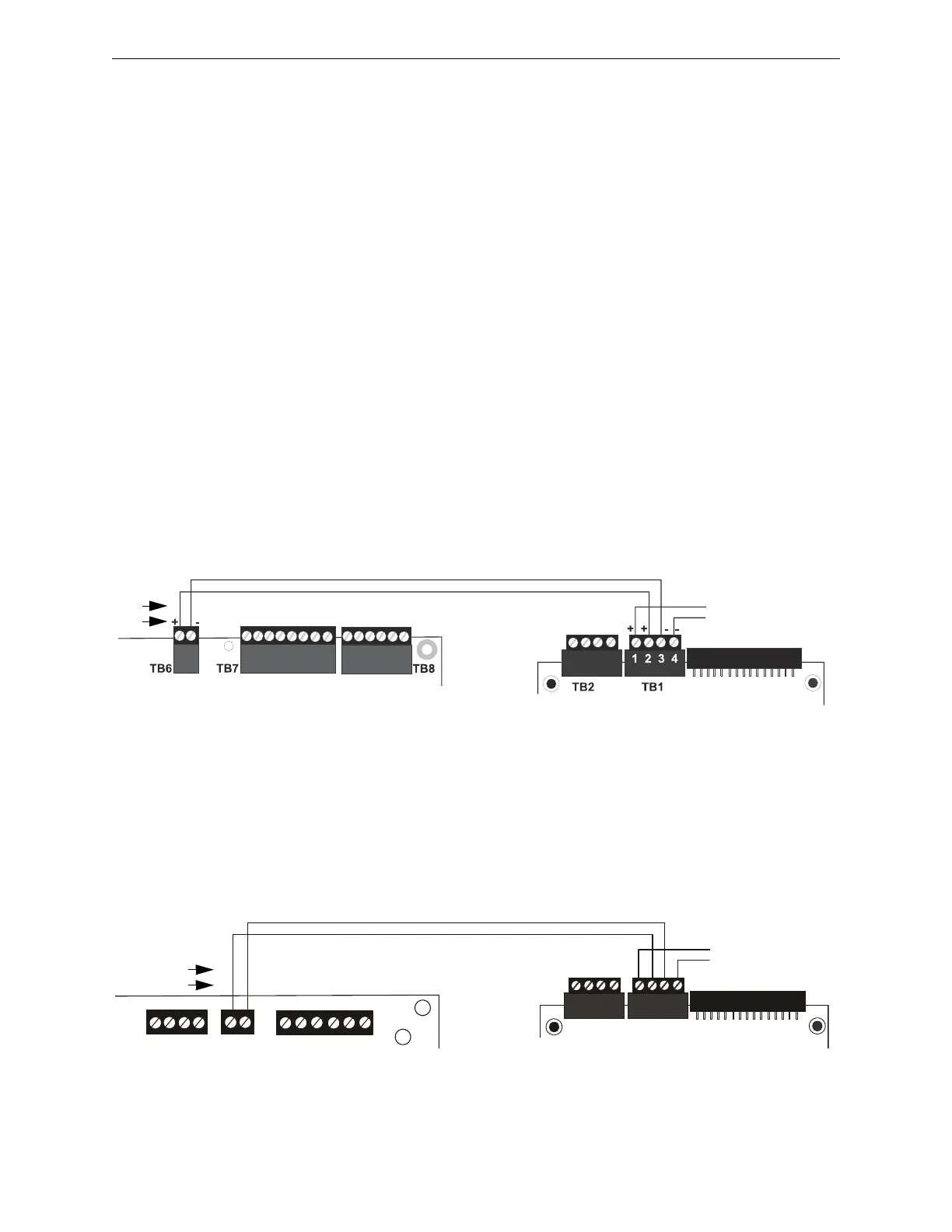
D.1.3 Wiring From ACC-25/50ZS or ACC-25/50ZST to FACP
MS-9600 and MS-9600LS
The FACP communicates with the ACC-25/50ZS/T over the ACS or ANN-BUS annunciator link.
Wiring must be connected between Terminal TB6 on the FACP and Terminal TB1 on the ACC-
ZPMK Zone Page Module installed on the ACC-25/50ZS/T panel.
MS-9200UD and MS-9200UDLS
The MS-9200UD and MS-9200UDLS FACPs communicate with the ACC-25/50ZS or ACC-
25/50ZST over the ACS or ANN-BUS annunciator link. Wiring must be connected between Ter-
minal TB9 on the FACP and Terminal TB1 on the ACC-ZPMK Zone Page Module installed on the
ACC-25/50ZS or ACC-25/50ZST panel.
Figure D.1 Connection for MS-9600 or MS-9600LS to ACC-ZPMK
MS-9600 or MS-9600LS
ACC-ZPMK
to other ACS/ANN
devices
A B
ANN
ACS
9
6
0
0
z
p
m
k
.
w
m
f
+ -
B+ A+ B- A- A B
ACS
SHIELD
SLC
SLC
SLC
SLC
OUT+ IN+ OUT- IN-
TB8
TB9
TB10
Figure D.2 Connection for MS-9200UD or MS-9200UDLS to ACC-ZPMK
MS-9200UD or MS-9200UDLS
ACS
ACC-ZPMK
to other ACS/ANN
devices
A BANN
ACS
9
2
0
0
u
d
z
p
m
k
.
w
m
f











 To Next Page