© FJDynamics. All rights reserved.9
FJDynamics AT2 Auto Steer System Hardware Installation Manual
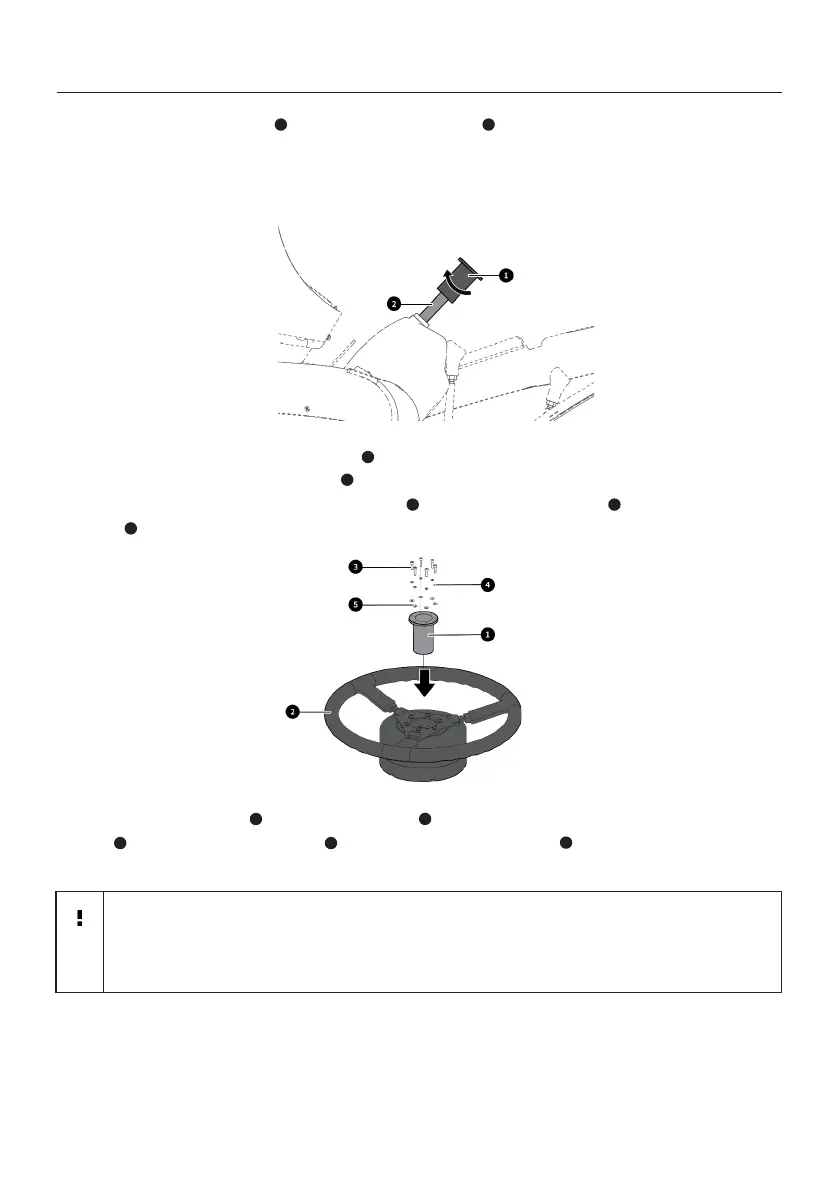
2. Install the splined sleeve on the steering column , and check whether the splined
sleeve is appropriate by rotating it to see whether there are any sways or gaps. As the
steering column on the machine varies, you may try several splined sleeves to select the
one that ts.
1 2
4. Fix the steering motor and motor bracket with two M6×16 hexagon socket head cap
screws , two M6 spring washers , and two M6 plain washers . Do not fully torque the
screws at this time.
5
1
4
3
2
3. Remove the selected splined sleeve from the steering column, put it into the steering
motor of the electric steering wheel , and then x the splined sleeve and the motor with
six M4×14 hexagon socket head cap screws , six M4 spring washers and six M4 plain
washers .
1
2
3 4
5
Note
: As the dashboard under the steering wheel varies, select an appropriate
motor bracket according to the specic machine used. The 2# motor bracket is
only shown and illustrated as an example.



 To Next Page