11
SOFTWARE CONTROLLER OVERVIEW
PATCH MANUAL
THE PATCH APP OVERVIEW
SOFTWARE CONTROLLER OVERVIEW
THE
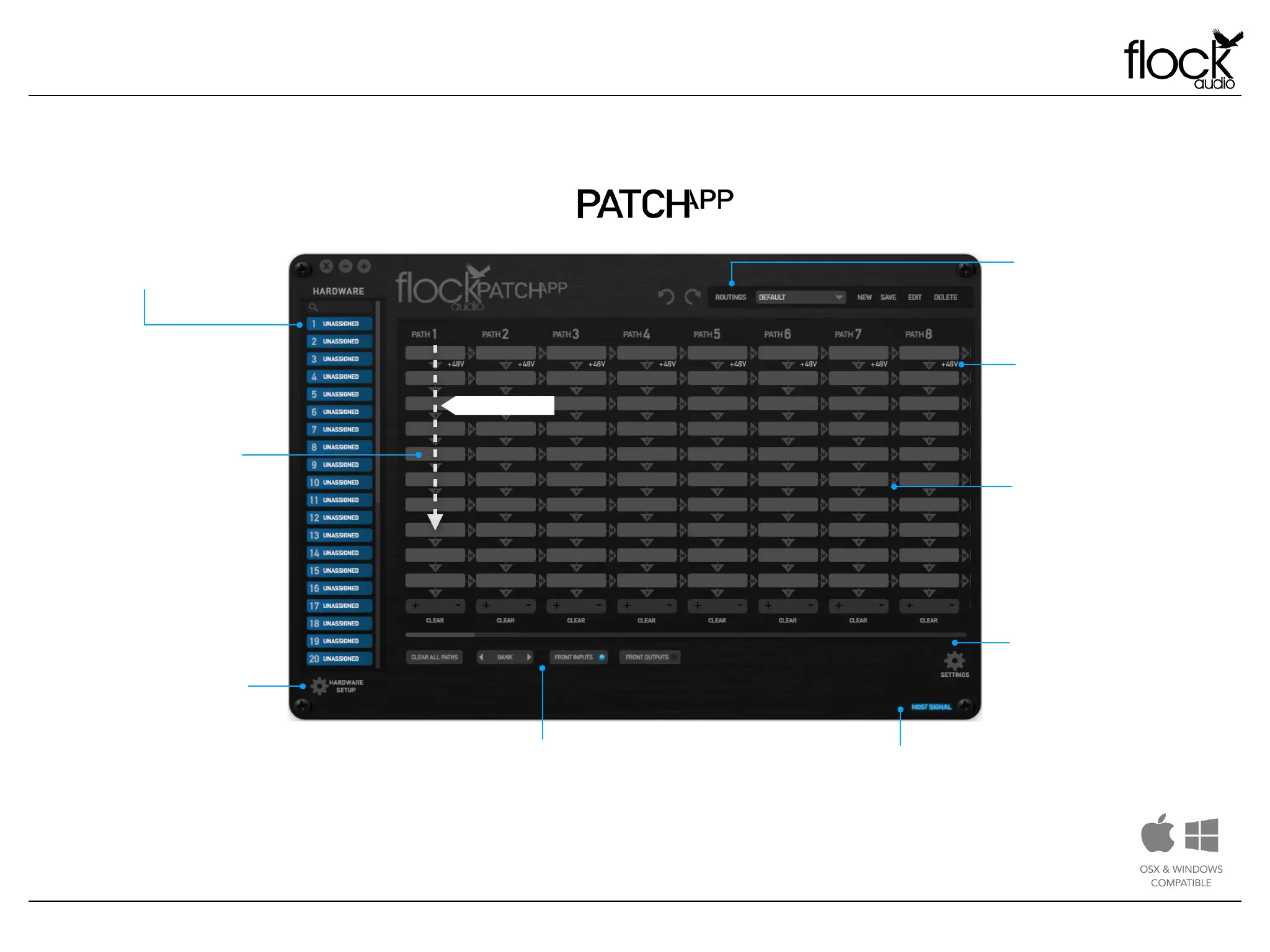
Hardware Index!
All external audio equipment
connected to the PATCH
System Hardware will be
cataloged in this Index.
Routings Menu!
Create, Store, Recall & Manage
all existing analog routings from
the Routings Menu. This menu
allows the user to store & recall
desired analog audio routings.
Toggle & Control Center!
The Toggle & Control Center allows users to
quickly control viewing options and manage
active analog audio routing signals. The Toggle
section allows users to redirect 31-32 Inputs &
Outputs from the rear side of the PATCH
Hardware to the Front Panel Inputs & Outputs.
PATH!
All signal flows in the PATCH
APP are referred to as
PATH’s. PATH’s represent an
active signal flow chosen by
the user. All PATH’s are
shown vertically in the active
rou tings sect ion of th e
PATCH APP. PATH signal
flows go from top to bottom
i n e a c h PAT H r o u t i n g
column.
Settings Menu!
User preference settings,
support, updates & multiple
unit setup parameters are
located in the Settings Menu.
Hardware Setup Menu!
This menu is where all external
audio equipment connected to
the PATCH System’s hardware is
m a n a g e d a n d n a m e d
a c c o rd i n gl y t o t h e us er s
preference. This Hardware
Setup Menu also includes
various other setting controls
In c lu din g : 48V S a fe gua rd
Toggles, Master 48V Bypass
Toggles, Digital Rack Number
Controls and Link/Unlinking
controls.
Host Signal!
This indicator will illuminate “Blue” when the
PATCH APP is properly communicating with
the PATCH Hardware. If Host Signal is
“Red” the connection between the Software
& Hardware needs to be reconnected.
48V Phantom Power!
32 Channels of individually
controlled 48V Phantom Power
is available on the first slot of
each Digital Rack Space.
“M” Multing !
By clicking “M” located to the
right-side of each Digital Space
it will enable Multing capability,
effectively allowing you to split a
signal processing chain into
multiple PATH’s.
PATH Signal Flow


 To Next Page