31
USER TIPS & TRICKS
PATCH MANUAL
USER TIPS & TRICKS
Quick User Tips & Tricks
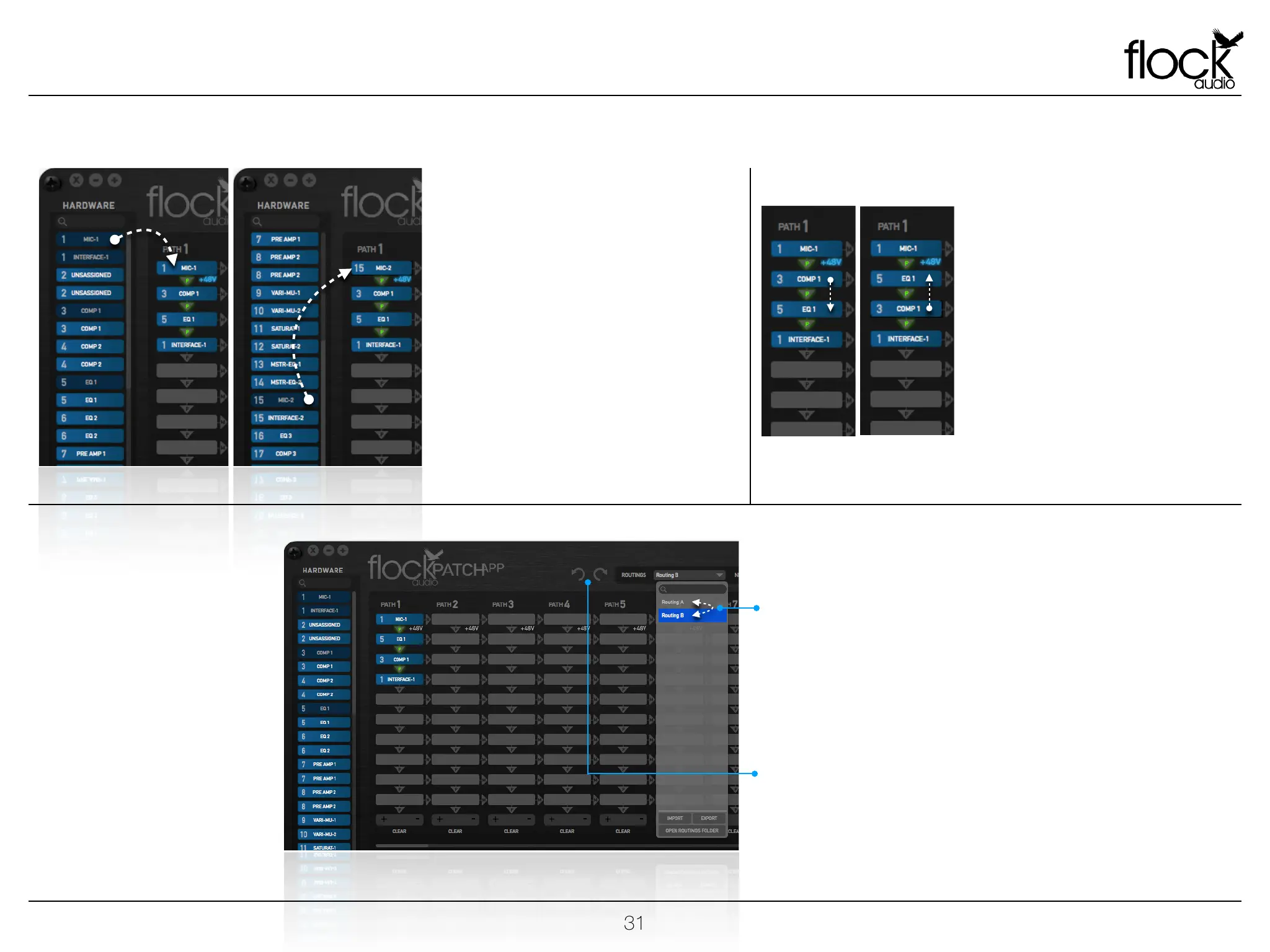
AUDITIONING MICROPHONES
The PATCH System will allow you to
quickly audition various microphones
including 48V Phantom Power capable
microphones.
Example: Once a user has selected a
desired signal chain with a microphone in
the first digital rack space, the user can
quickly click and drag other microphones
overtop into that first slot to replace and
audition different connected microphones
during a recording session.
A/B ENTIRE SIGNAL CHAINS
Using the Routings Dropdown Menu,
a user can easily flip between various
stored routings for quick A/B or even
C comparisons. These signal chain
comparisons can be performed
during playback of any audio signals
passing through the system or while
playback is stopped.
Users can also alternate between 2
different routing signal chains by
utilizing the Undo/Redo buttons
located to the left side of the
Routings Menu.
REARRANGE ACTIVE RACKS
Clicking and Dragging an Active Digital
Rack Space overtop of an already
placed Digital Rack Space will initiate a
flip or alternating signal flow between
the 2 Active Digital Rack Spaces.
This allows for quick review and A/B
comparisons when selecting your
preferred signal flows.


 To Next Page