Product Overview and Specifications
Front and Rear-Panel Overview 1
1-5
Front and Rear-Panel Overview
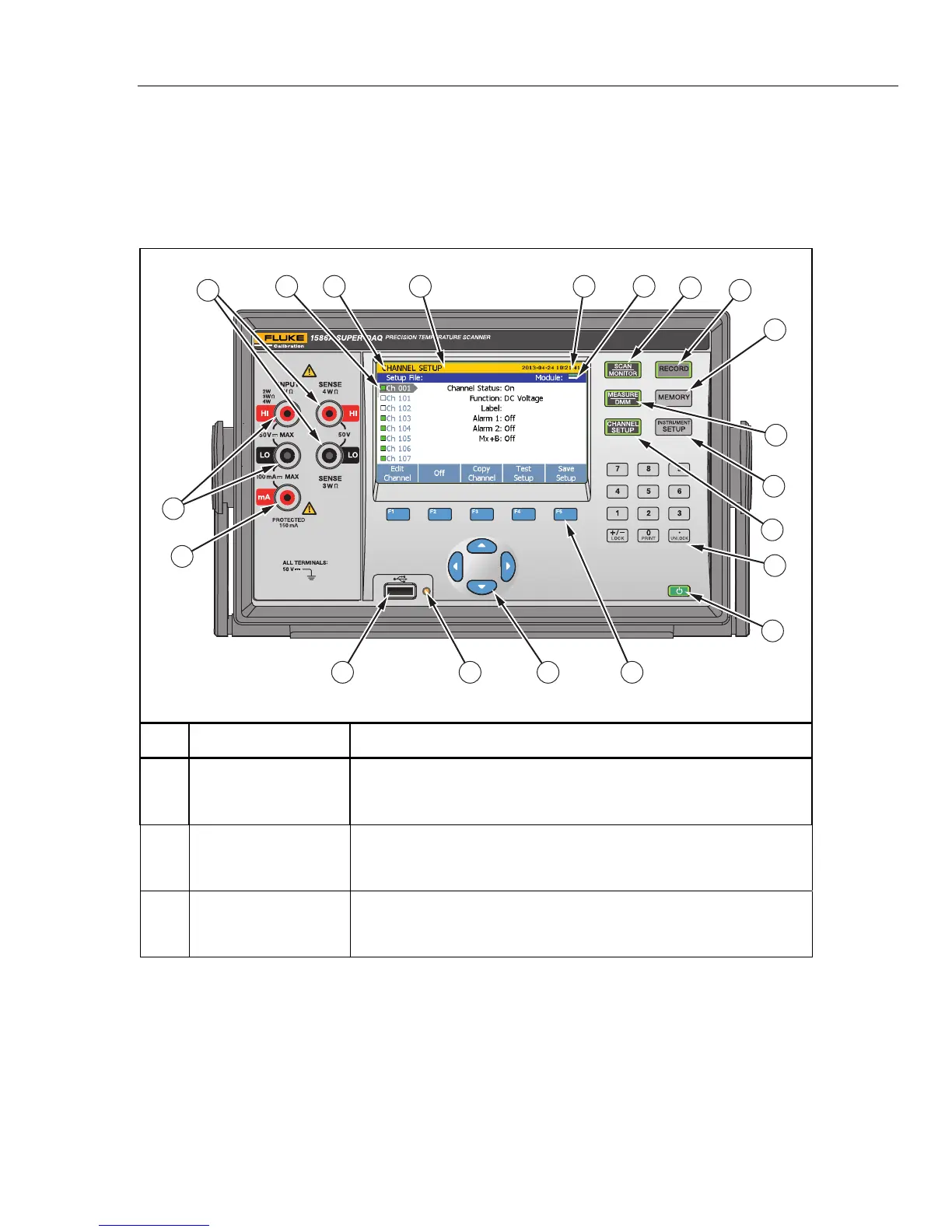
Table 1-1 identifies and describes the front-panel features and Table 1-2 identifies and
describes the rear-panel features.
Table 1-1. Front-Panel Features
X
19
14
1
345 2
6
7
10
9
11
12
13
8
15
17
16
18
20
hcn001.eps
Item Name Function
Standby Key
Puts the Product in the standby mode. In standby, the display is off and
the keys are disabled. Standby mode also disables remote operation.
See “Power ON and Standby” in Chapter 2.
Function Softkeys
Function softkeys to open submenus and set selections. The function of
the softkey changes with each menu and is shown above the softkey
on the display.
Arrow Keys
Scroll menus, increase or decrease values, and highlight selections.
The keys also let the user cycle through measurement values in data
menus and also change the view of graphs.



 To Next Page