Initial Setup and Configuration
Introduction 2
2-3
Introduction
This chapter supplies information and instructions on how to set up and configure the
Product for first time use.
Set the Regional Voltage
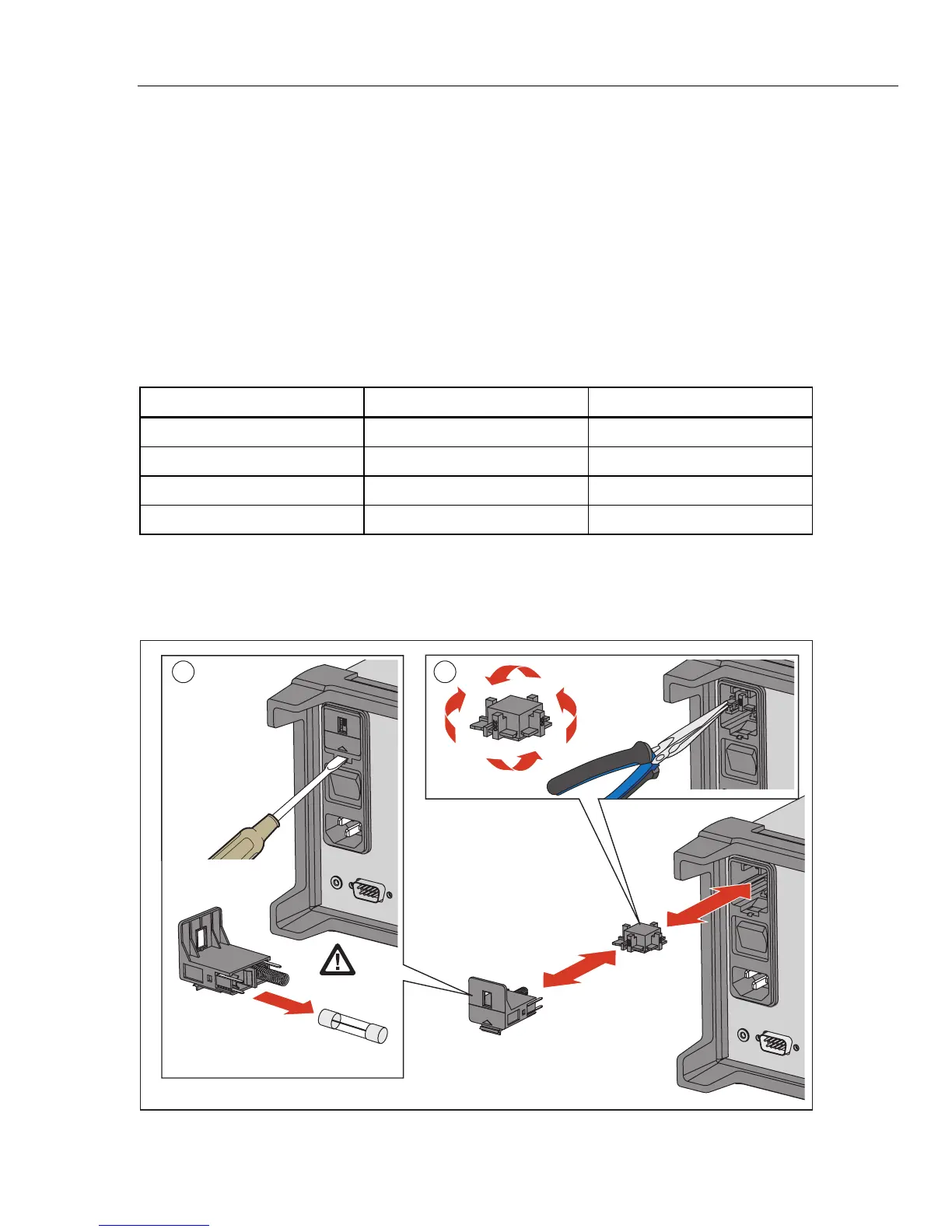
The Product is equipped with a voltage selector that must be set for the region of use
before the mains power cord is connected. The selector can be set to 100 V, 120 V,
220 V, or 240 V. See Figure 2-1 for an illustration on how to set the voltage selector.
See Chapter 6 for instructions on how to change the fuse. Each voltage selection requires
a specific fuse. See Table 2-1.
Table 2-1. Fuses
Voltage Selector Fuse Fluke Part Number
100 V 0.25 A, 250 V (slow blow) 166306
120 V 0.25 A, 250 V (slow blow) 166306
220 V 0.125 A, 250 V (slow blow) 166488
240 V 0.125 A, 250 V (slow blow) 166488
Caution
To prevent damage to the Product, make sure the regional
voltage selector is in the correct position for the region of use
before mains power is connected.
1 2
hcn027.eps
Figure 2-1. Fuse Replacement and Line-Voltage Selection



 To Next Page