1586A
Users Manual
3-26
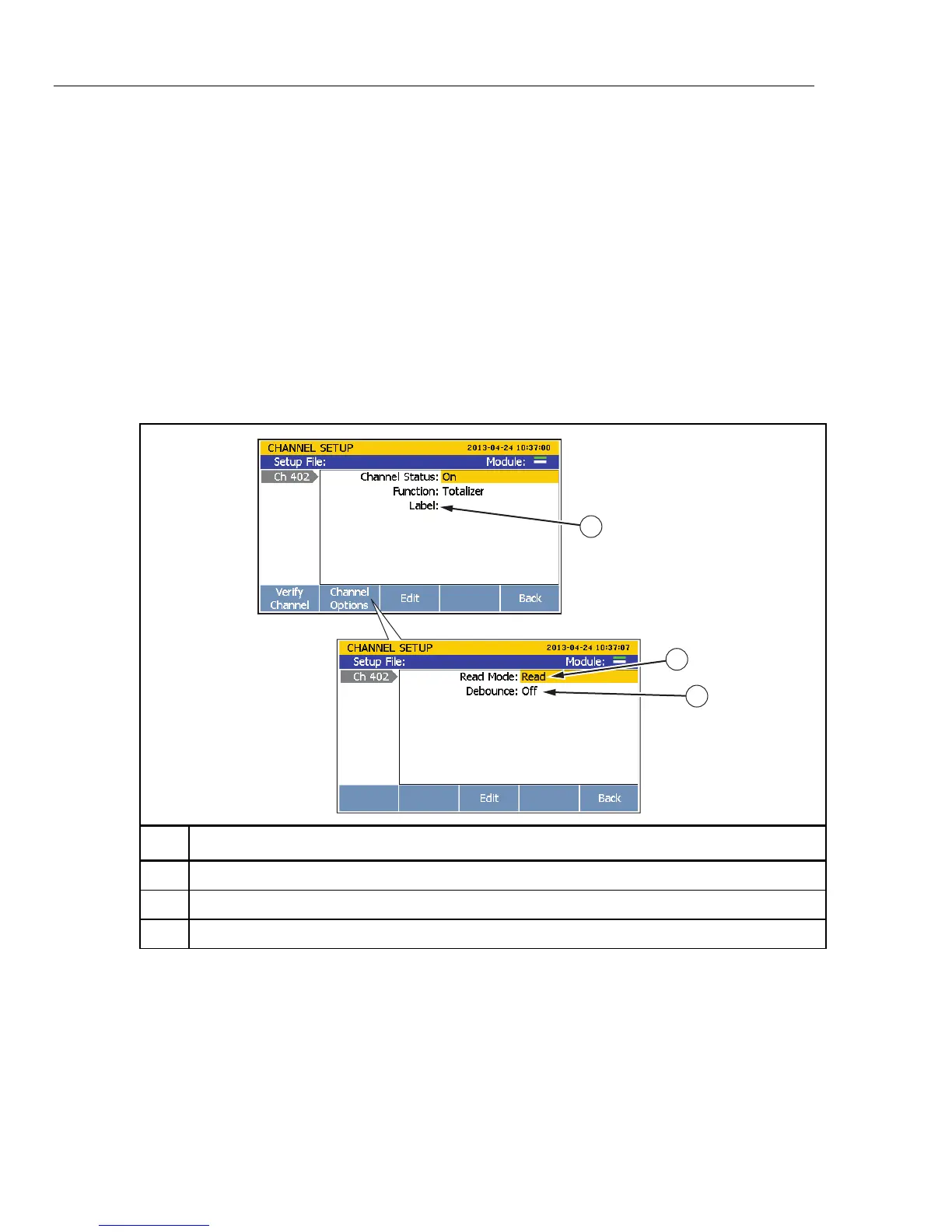
Set up a totalizer channel as follows (see Table 3-9):
1. Connect the wire to the TOT terminal of the plug then insert the plug into the rear-
panel DIO/TOT port.
2. Set the channel to ON (see “Set Channels to ON or OFF” on page 3-12). When the
channel is set to ON, a channel configuration sequence shows on the display that
steps the user through an initial configuration sequence as shown in Table 3-9. If the
channel was previously configured, push to cancel the configuration sequence
to use the last channel configuration.
3. Use the information in Table 3-9 to configure the totalizer channel. Push or to
highlight the channel setting then push to edit the setting.
4. To see the totalizer count, monitor Ch402 in the Scan/Monitor menu.
Table 3-9. Totalizer Channel Configuration
1
2
3
hcn022.eps
Item Function
Input a custom alpha-numeric label to help identify the channel (optional).
Read mode selection. See “Read Mode” on page 3-25.
Set the Debounce feature to ON or OFF. See “Debounce” on page 3-25.



 To Next Page