709/709H
Users Manual
12
mA Simulate
In the mA Simulate mode, the Product functions like a
2-wire transmitter and controls the loop current from an
external power supply. This function can test a loop
with the transmitter removed.
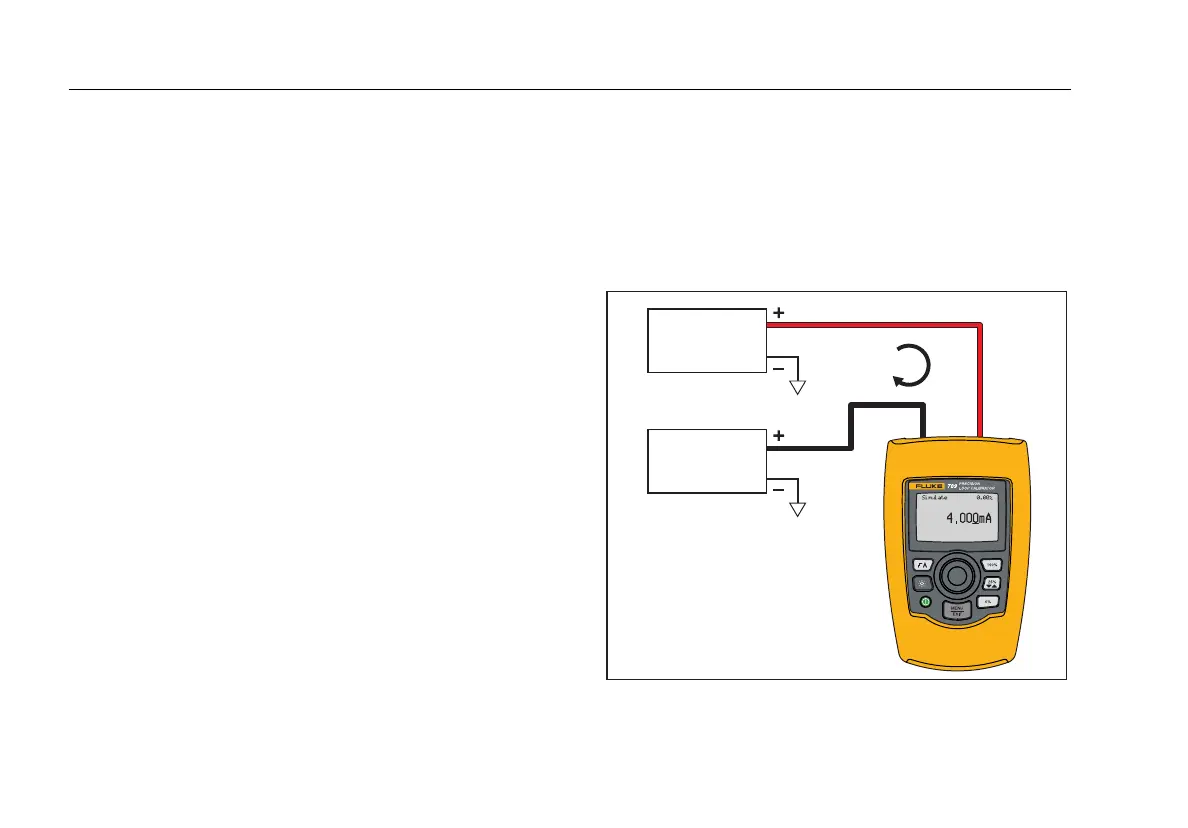
Figure 5 shows the mA Simulate home screen and typical
connections for this mode.
To use mA Simulate:
1. Select mA Simulate from the Main menu.
2. Push the selection knob to move the decade cursor.
3. Turn the selection knob to increment or decrement
the output in steps indicated by the selected decade.
4. Push , , or to set the output to preset
values.
5. Push to select and stop these advanced modes.
When automatic step or ramp is active, one of the
subsequent icons is shown in the lower left corner:
• Automatic step:
• Automatic ramp:
6. Push to go to the Main menu.
7. Push again to go to the mA Simulate home
screen.
• Valve Test is shown in the lower center when
the valve test function has been enabled on the
Setup menu. See the “Valve Test” section of this
manual.
• 250Ω is shown in the lower right corner when
the HART resistor has been enabled on the
setup menu.
4 mA to 20 mA
Power Supply
30 V dc Max
4 mA-20 mA
Input Device
gzx004.eps
Figure 5. mA Simulate Connections


 To Next Page