Page 36
Flymaster GPS M User Manual v. 1.0
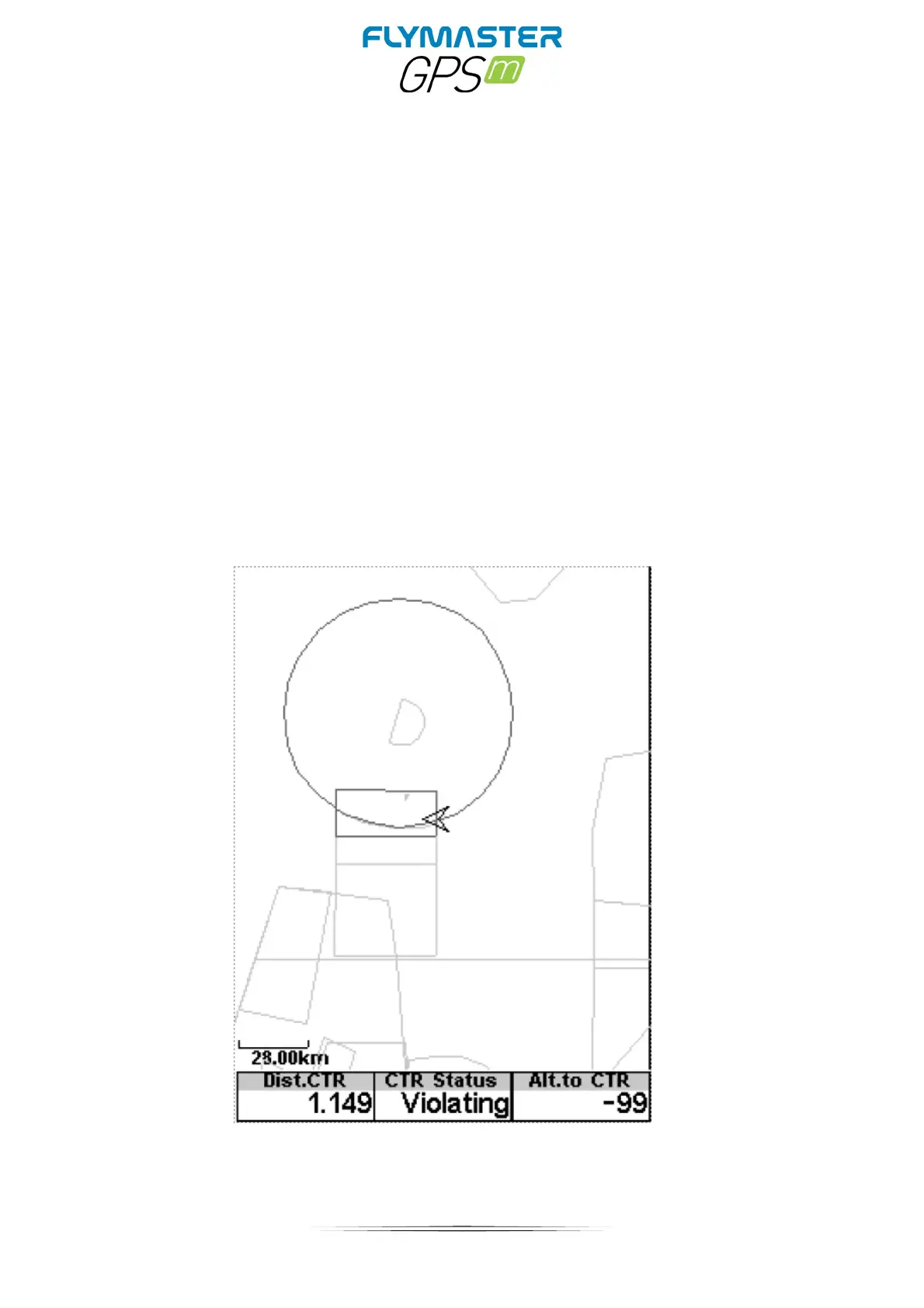
Once the flight starts, the map is redrawn with an arrow (representing the pilot) which will
move around the map, indicating the relative position of the pilot to each of the airspace
areas. If the pilot is outside a visible airspace area then a gray line is used to draw the area,
whereas if the pilot is inside the airspace then a black line is used instead. Note that being
inside a airspace area (2D) does not mean that the airspace is being violated, since the
pilot can be above, or below the defined 3D shape. In order to have more information about
possible Airspace violation, some data fields should be added to the layout. This data fields
are Distance to CTR, Altitude to CTR, and CTR Status.
The Dist. CTR data field shows the shortest horizontal distance to the nearest airspace
line. This distance is always positive. Similarly, the Alt. To CTR shows the shortest vertical
distance to nearest airspace line. Unlike the horizontal distance, the vertical distance can
be negative. A positive vertical distance indicates that you are outside the airspace,
whereas a negative distance indicates that you are inside the airspace. Additionally, the
CTR status ˝eld will indicate if an airspace is being violated by displaying Violating. If the
pilot is not violating the airspace but it is inside a predefined margin then the messages
Altitude Imminent, or Position Imminent will be shown.



 To Next Page