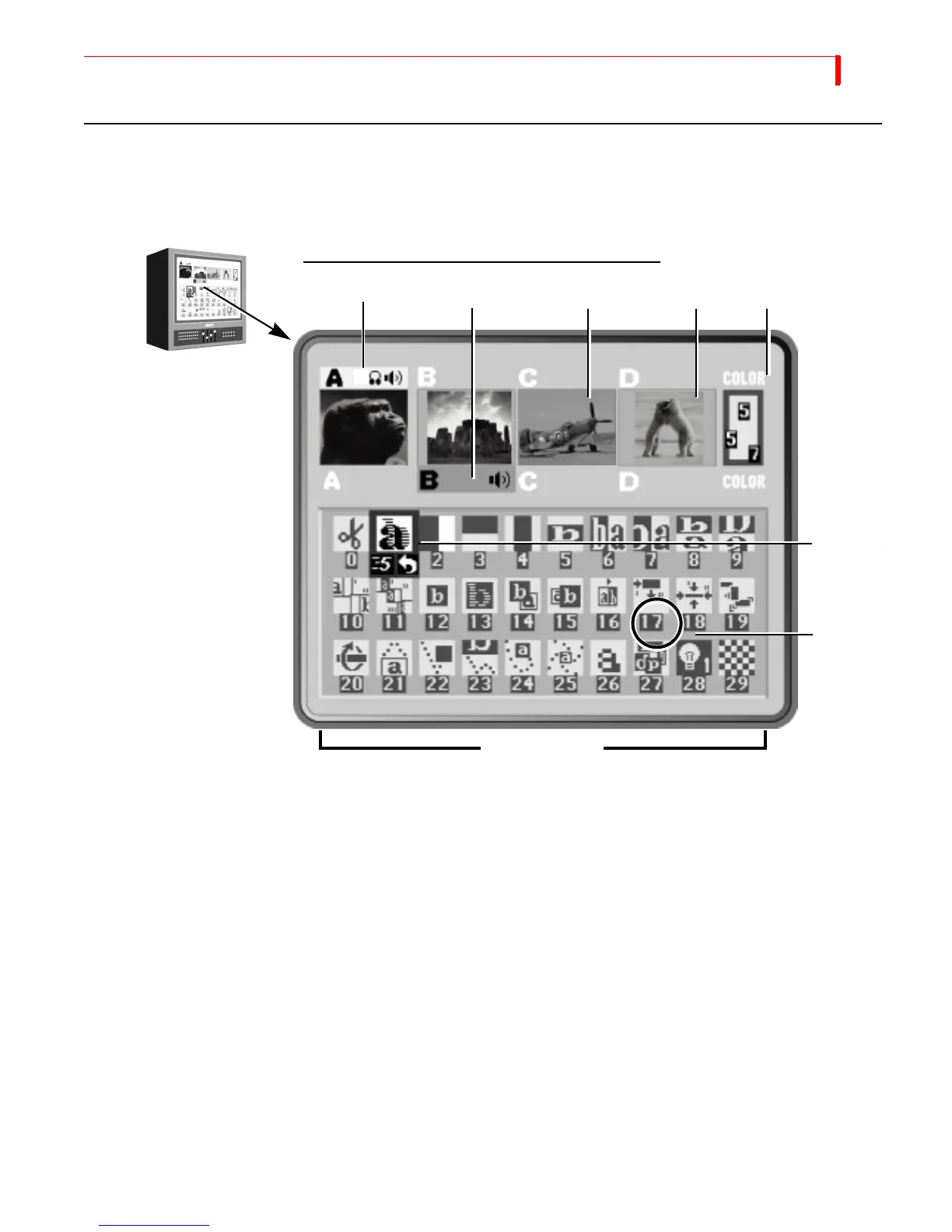
BASIC OPERATIONS USING THE PREVIEW SCREEN
35
USING THE PREVIEW SCREEN
The Preview Screen is your control center for the MX-4 operations. This section describes individ-
ual items on the Preview screen. The Preview screen appears on the monitor attached to the MX-4
PREVIEW OUT jack.
The MX-4 always processes the output at the highest possible quality. The Input Source Pre-
views, however, appear in reduced quality because the MX-4 must reduce the images to fit the
smaller window. What you see on the Preview screen is not indicative of what gets recorded or dis-
played on the output.
Changing the Display Configuration
Press the DISPLAY button to repeatedly cycle through five different configurations for the Preview
screen, or use the shortcut key indicated for each:
• Standard — (SHIFT+1) Shows preview images for all four input sources and up to 30 different
transition options (as shown above).
• Two Channel — (
SHIFT+2) Shows only enlarged CURRENT and NEXT input source Pre-
views and two rows of the Transitions menu.
• Full – (
SHIFT+3) Displays only the input source Preview windows, each in a larger size. Tran-
sitions menu not displayed.
PREVIEW MONITOR AND STANDARD PREVIEW SCREEN
Input Source Previews
Active Source Highlights
Color
Selector
Number
Transition
Transition
Select
Transitions Menu



 To Next Page