INPUT EFFECTS VIDEO A DJUSTMENT
65
VIDEO ADJUSTMENT
Allows you to access the Brightness, Color Saturation, Contrast, and Hue adjustment
menu. Use the
ARROW keys to select this option, then press OK. The MX-4 then
guides you to the video adjustment menu. Parameter valuers are 0 (zero) or 1 (one).
0=OFF, 1=+
OK activates the video adjustment menu. Refer to “Input Effects Menu”
on page 60, for complete details.
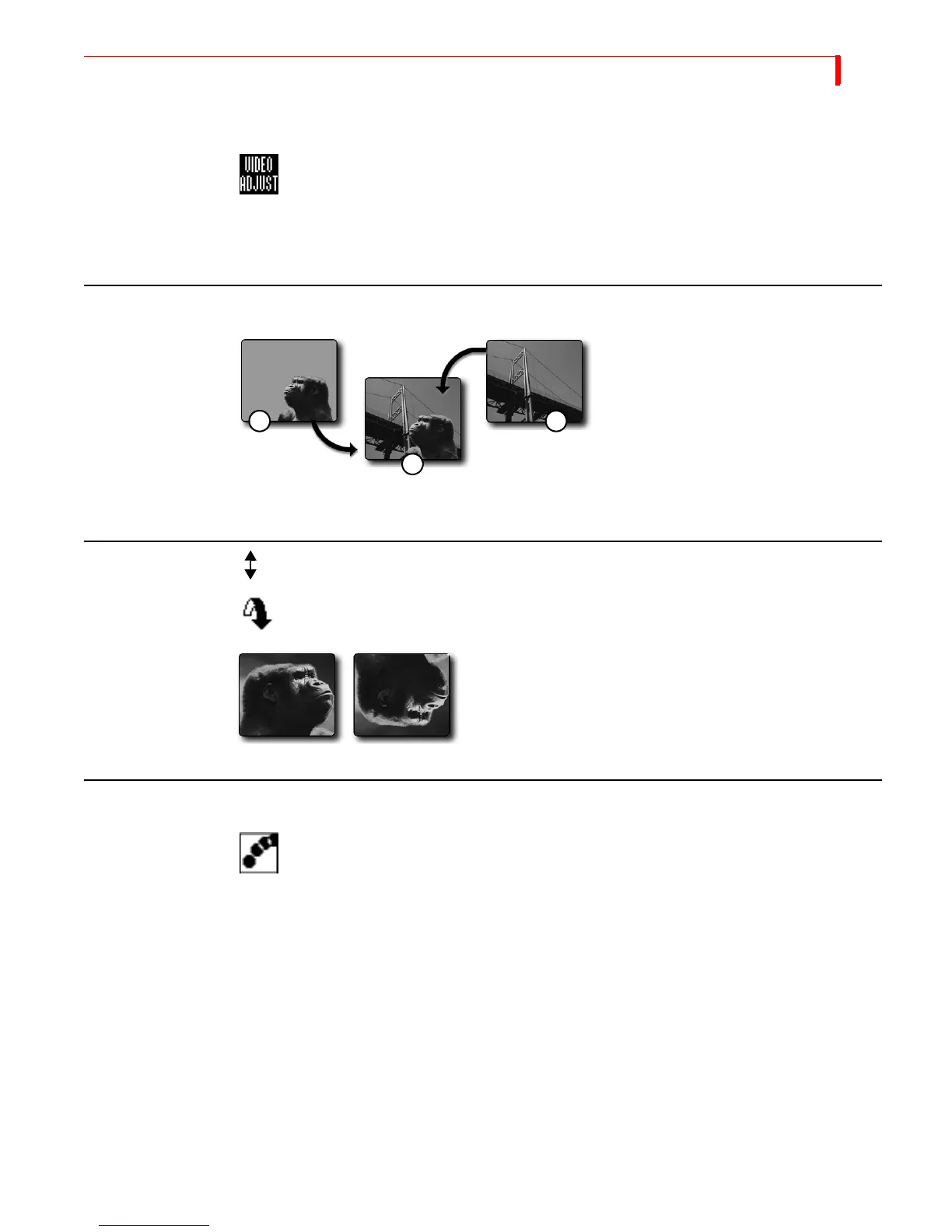
CHROMAKEY
Chromakey replaces all occurrences of a
color in an image with a different image.
In this example, (1) the block of color in
the first image (the area behind Kong’s
head) gets replaced with the image of the
Golden Gate Bridge (2). The resulting
image (3) is Kong superimposed over the
bridge. Refer to Chapter 10, Chromakey,
for complete details.
FLIP VERTICAL
Flips picture top-to-bottom.
Parameter Values — Zero or one.
0 = Off: 1 = On
STROBE
Slows down the picture’s video frame rate. Motion appears halting, or jerky — like
that produced by a strobe light. The strobe effect stays on during a transition.
Parameter Values — Zero through nine. Zero turns off the effect.
Higher values increase the effect. Setting 1, for example, produces the look of film:
setting 2 makes video look like an old movie.
12
3



 To Next Page