15
Outputs . . .
Monitor Outputs
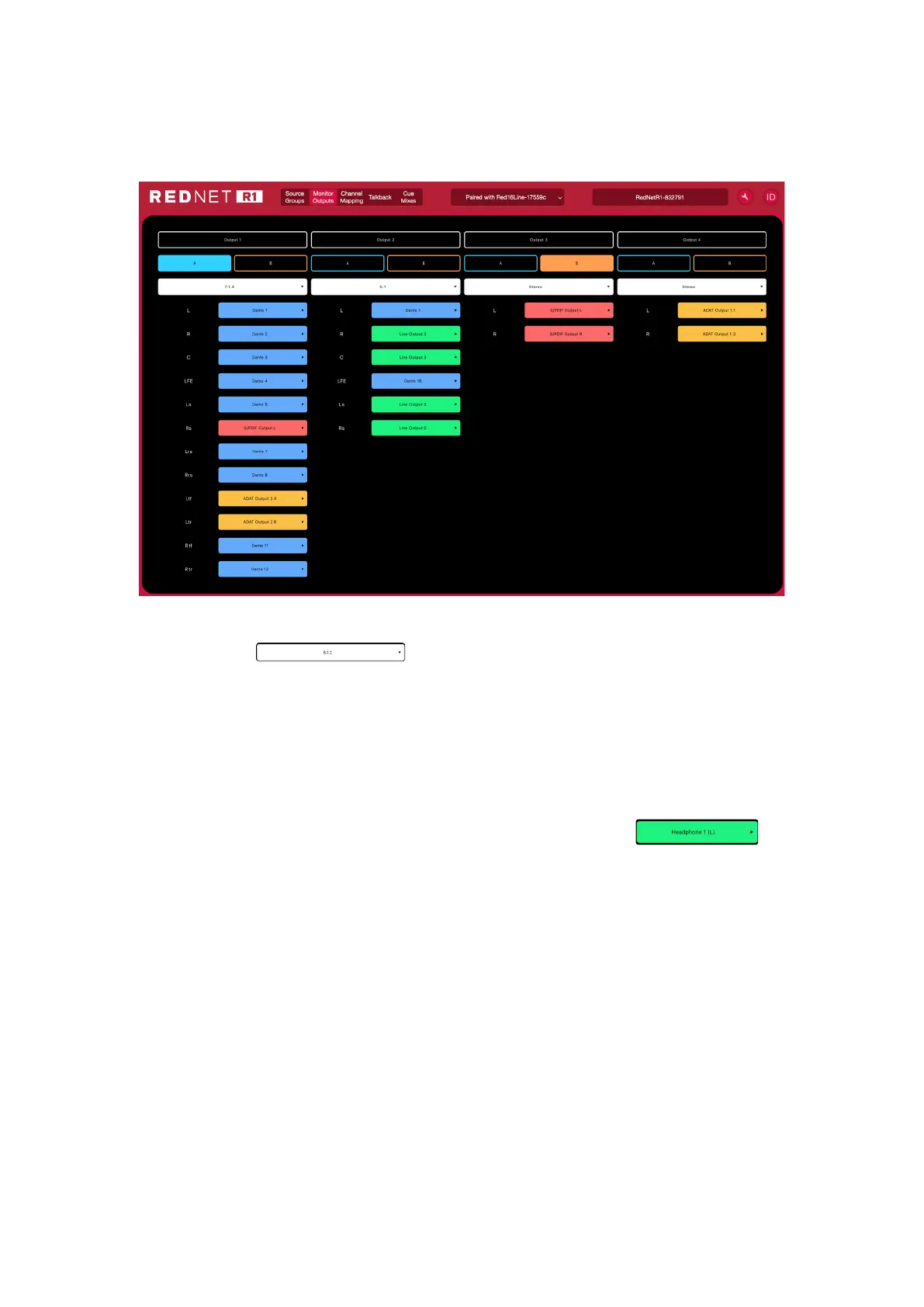
The Monitor Outputs page is used to configure the output groups and to assign audio channels.
Output Type Selection
Click each drop-down to assign its output configuration:
- Mono - 5.1.2
- Stereo - 5.1.4
- LCR - 7.1.2
- 5.1 - 7.1.4
- 7.1 - Custom (1 – 12 channels)
Output Destination Selection
The audio destination for each channel is assigned using its drop-down:
- Analogue 1-8/16 - Loopback 1-2
- ADAT 1-16 - Dante 1-32
- S/PDIF 1-2
• Channels can be renamed by double-clicking on their current channel number
• The output channels selected for Output Types 1-4 remain constant across all Input Source
Groups, however the routing and levels can be modified. See ‘Channel Mapping’ on next page
A/B Switch Configuration
Select an output for ‘A’ (blue) and ‘B’ (orange) to assign the alternate Output Types to the front panel
A/B Switch. The switch colour will toggle (blue/orange) to indicate the currently selected output
The switch will illuminate white if an A/B setup has been congured but the currently selected speaker is neither
A or B. The switch will dim if A/B have not been set up.













 To Next Page