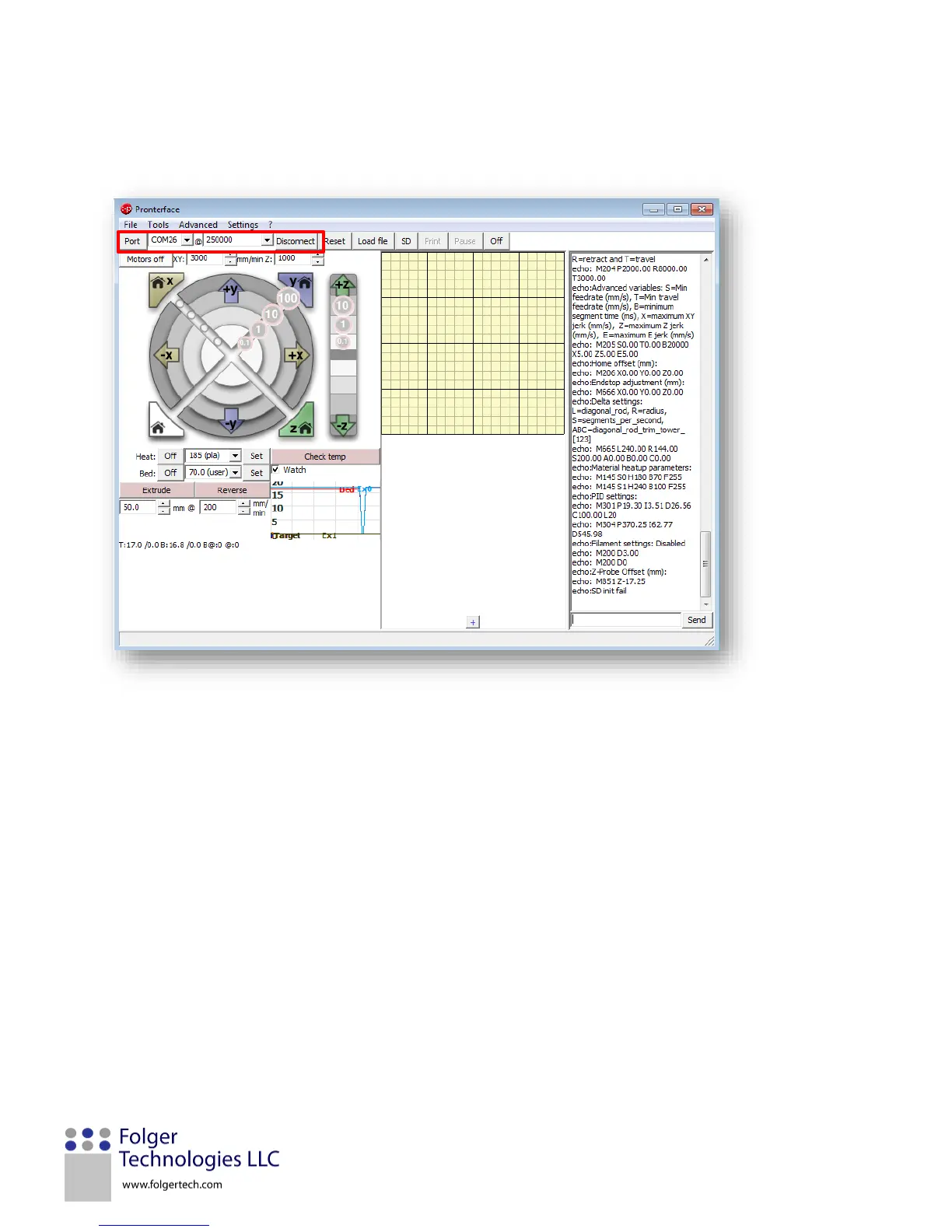
Select the “COM” port that is associated with the printer (this will depend on which one your computer assigns).
Then click the “Connect” button to the right of the port pulldown. If the computer is connected to the printer
correctly, then you should see “the printer is now online” on the right.
Manually move the gantry with your hands so that it is not touching the X and Y endstops. Turn the Acme threaded
rods with your hands so the Z endstop is not engaged. In the bottom right of the screen in Pronterface, type in
“m119” and click send. This code will tell the printer to send back the status of the end stops.
Each endstop status should return as “open,” which will appear in the text column on the right side of the screen.
Now, manually move the gantry until the X endstops make a click noise and the led on the endstops turns red.
Send the “m119” command again in the bottom right corner. Verify the X endstop has triggered. Repeat this for
the Y and Z endstop. It helps to do them individually in case they have been wired wrong.


 To Next Page