3. On each Y axis stepper motor, clip all four wires
300mm from the 4 pin board connector. Strip ¼
inch off each wire.
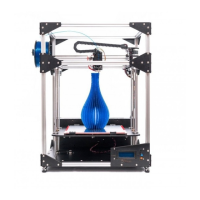
4. Combine the following two wires together:
Insert them into the 4 pin green connector with
the screws facing up.
As from looking from the front of the printer.
Green (Right Motor)/Red (Left Motor)
Gray (Right Motor)/Yellow (Left Motor)
Yellow (Right Motor) /Gray (Left Motor)
Red (Right Motor ) /Green (Left Motor )
Take the 4 pin pigtail, and strip ¼ inch off the ends
of each wire. Insert them into the other end of
the 4 pin terminal as follows:
Green, Yellow, Gray, Red.


 To Next Page