Forma Scientific, Inc.
7-6
2. Remove the CO2 Control Module by pulling out the black plastic button
locking button on the bottom of the module. (Figure 7-3.)
3. Firmly pull the button rearward until the circuit card releases from the
internal connector strip.
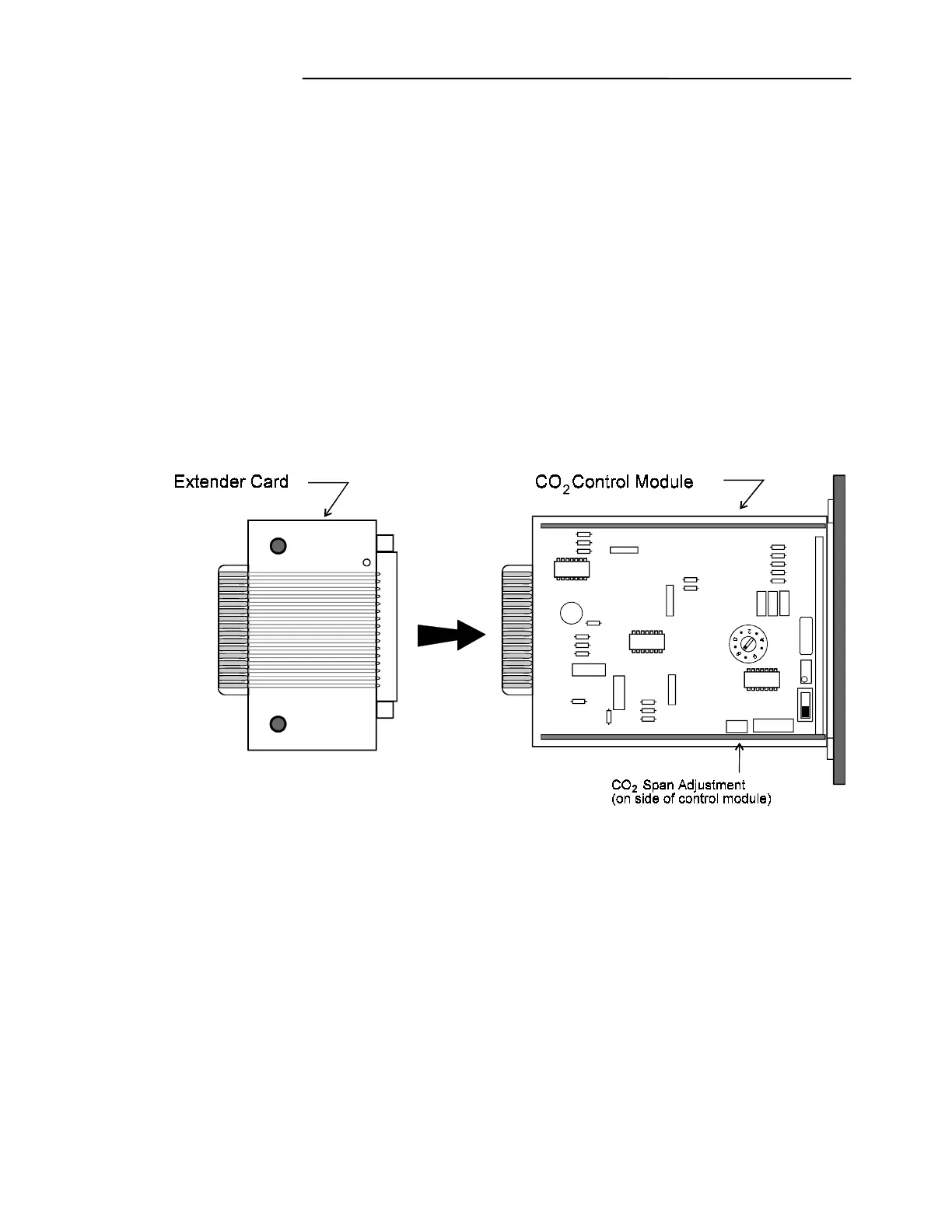
4. Attach the extender card to the back of the control module circuit board.
(Refer to Figure 7-2.)
5. Return the control module with extender card attached to the incubator
control panel. Press the module firmly into the panel until the connector strip
is seated. The control module will protrude a few inches from the incubator
panel, allowing access to the span adjustment screw.
CO
2
Control Module showing the Extender Card
and Span Adjustment Pot Location
Figure 7-2
6. Turn off the CO
2
at the tank.
7. Open the incubator doors for at least two minutes or fan the glass door back
and forth ten times to completely evacuate the CO
2
from the chamber.
8. Ensure the humidity pan is filled with water.


 To Next Page