19
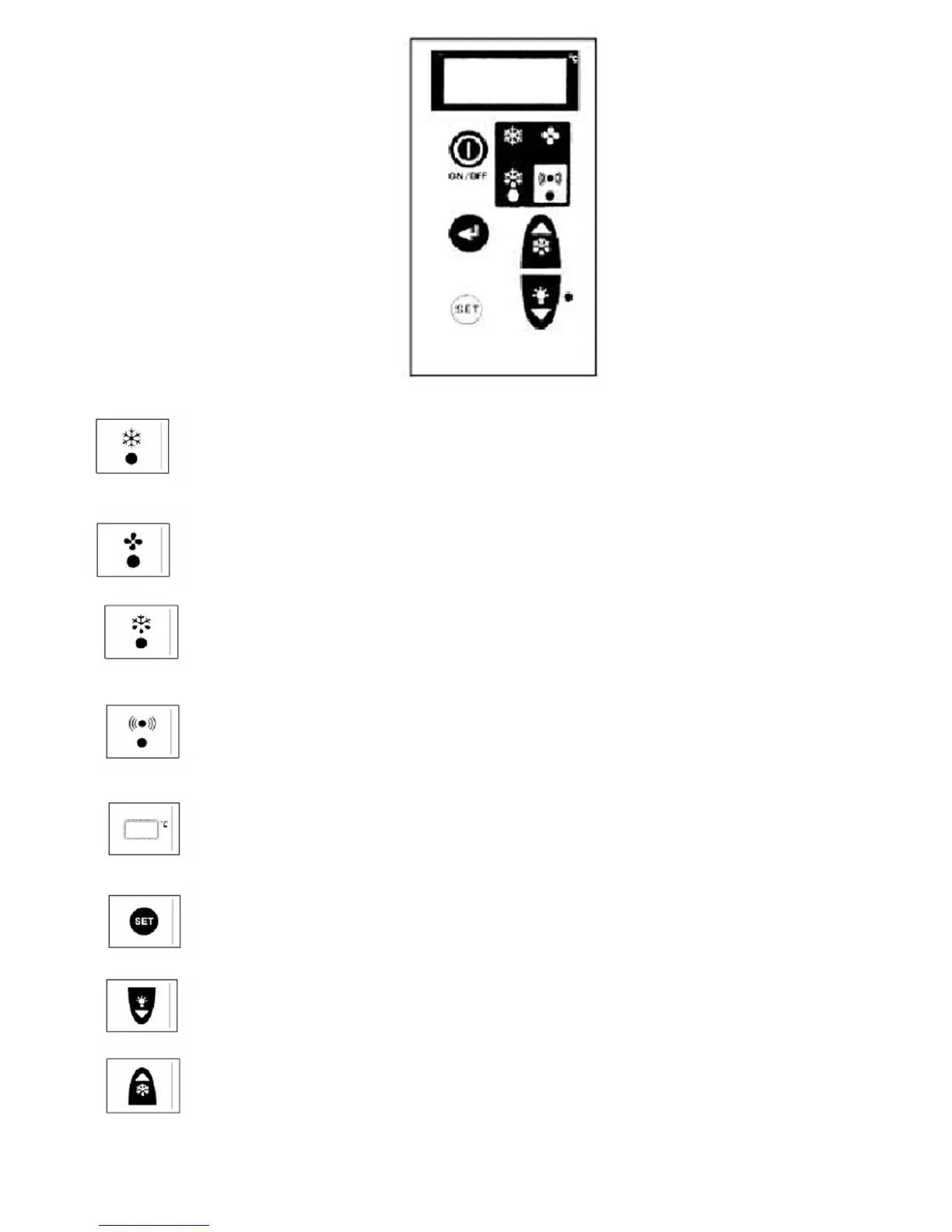
1) Control LED (GREEN)
ON: Compressor running, unit refrigerating.
FLASHING: Compressor is in Start Delay mode.
OFF: Compressor off, Room down to temperature
2. Control LED (GREEN)
ON: Evaporator fan running.
FLASHING: Evaporator fan in start delay mode.
OFF: Evaporator fan off. Unit in defrost mode.
3. Control LED (YELLOW)
ON: Unit in Automatic or Manual defrost.
4. Alarm LED (RED)
ON: Alarm activated due to Sensor failure, pressure switch intervention or coldroom temperature
outside set values.
OFF: Unit operating normally.
5. DISPLAY: On connection to the main supply OFF is displayed indicating the statues of the unit.
By pressing the ON/OFF key for 3 seconds the unit is turned on with the room temperature
displayed. In the programming mode the parameters are displayed and if an alarm occurs the
code is displayed.
6. SET key: When pressed for two seconds it illuminates and allows the room temperature to be
set. During programming it is used to pass from submenu to an upper menu.
7. DOWN/ROOM LIGHT key: In programming mode or when setting room temperature it is used
to reduce the displayed value.
At other times it is used to turn the coldroom light on or off.
8. MANUAL DEFROST/UP key: In programming mode or when settings room temperature it is
used to increase the displayed value.
Manual defrost initiated if pressed for more then 5 seconds.


 To Next Page