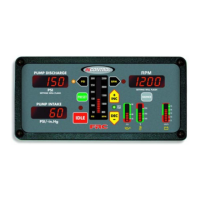
PRO-S Rev1104
8
Controls and Indicators
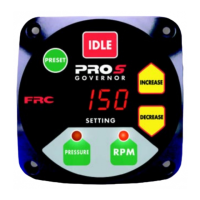
All controls and indicators are located on the front of the control module. It contains
the push button electronic controls, LED indicators, and a digital display. (Refer to
Figure 1.)
PRESET Button
The green PRESET button sets the pump pressure or engine RPM to a
preprogrammed value. This button is also used in the programming of pressure or
RPM preset values.
IDLE Button
The red IDLE button immediately sets the engine to idle RPM. This button can be
used in an emergency or for a normal shut down after operations.
SETTING Display
The SETTING display will show a diagnostic error code, IdLE for engine idle,
the pressure setting or the RPM setting. The LED digital display has daylight bright
digits at least 0.56 inch high.
INCREASE Button
During operations the yellow INCREASE button raises pressure or RPM setting.
This button is also used in the programming of the pressure or RPM preset values.
DECREASE Button
During operations the yellow DECREASE button lowers pressure or RPM setting.
This button is also used in the programming of the pressure or RPM preset values.
RPM Button
The green RPM button selects the RPM mode of operation.
RPM LED
The red RPM LED is on to indicate operation in the RPM mode.
PRESSURE Button
The green PRESSURE button selects the pressure mode of operation.
PRESSURE LED
The amber PRESSURE LED is on to indicate operation in the pressure mode.


 To Next Page