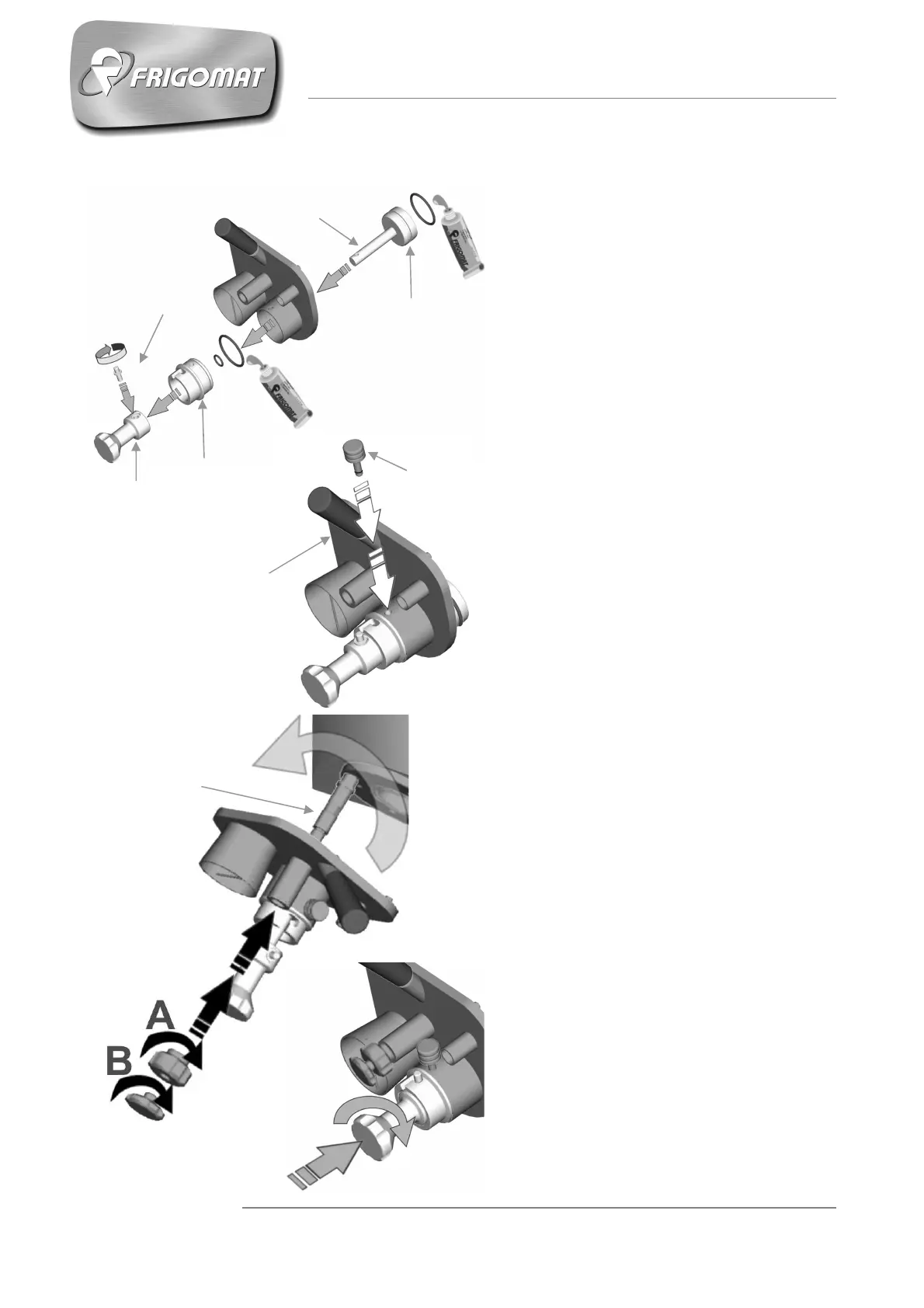
TAP ASSEMBLY CHEF 30 LCD - CHEF 60 LCD
- - Insert the Oring into the plastic bottom
- part, into the steel piston and into the slot
- around the exhaust duct on the machine;
- grease with the Frigomat lubricant which
- is contained inside the tune-up kit.
- Insert the piston into its housing as per
picture.
- Put the knob on the piston rod and
tighten the steel pin. Ensure that the
piston slides easily into its housing (pic.
1).
- Insert the complete piston into the tap
duct of the machine. Match the hole on
the bottom with the hole on the tap body
and insert the locking plug. (pic. 2).
- Insert the tap on the threaded bolt and
tighten the nut "A" until the proper
tightening. Lock the tap, tightening the
second lock nut "B" (pic.. 3).
- Turn the tap to the closed position, insert
the piston into the duct tap of the
machine and turn the knob in the bottom
of a few degrees to the locked position
(Pic. 4)
Fig.2
Fig.1
Fig.3
Fig.4
TAP BODY
LOCKING PIN
PIN











 To Next Page