FRITZ!Box 6490 Cable 12
Ports, Interfaces, Buttons and LEDs
2 Ports, Interfaces, Buttons and LEDs
This chapter describes the ports, interfaces, buttons and LEDs of the
FRITZ!Box.
2.1 Ports and Interfaces
Possibilities for connecting the FRITZ!Box
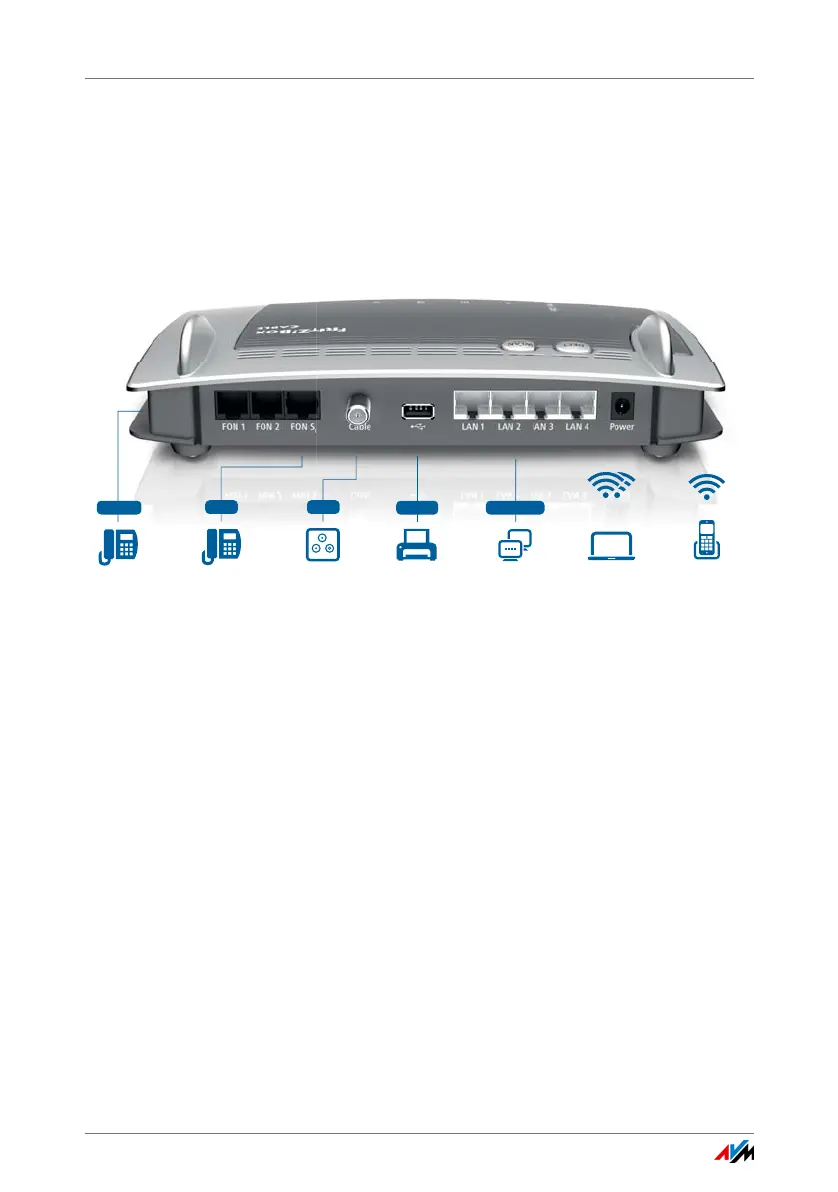
• CABLE
Socket for connecting with the cable junction
• FON 1 and FON 2
2 TAE sockets and 2 RJ11 sockets for connecting analog
telephones and other analog terminal devices
You can connect one line to each of the sockets FON 1
and FON 2. This means you can connect a total of two
analog telephones.
• FON S
0
RJ45 socket for connecting ISDN telephones or tele-
phone systems (PBXs)
• LAN 1 – LAN 4
4 gigabit Ethernet ports (10/100/1000 Base-T) for con-
necting computers and other network devices like game
consoles and network hubs
Analog telephone, fax
and answering machine
Printer,
storage media
Notebook, PC, smartphone,
video/TV streaming
FRITZ!Fon or
other DECT telephones
USB 2.0 4 x Gigabit
analog
Wireless AC+N
2.4 GHz and 5 GHz
DECT
LAN, 1 Gbit/s, PC,
game console, network
Telephone,
telephone system
ISDN
Internet at the TV
cable connection
Cable















 To Next Page