FRITZ!Box 6490 Cable 14
Meaning of the LEDs
Button Functions
“WLAN” Button
• Switches wireless LAN on and off.
• Establish a wireless LAN connection using WPS, see
Establishing a Wireless LAN Connection Using WPS from
page 21
“DECT” Button
• Registers cordless telephones, see page 37
• Pages cordless telephones, see page 115
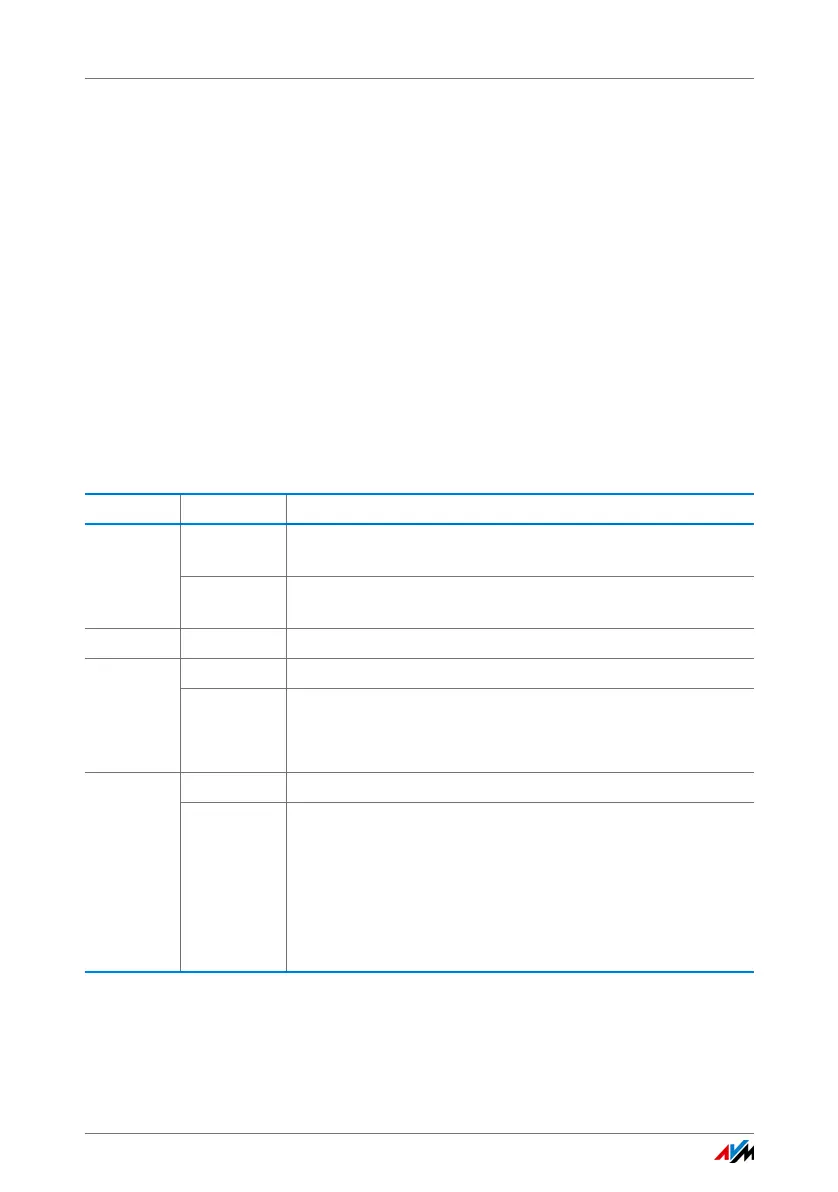
2.3 Meaning of the LEDs
LED Condition Meaning
Power /
Cable
on Power supply is connected and the cable connection is
ready for operation
flashing Power supply is connected and the cable connection is be-
ing established or has been interrupted
Fon on A telephone connection is active
DECT on DECT function is enabled
flashing
• Registration procedure for a DECT handset in progress
• Registration procedure for a Smart Home device in prog-
ress
WLAN on Wireless LAN function is enabled
flashing
• Adopting the wireless LAN settings
• Switching the wireless LAN function on or off
• Performing WPS
• WPS procedure aborted: More than two wireless LAN de-
vices are performing WPS at the same time. Repeat the
WPS procedure.















 To Next Page