Connecting Telephones and Other Terminal Devices
FRITZ!Box 6490 Cable 35
9 Connecting Telephones and Other Terminal Devices
This chapter describes how to connect telephones, fax machines, an-
swering machines and telephone systems (PBXs) to the FRITZ!Box.
9.1 Connecting Analog Telephones and Terminal Devices
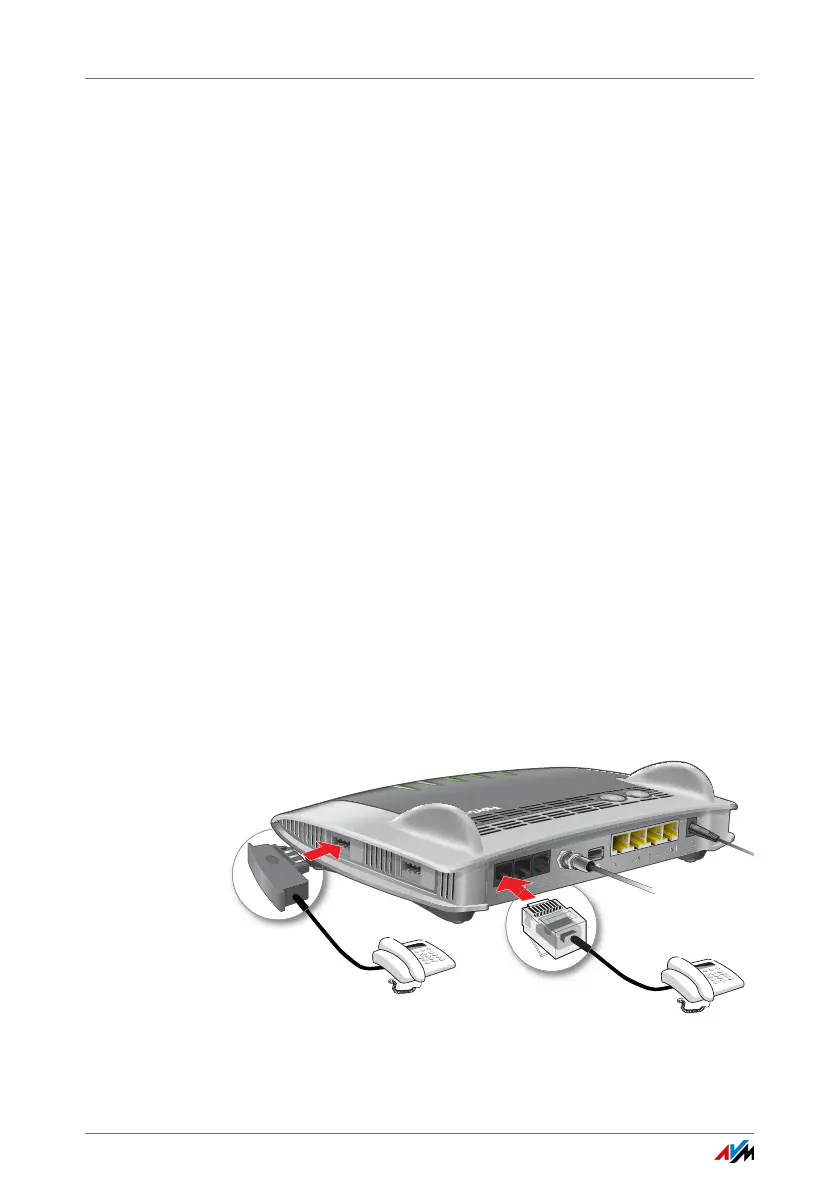
You can connect two analog terminal devices.
Two Sockets Have to Stay Free (Not Allocated)
The FRITZ!Box has different sockets for analog terminal devic-
es:
• on the back, “FON 1” and “FON 2” for terminal devices
with RJ11 plug
• on one side, “FON 1” and “FON 2” for terminal devices
with TAE plug
You can connect a total of two analog terminal devices to
these sockets. One “FON 1” socket and one “FON 2” socket
have to stay free (not allocated).
Connecting a Telephone
1. Connect the telephone to a “FON 1” or “FON 2” socket.
Keep in mind that one “FON 1” socket and one “FON 2”
socket have to stay free (not allocated).
2. Configure the telephone in the FRITZ!Box; see page 40.
FON S
0
W
LA
N
WPS
DECT
I
n
fo
W
L
A
N
D
E
CT
Fon
Powe
r/
Cable















 To Next Page