Connecting the FRITZ!Box
FRITZ!Box 6490 Cable 17
4 Connecting the FRITZ!Box
• Before you connect the FRITZ!Box, read the instructions on
Security and Handling on page 7.
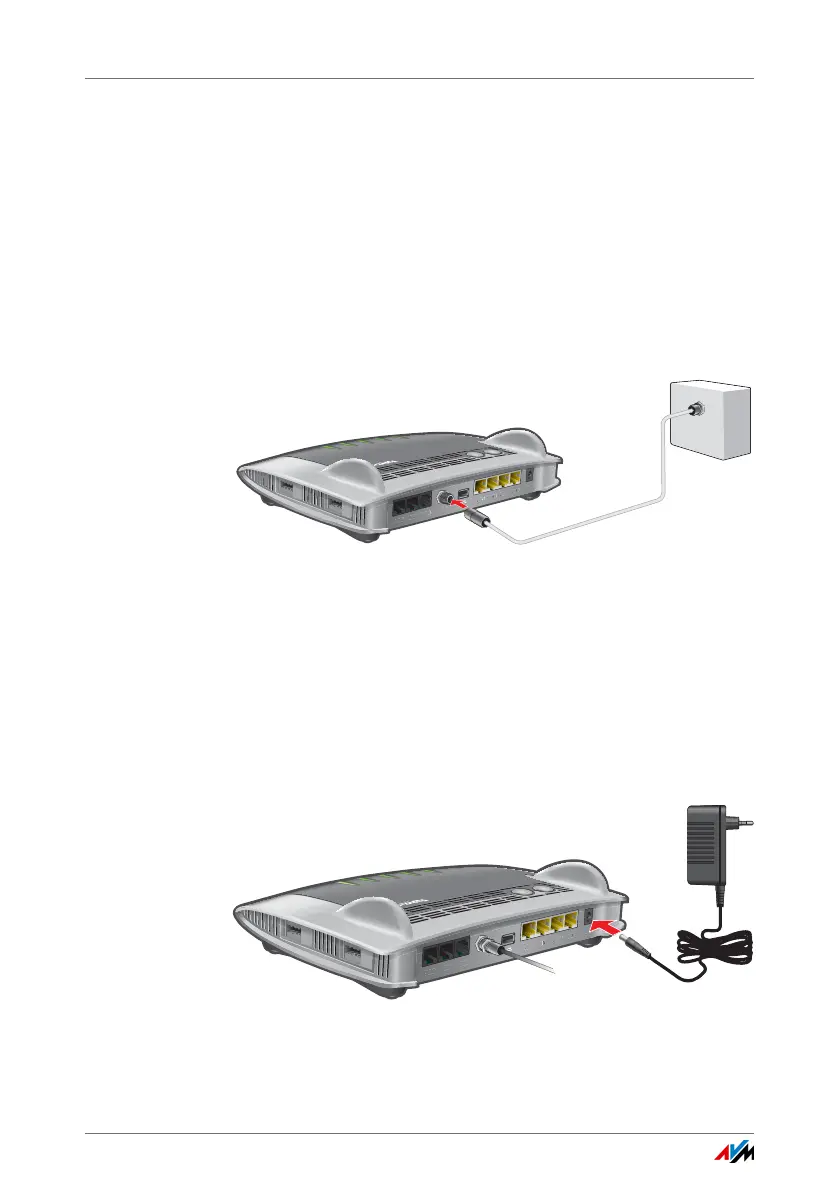
• Connect the FRITZ!Box to the cable junction.
• Connect the FRITZ!Box to the power supply.
4.1 Installing at the Cable Connection
Installing at the cable connection
To connect the FRITZ!Box you need the coaxial cable provided
by your cable network operator. The FRITZ!Box package does
not contain a coaxial cable.
Connect the coaxial cable to the “CABLE” port of the
FRITZ!Box and to your multimedia socket.
4.2 Connecting to Electrical Power
Connecting to the power supply
FON 1
FON 2
LAN 1
LAN 2
LAN 3
LAN 4
Power
FON S
0
W
LAN
W
PS
D
E
CT
In
f
o
W
L
A
N
D
E
C
T
F
o
n
P
o
we
r/
C
a
bl
e
CABLE
Radio
Data
TV
FON 1
FON 2
LAN 1
LAN 2
LAN 3
LAN 4
Power
FON S
0
W
LAN
WPS
D
ECT
In
f
o
WLA
N
D
EC
T
F
o
n
P
o
wer/
C
a
b
l
e















 To Next Page