EasyManua.ls Logo

Fronius IG-TL 4.0 - User Manual

Fronius IG-TL 4.0
140 pages
Print Icon
To Next Page IconTo Next Page
Loading...
42,0426,0074,EA 03/2011
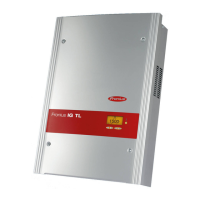
Fronius IG-TL 3.0 / 3.6 / 4.0 / 4.6 / 5.0
g
Operating Instructions
Inverter for grid-connected photo-
voltaic systems

Table of Contents

Questions and Answers

  • J
    James JonesSep 6, 2025
    What to do if Fronius Inverter shows fixed voltage setting error?
    • D
      Daniel JonesSep 6, 2025
      If the 'fixed voltage' setting has been selected instead of MPP voltage operation and the voltage is set to a value that is too low or too high on your Fronius Inverter, remove excess solar modules so DC voltage fits within inverter limits. If the status code persists, contact a Fronius-trained service technician.
  • J
    james60Aug 22, 2025
    What to do if the Fronius IG-TL 4.0 display fails completely?
    • C
      Christopher RiveraAug 22, 2025
      If the Fronius Inverter display is completely blank, there might be an issue with the photovoltaic system if the open circuit voltage is less than 350 V. If the open circuit voltage is greater than 350 V, this may indicate a basic fault in the inverter, so notify a Fronius-trained service technician. Also, ensure the AC voltage at the inverter's connections is 230 V (+ 10 % / - 15 %).
  • E
    Elizabeth McleanSep 3, 2025
    What to do if Fronius IG-TL 4.0 Inverter DC input voltage is too high?
    • W
      Wayne CastroSep 4, 2025
      If your Fronius Inverter shows that the DC input voltage is too high, the fault should rectify automatically. If this status code keeps recurring, contact your system installer.
  • M
    Matthew SmithSep 2, 2025
    What to do if Fronius Inverter interior temperature is too high?
    • C
      Candace GarciaSep 2, 2025
      If your Fronius Inverter indicates that the interior temperature is too high, you can clean the cool air vents and cooling elements with compressed air, if required. The fault should rectify automatically. If this status code keeps recurring, contact your system installer.
  • Y
    ygarciaSep 1, 2025
    What to do for over-temperature cooling element on Fronius IG-TL 4.0?
    • M
      Morgan LeeSep 1, 2025
      If your Fronius Inverter displays an over-temperature warning for the cooling element, the fault should rectify automatically. If this status code keeps recurring, contact your system installer.
  • S
    selenawaltersAug 30, 2025
    What to do if Fronius Inverter RCMU detects a fault current?
    • S
      Sandra WilliamsAug 30, 2025
      If the RCMU in your Fronius Inverter detects a fault current, check the grid connections or fuses. If this status code continues to appear, contact your system installer.
  • J
    Jamie HarrisAug 29, 2025
    What to do if Fronius IG-TL 4.0 shows no AC grid detected?
    • C
      Chris HernandezAug 29, 2025
      If your Fronius Inverter isn't detecting an AC grid, begin by checking the grid connections. If the status code continues to appear, it's best to contact your system installer for assistance.
  • T
    Tara DixonAug 27, 2025
    What to do if Fronius IG-TL 4.0 AC frequency is too low?
    • K
      Kelly CobbAug 27, 2025
      If the AC frequency of your Fronius Inverter is too low, check the grid connections. If the issue continues, contact your system installer.
  • H
    Henry Gutierrez DDSAug 27, 2025
    What to do if Fronius IG-TL 4.0 AC frequency is too high?
    • J
      Jesus HarrisAug 27, 2025
      If your Fronius Inverter shows that the AC frequency is too high, you should check the grid connections. If the status code keeps recurring, contact your system installer.
  • E
    Edward CabreraAug 25, 2025
    What to do if Fronius IG-TL 4.0 AC voltage is too low?
    • E
      Ernest WilliamsAug 26, 2025
      If your Fronius Inverter displays a message indicating the AC voltage is too low, start by inspecting the grid connections. If the problem persists, contact your system installer.

Summary

Safety Rules

Safety Rules Explanation

Explanation of safety symbols and warnings used in the manual.

General Safety Guidelines

General safety rules for device operation, handling, and personnel qualifications.

General Information

Protection of Persons and Equipment

Details on inverter safety features like RCMU and grid monitoring.

Intended Purpose and Application

Defines the inverter's intended use and restrictions, including photovoltaic system stipulations.

Installation and Startup

Choosing the Installation Location

Criteria for selecting a suitable location for the inverter, considering environmental factors.

Attaching the Wall Bracket

Instructions for selecting mounting hardware and attaching the wall bracket.

Connecting to the Public Grid (AC)

Procedures for connecting the inverter to the AC grid, including terminals and cables.

Connecting Solar Module Strings (DC)

Guidelines for connecting solar modules, including voltage and safety aspects.

Inserting String Fuses

Instructions for installing string fuses, including selection criteria and safety.

First Startup Procedure

Steps for initial setup, including language and time configuration.

Operation

Troubleshooting and Maintenance

Status Diagnosis and Codes

Information on the inverter's self-diagnostic system and status codes.

Class 4 Status Codes (Service Technician Required)

Codes indicating faults that require intervention from a trained service technician.

Replacing String Fuses

Detailed instructions for safely replacing string fuses in the inverter.

Appendix

Technical Data

Detailed technical specifications for all Fronius IG TL inverter models.

Fronius IG-TL 4.0 Specifications

General IconGeneral
Rated Output Power4.0 kW
Max. apparent AC power4000 VA
AC nominal power4000 W
AC voltage range180 - 280 V
Nominal AC voltage230 V
THD< 3 %
Number of DC connections2
Protection classIP65
Number of MPP Trackers2
Operating Temperature Range-25 °C to +60 °C
Cooling MethodConvection
ModelIG-TL 4.0
TypeGrid-tied inverter

Related product manuals