CHAPTER 8: NAVY SHIPBOARD CONTROLLER
8-1
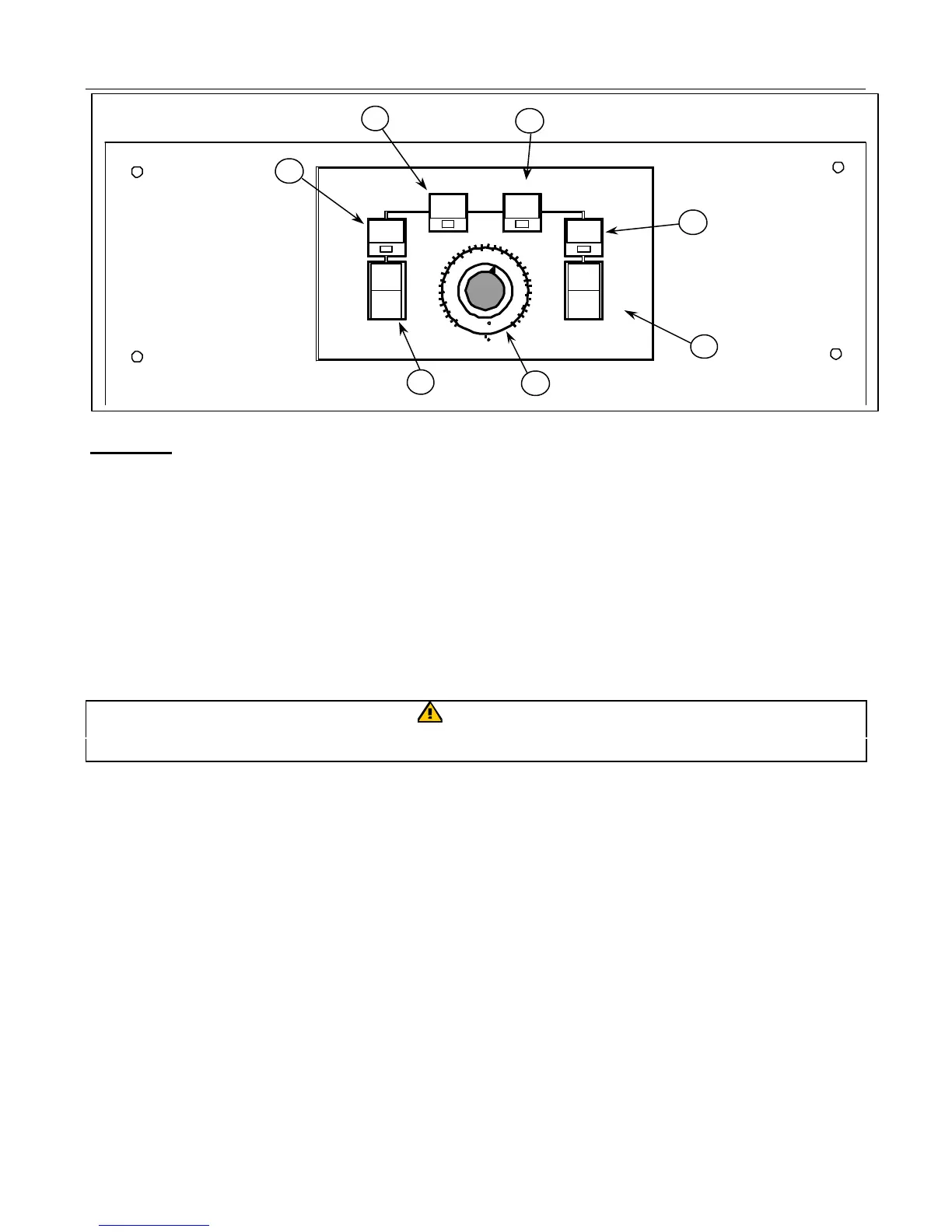
ITEM NO.
1. Power Supply Switch - controls power supply.
2. Power On Light - indicates when electrical power is on.
3. Temperature Control Knob - sets desired frying temperature.
4. Heating Light - indicates element is on.
5. Trouble Light - indicates malfunction of fryer control circuit or overheat condition. Reset by
turning the ON/OFF switch OFF for 30 seconds, then ON.
6. Second High-Limit Light – indicates fryer has overheated and the high limit has shut fryer off.
7. High-Limit Test Switch – Tests high-limit thermostats.
CAUTION
Fryer must be filled with oil, shortening, or water before turning on controller.
8.1 Temperature Calibration
1. Insert a good grade thermometer or pyrometer probe into the cooking oil/shortening near the fryer
temperature-sensing probe.
2. Turn thermostat knob to frying temperature.
3. Let elements cycle on and off automatically three times to allow the cooking oil temperature to be
uniform.
4. When the elements start for the fourth time, the pyrometer reading should be within 5°F (2°C) of
the thermostat knob setting. If it is not, calibrate as follows:
a. Loosen set screw in thermostat control knob until outer shell of knob will rotate on insert inside
knob.
b. Rotate outer shell of knob until index line on knob aligns with marking that corresponds to
thermometer or pyrometer reading.
c. Hold knob and tighten set screw.
OFF
2
ND
POWER
ON
1
ST
HI LIMIT
TEST
POWER
SECOND
TROUBLEHEAT
280
260
220
240
320
300
340
360
200
140
110
100
120
130
150
160
170
180
190
C
F
5
3
7
6
4
2
1






 To Next Page