33
3
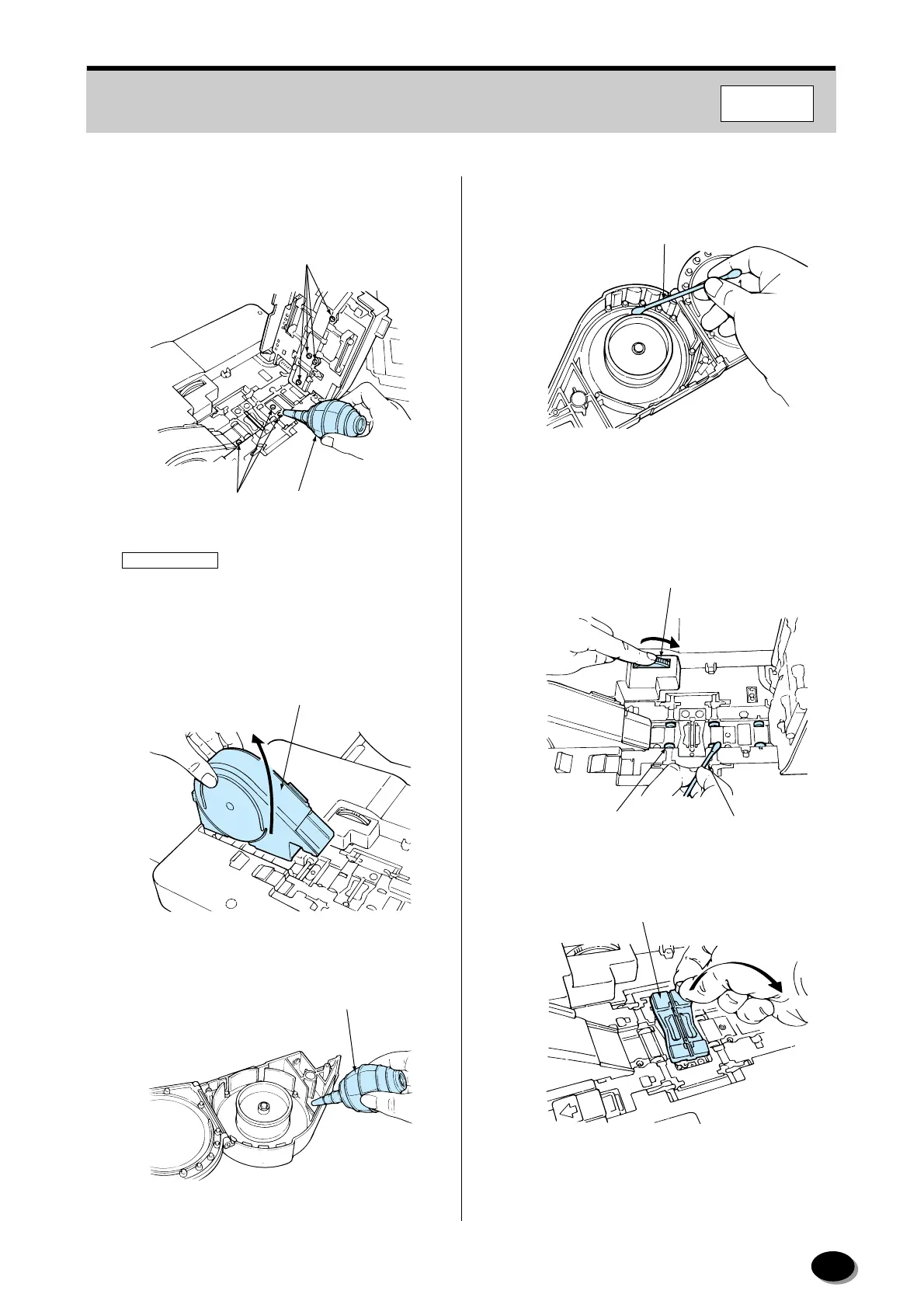
Blow off any dirt or dust adhering to the sensors
(glass surfaces) and film guide sections using
the blower brush.
IMPORTANT
•Take care not to scratch or mark the sensors.
Dirt or dust on the sensor or guide may scratch
or mark the films.
4
Remove the winding section.
5
Blow off any dirt or dust adhering to the inside.
6
Remove any dirt or dust adhering to the guide
rollers using a cotton swab.
7
While rotating the roller cleaning knob, use a
cotton swab moistened with magnet cleaner
(MC-100) to remove any dirt or dust adhering to
the rollers.
8
Remove the mask.
Sensors
Sensors
Blower Brush
EZ632
Winding Section
EZ1013
Blower Brush
EZ1014
Swab
EZ1324
Swab
Roller Cleaning Knob
Roller
EZ633
Mask
EZ1297
F350/370
distributed by www.minilablaser.com



 To Next Page