34
9
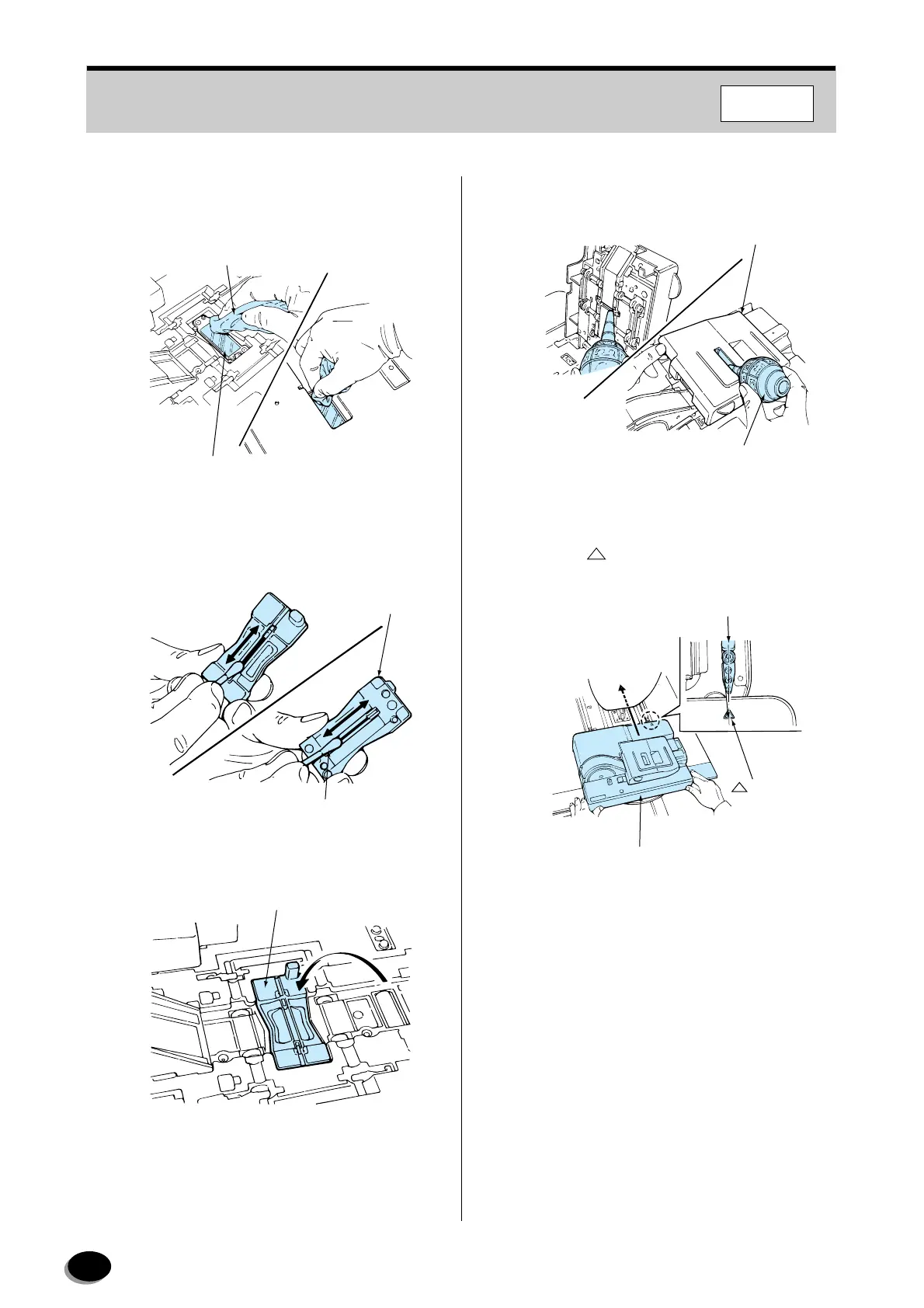
Lightly wipe any dirt or dust off the upper and
lower surfaces of the diffusion plate using a lens
cleaning cloth.
10
Remove any dirt or dust adhering to the groove
in the mask using a cotton swab and blower
brush.
11
Reinstall the mask.
12
Blow off any dirt or dust adhering to the opening
in the pressure cover using the blower brush.
13
Close the pressure cover.
14
Align the “ ” mark on the film carrier with the
rail and push the carrier all the way in.
15
Click [OK].
• The Scanner Correction screen appears.
Lens Cleaning Cloth
Diffusion Plate
EZ1298
Mask
Swab
EZ1833
Mask
EZ1299
Pressure Cover
Blower Brush
EZ1832
Rail
Auto Film Carrier NC135Y
Mark
EZ637
F350/370
distributed by www.minilablaser.com



 To Next Page