39
2
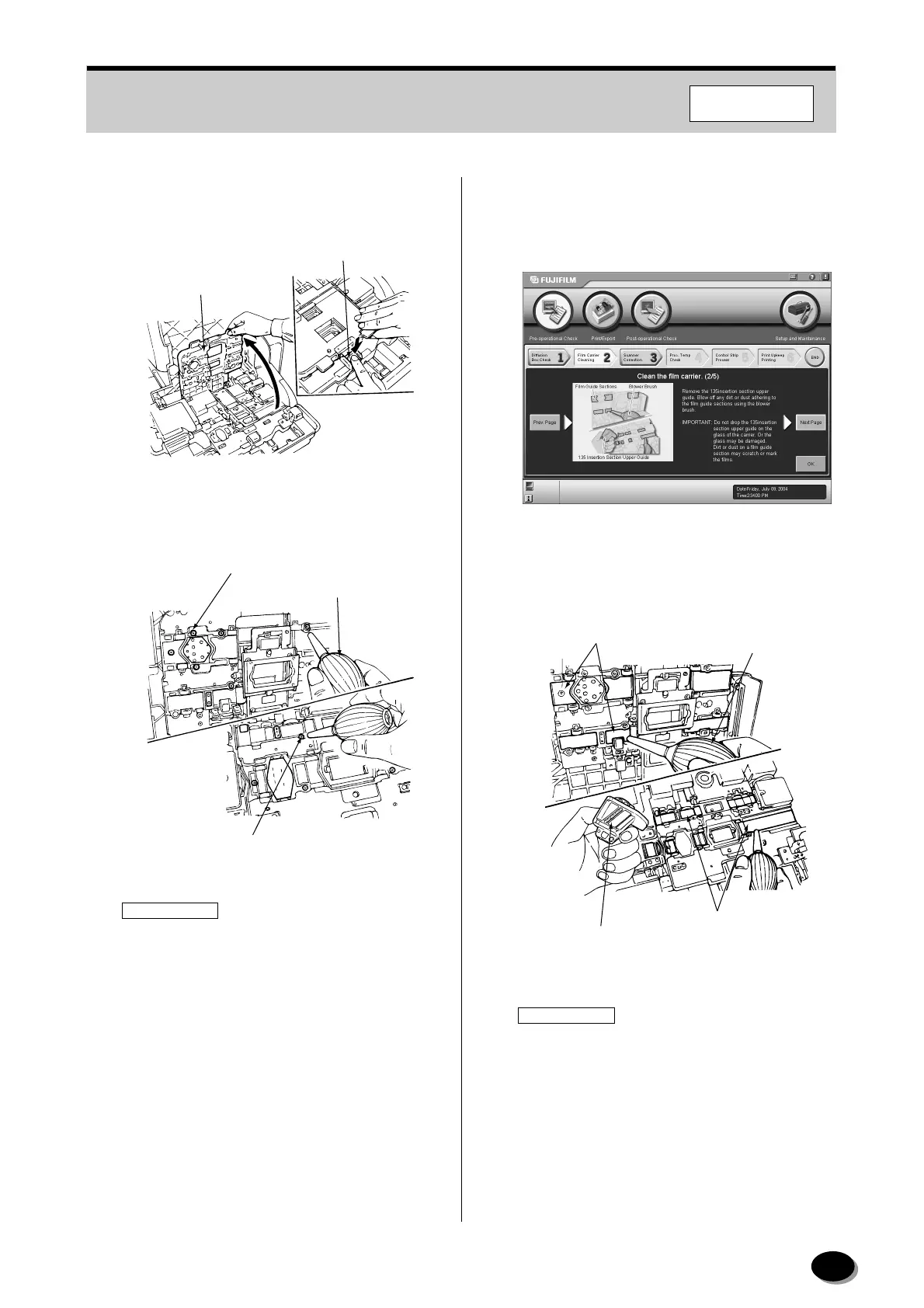
Press the pressure cover release lever to release
the lock, and then open the pressure cover.
3
Blow off any dirt or dust adhering to the sensors
(glass surfaces) using the blower brush.
IMPORTANT
• Dust or dirt may scratch or mark the films. Take
care not to scratch or mark the sensors.
• Do not use alcohol solution to clean the
sensors.
• Do not drop the 135 insertion section upper
guide on the glass surfaces of the feed lanes.
Otherwise the glass surfaces may be
damaged.
4
Click the [Next Page] button.
• The second screen of “2 Film Carrier Cleaning”
appears.
5
Remove the 135 insertion section upper guide.
6
Blow off any dirt or dust adhering to the film
guide sections using the blower brush.
IMPORTANT
Dust or dirt on a film guide section may scratch
or mark the films.
7
Click the [Next Page] button.
Pressure Cover
Pressure Cover
Release Lever
Z2054
Sensors (on Upper Feed Lane)
Blower Brush
Sensors (on Lower Feed Lane)
EZ2001
Film Guide
Sections
135 Insertion Section
Upper Guide
Blower Brush
Film Guide Sections
EZ2002R
F355/375/570
distributed by www.minilablaser.com



 To Next Page