83
FMPC
3
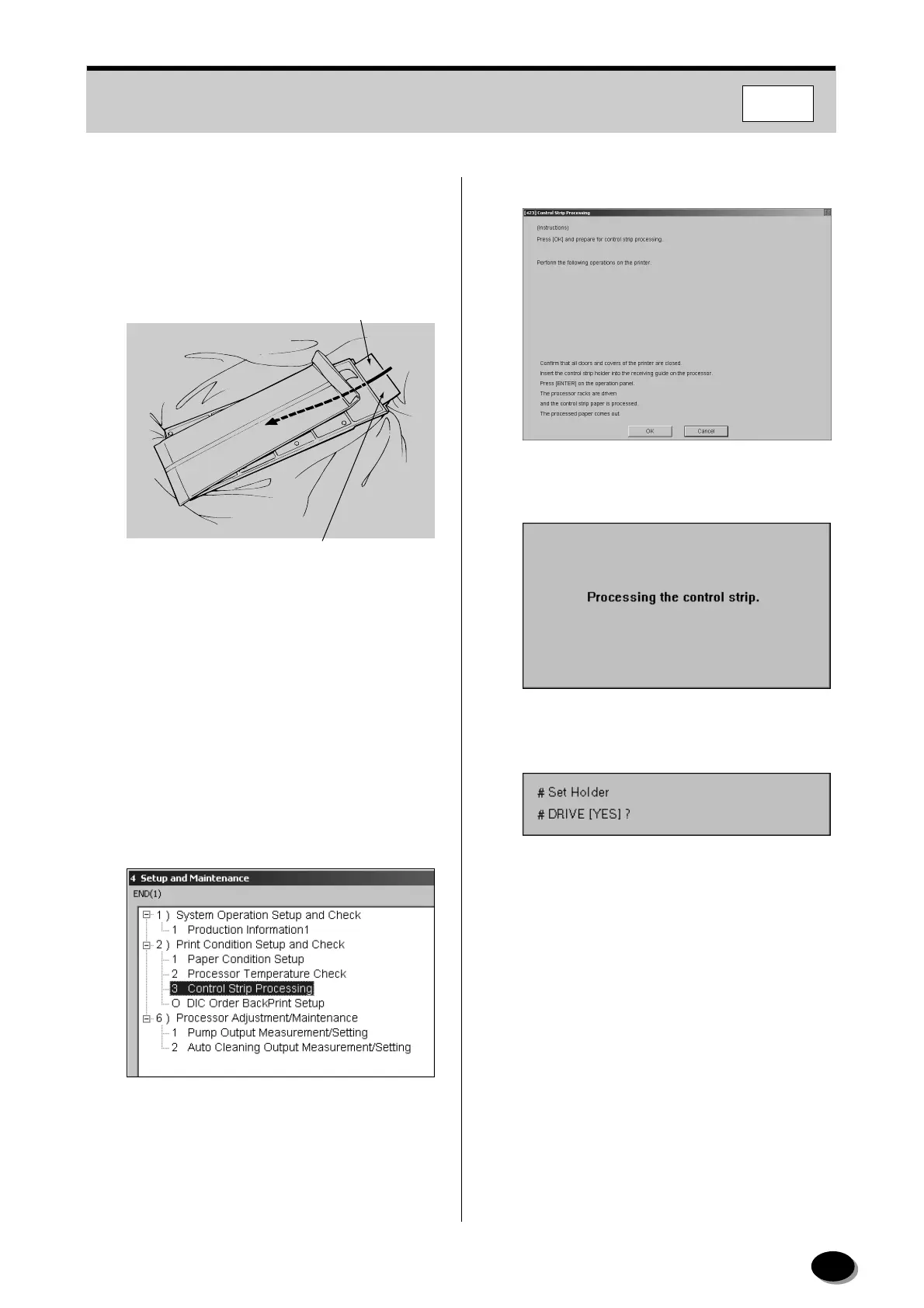
Pass your hands through the sleeves of the dark
box, take one control strip out of the inner bag,
and insert it into the control strip holder, as
shown in the figure. Push it in until it reaches the
far end.
4
Fold over the open end of the inner bag to
prevent fogging of the unused control strips.
5
Take the control strip holder out of the dark box.
6
Return the control strip package to the freezer.
7
Open the “4 Setup and Maintenance” menu
screen (see Section 8.1).
8
Select “3 Control Strip Processing”, and click
[START].
• The “[423] Control Strip Processing” screen
appears.
9
Click [OK] to start the control strip processing.
• The message “Processing the control strip.”
appears.
• The message “Set Holder” appears on the
operating panel on the printer.
Emulsion Surface
Upward
Control Strip
EZ741
distributed by www.minilablaser.com



 To Next Page