84
FMPC
10
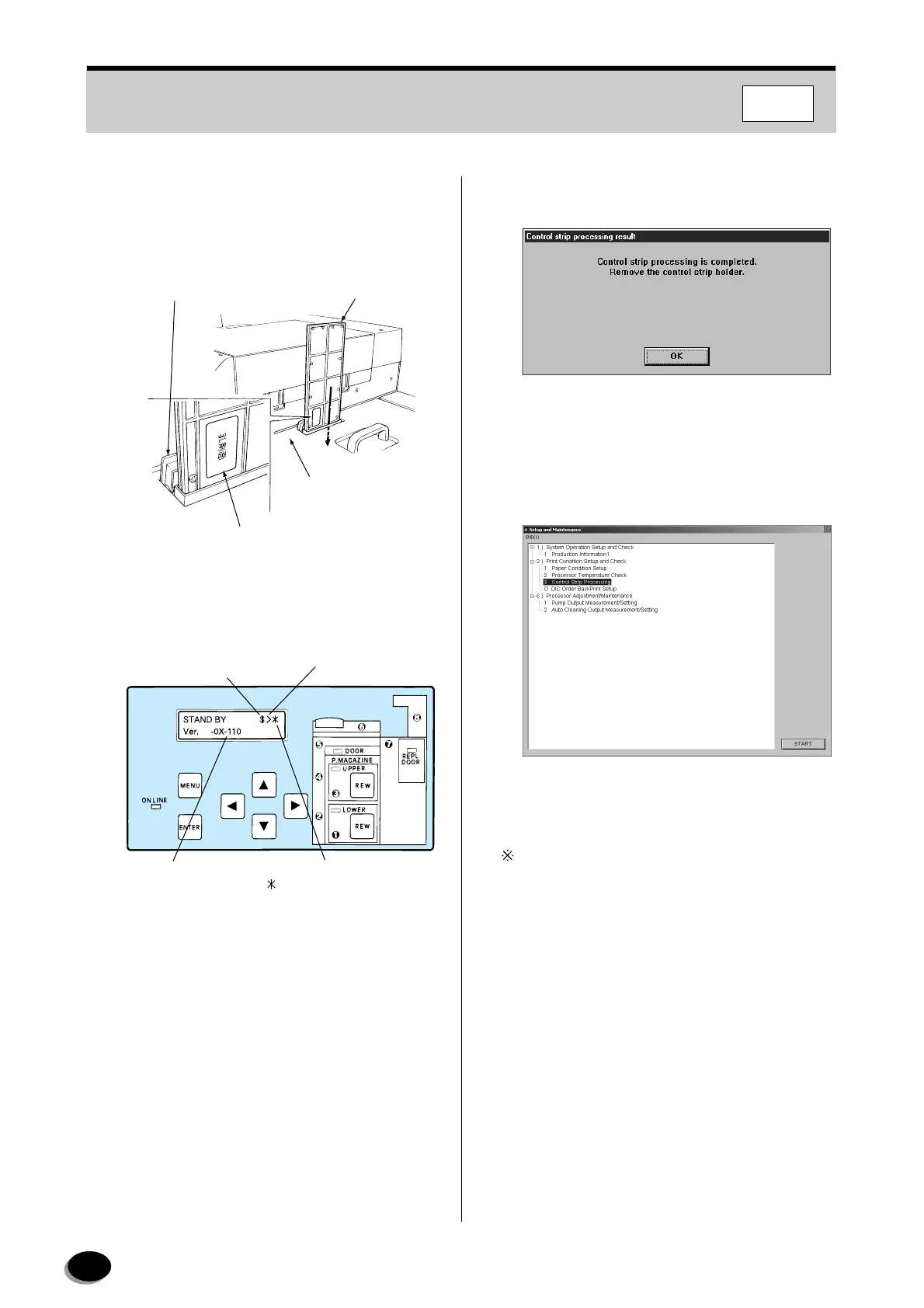
Open the cover of the control strip holder port in
the processor cover, and position the holder so
that its “EMULSION SURFACE” mark faces the
processor side.
11
Press the [ENTER] key on the operating panel of
the printer.
• The processor starts and control strip
processing begins.
• After about 4 minutes, the control strip is fed out
to the large size tray.
• The message “Control strip processing is
completed.” appears on the screen.
12
Remove the control strip holder from the port in
the processor cover.
13
Click [OK].
• The message is cleared.
14
Click [Cancel].
• Control returns to the “4 Setup and
Maintenance” screen.
For the daily morning pre-operational checks,
operation returns to the “Printing Condition
Upkeep”.
15
Select the “END [1]” on the menu bar.
• Control returns to the “Main Menu” screen.
Control Strip Holder
Port Cover
Control Strip
Holder
Processor Cover
“EMULSION SURFACE” Mark
EZ742
7.7
Laser warming-up
($ : complete, + : warming-up)
Processer warming-up
( : complete, + : warming-up)
Display
Driving processer
EZ625
distributed by www.minilablaser.com



 To Next Page