4 - 62 C156-E142-02EN
4.6.15 REQUEST SENSE command
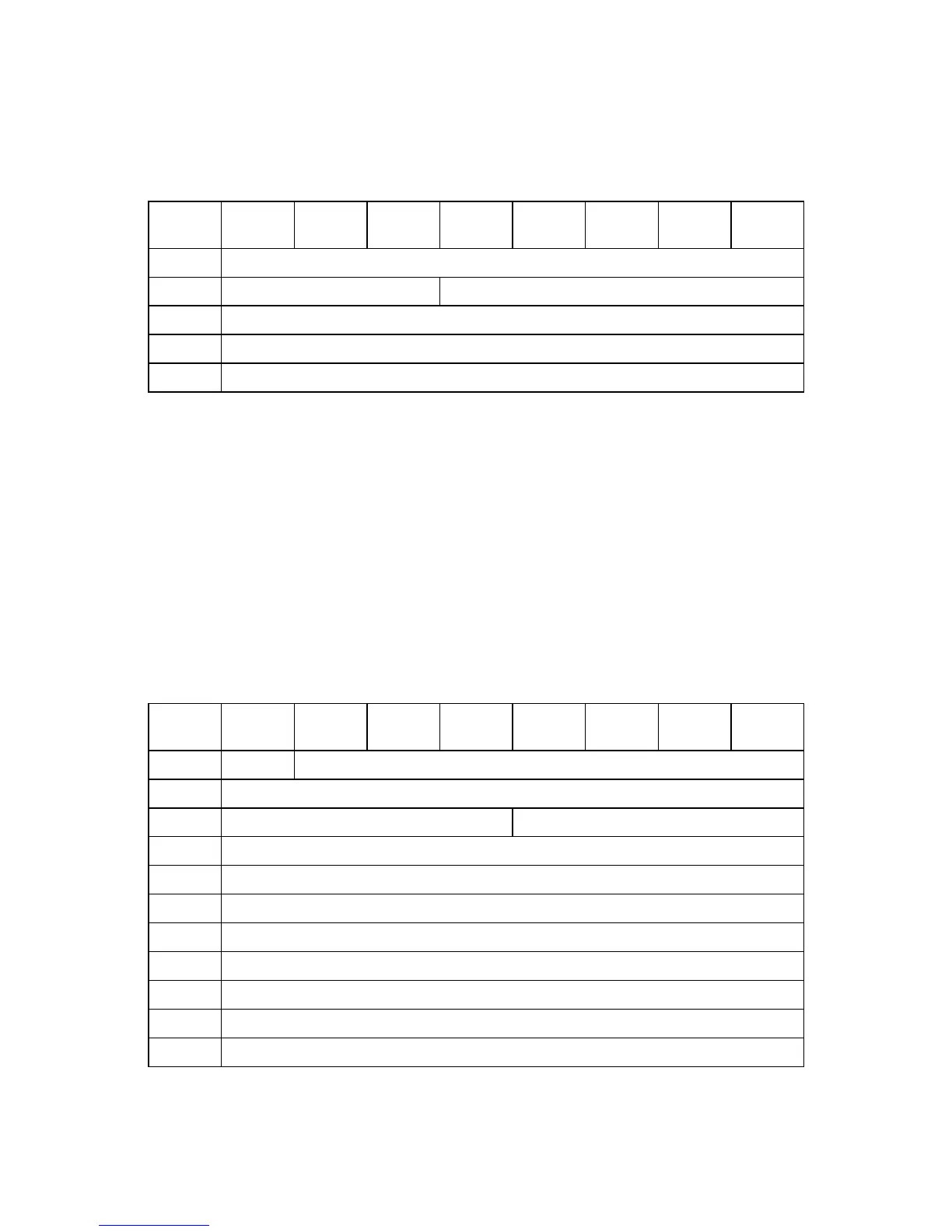
Table 4.94 REQUEST SENSE command
Bit
Byte
76543210
0 Operation Code (03h)
1 Logical Unit Number Reserved
2-3 Reserved
4 Allocation Length
5-11 Reserved
The REQUEST SENSE command transfers sense data to the host. Sense data indicates detailed
error information on the command whose error was reported previously. If no error command was
reported, SENSE KEY indicates NO SENSE.
When issuing the REQUEST SENSE command to detect the device status, first issue the TEST
UNIT READY command, then issue REQUEST SENSE.
Allocation Length indicates the length of sense data to be transferred in bytes. If Allocation
Length is 0, the command transfers no data and ends normally.
The sense data format is shown in Table 4.95.
Table 4.95 Request sense data
Bit
Byte
76543210
0 Valid Error Code (70h or 71h)
1 Reserved (00h)
2 Reserved (0h) Sense Key
3-6 Information
7 Additional Sense Length (18h)
8-11 Command-Specific Information
12 Additional Sense Code
13 Additional Sense Code Qualifier
14 Reserved (00h)
15-17 Sense-key specific
18-31 Additional Sense Bytes



 To Next Page