4 - 28 C156-E142-02EN
4.5.3 DEVICE RESET (X'80')
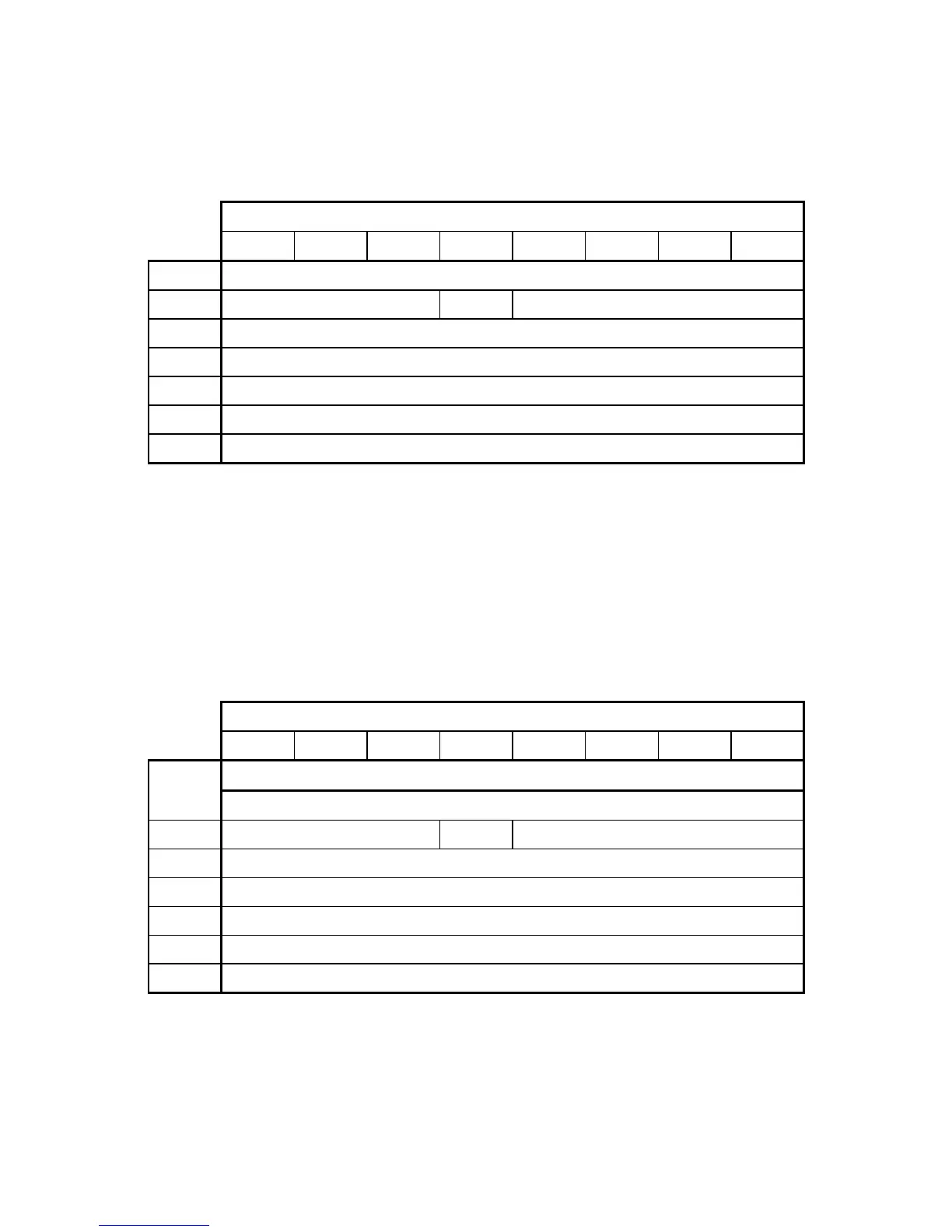
Table 4.22 DEVICE RESET command
Bit
76543210
CM00001000
DHXXXDRVXXXX
CHXXXXXXXX
CLXXXXXXXX
SNXXXXXXXX
SCXXXXXXXX
FRXXXXXXXX
The DEVICE RESET command resets the ODD.
When the ODD receives the DEVICE RESET command, it sets the BUSY bit to 1. After reset is
completed, the ODD sets the BUSY bit to 0. INTRQ is not asserted.
4.5.4 CHECK POWER MODE (X'98'/X'E5')
Table 4.23 CHECK POWER MODE command
Bit
76543210
CM10011000
11100101
DHXXXDRVXXXX
CHXXXXXXXX
CLXXXXXXXX
SNXXXXXXXX
SCXXXXXXXX
FRXXXXXXXX
The CHECK POWER MODE command sets the ODD power mode status in the SC register, then
notifies the host of the value in Table 4.24 When the drive is in sleep mode, the interface is
inactive and the ODD cannot receive this command.



 To Next Page