C156-E142-02EN 4 - 29
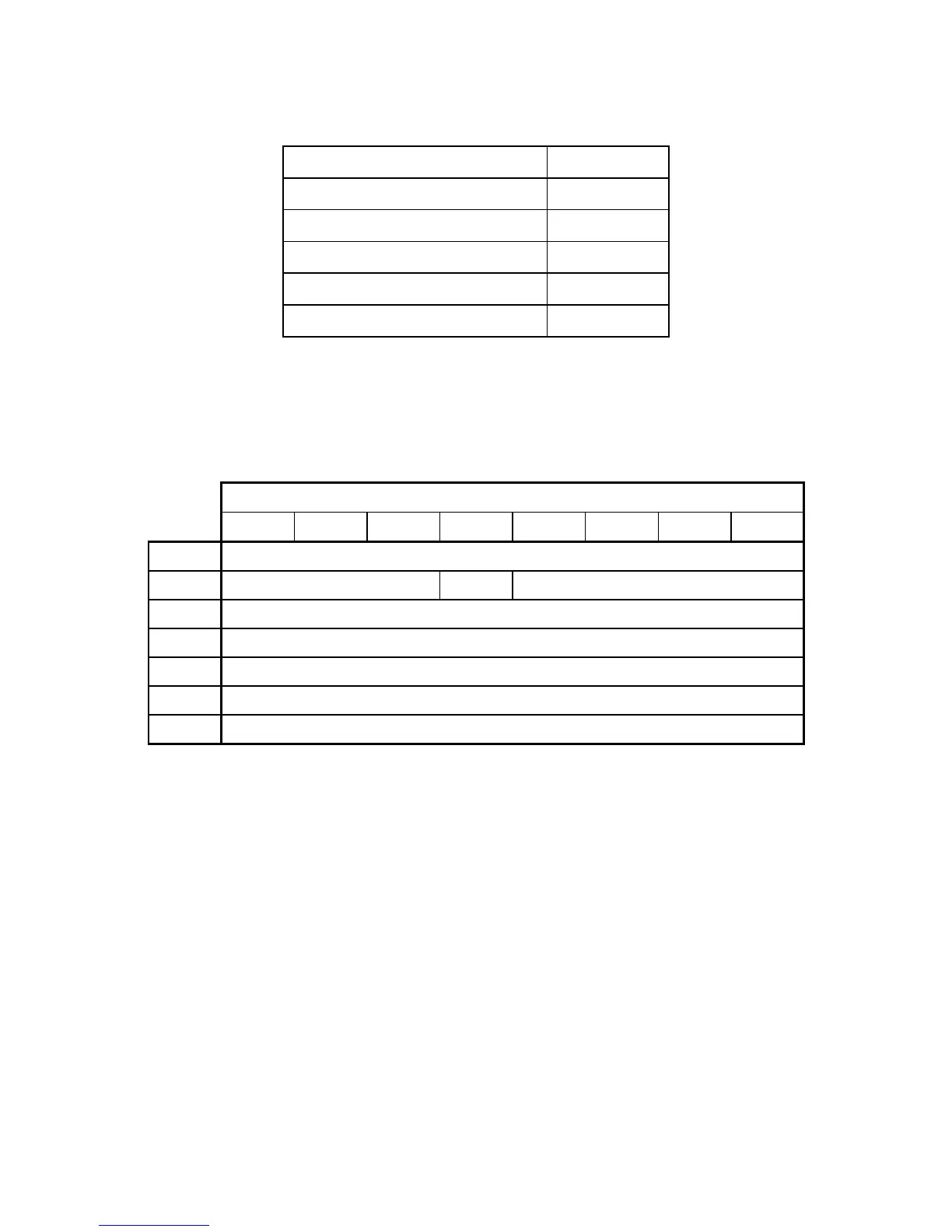
Table 4.24 Power mode indication
Power mode status SC register
Standby mode 00h
Entering standby mode 00h
Returning from standby mode 00h
Idle mode FFh
Active mode FFh
4.5.5 EXECUTE DEVICE DIAGNOSTIC (X'90')
Table 4.25 EXECUTE DEVICE DIAGNOSTIC command
Bit
76543210
CM10010000
DHXXXXXXXX
CHXXXXXXXX
CLXXXXXXXX
SNXXXXXXXX
SCXXXXXXXX
FRXXXXXXXX
When the ODD receives this command, it recognizes self-diagnostics.
When the ODD receives this command, it responds to the command regardless of the DRV bit
value; this means that the drive is unit 0 or 1.
When the ODD is device 0 (master), its response after the command is received depends on
whether device 1 (slave) is connected.
When no device 1 is connected
The ODD sets X'01' in the Error register and terminates the command.
When device 1 is connected
The ODD monitors the PDIAG- signal sent from device 1 for six seconds. If device 1 asserts the
PDIAG- signal within this time, the ODD recognizes that the device 1 self-diagnostic test ends
successfully. Otherwise, the ODD recognizes that the device 1 self-diagnostic test ended



 To Next Page