65
6. TIMER SETTING
METHOD
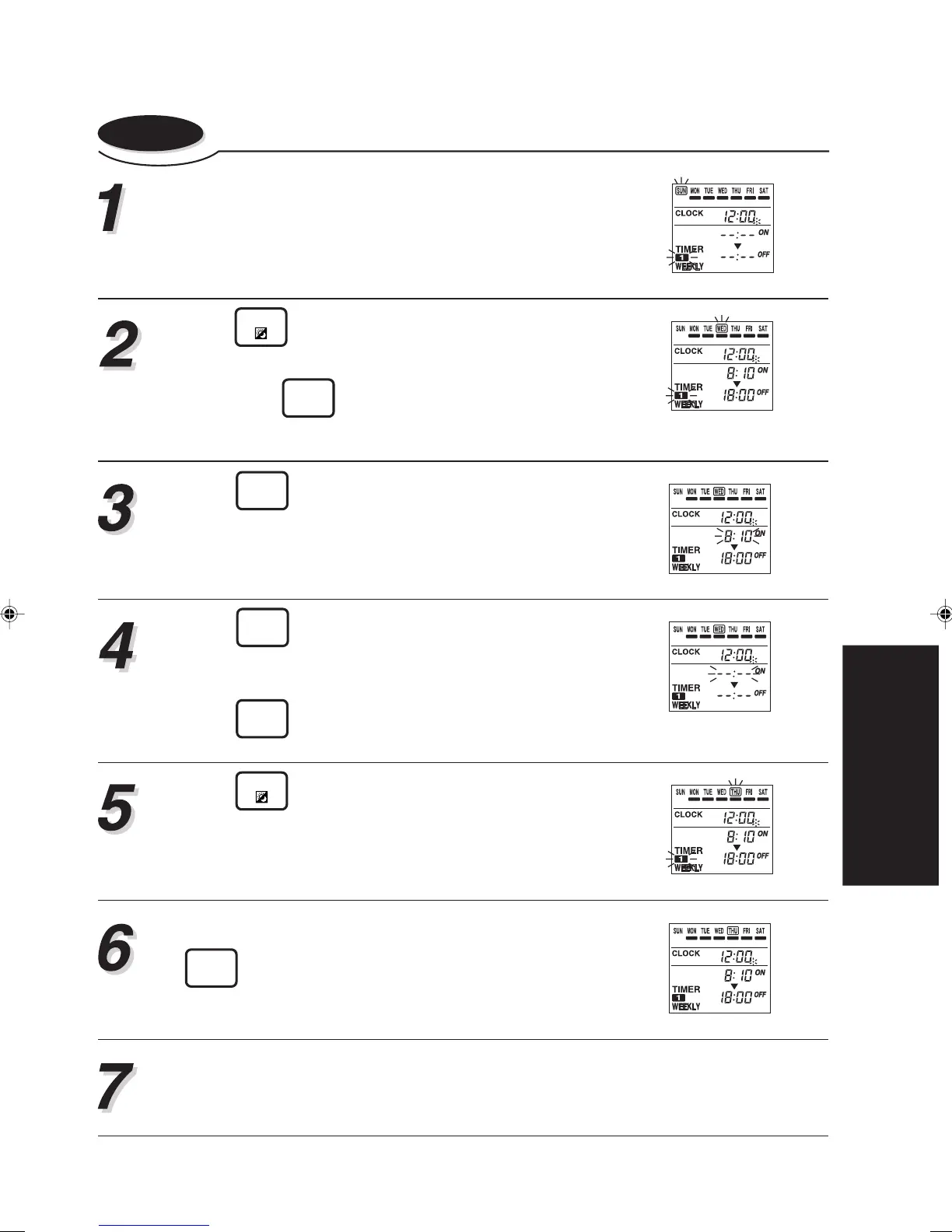
6-3-3. Canceling the selected time setting
Carry out steps 1 to 3 of the “Setting up the weekly
timer operation” procedure.
Press
DAY
to select the day that you want to can-
cel the timer setting.
(Here, press
TIMER
DELETE
will delete all set time (WEEKLY1,
2) of the current day.)
Press
TIMER
SET
to enter the setting mode.
The “WEEKLY1” ON time starts flashing.
Press
TIMER
DELETE
.
Then, “WEEKLY1” setting will be deleted and the time
display becomes blank “– – : – –”.
Press
TIMER
SET
to confirm the setting.
Press
DAY
to return to step 2.
If you wish to delete other time settings, repeat 2 to
4.
When you have finished setting, hold down the
TIMER
SET
for 2 seconds.
It is necessary to transmit the newly set information to the relevant indoor units.
Refer to steps 4, 5 and notes of “3-3. CONTROL MODE” for details.







 To Next Page