60
6. TIMER SETTING
METHOD
6-3. WEEKLY TIMER
Weekly timer features
• Set different operating times for each day of the week.
• Set one or two operating spans (one or two pair(s) of ON / OFF times) per day.
• Set time to a resolution of 10 minutes.
• OFF time can be carried over to the subsequent day.
• Use the “DAY OFF” setting to cancel operation for any day of the coming week (one time cancel-
lation).
• Copy and paste can be used for time setting for each day.
6-3-1. Setting up the weekly timer operation
CHECK
ACL
MASTER
ENERGY ANTI
FAN
TIMER
SET
TIMER
DELETE
TIMER
DAY
CLOCK
ADJUST
DAY OFF
TEMP.
MEMORY
OPERATION
MEMORY
TEST
SET
CENTRAL
DELETE
BACK
GROUP
ZONE
ON OFF
TIME
CONTROL
CONTROL
FILTER
RESET
CONTROL
FREEZE
COPY
TIMER
MODE
SAVE
SETTING SETTING
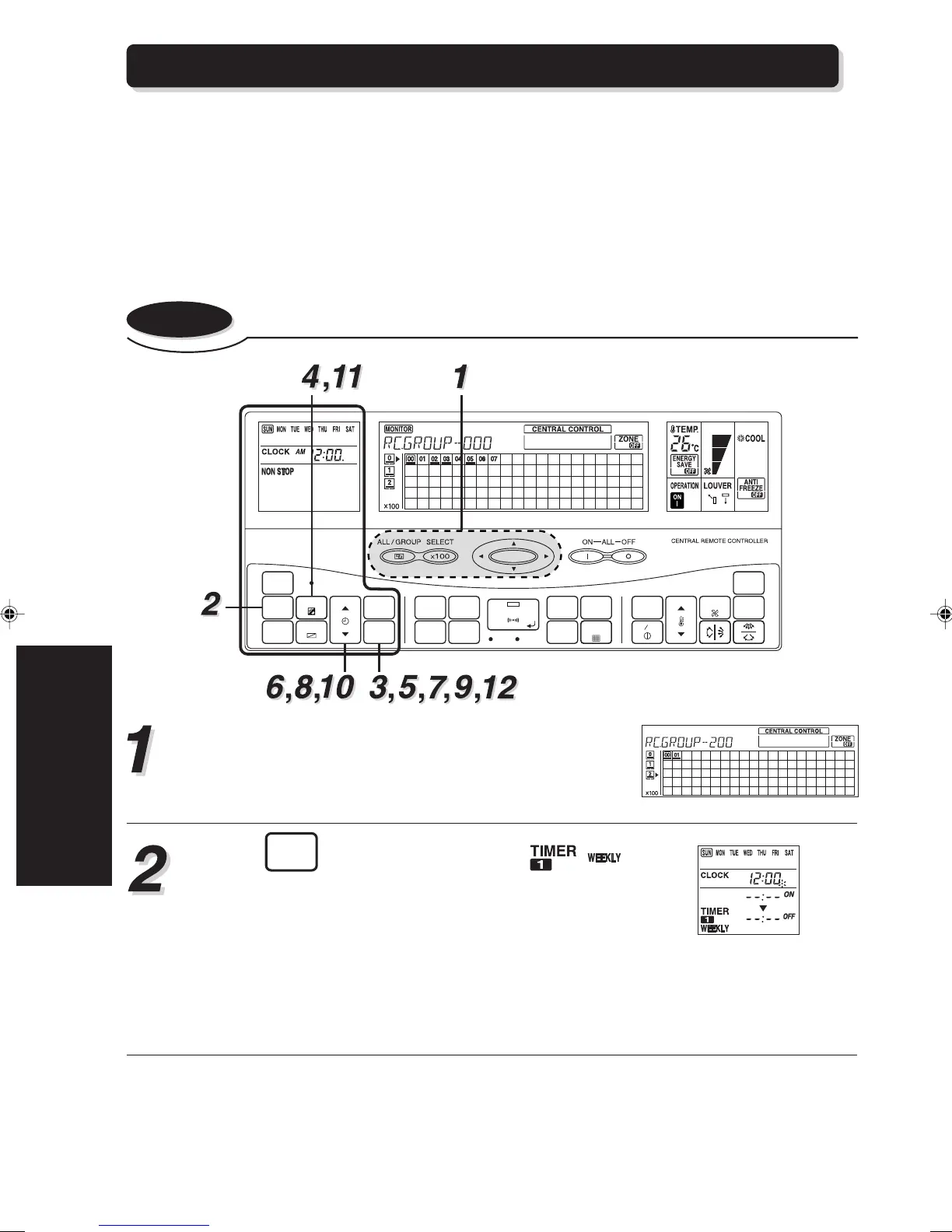
Enter the control mode to select the central control
number (the indoor units) to be set.
Refer to “3-3. CONTROL MODE” for information
about control modes.
Press
TIMER
MODE
until the segments of the ,
appear on the display.
The display now shows the current day (by DAY of
the week), the first ON and OFF times for the day
(the “WEEKLY1” times).
The top time value gives the on time and the bottom
one gives the off time.
If either time has not been set, the corresponding
time “– – : – –” will show on the display.






 To Next Page