61
6. TIMER SETTING
METHOD
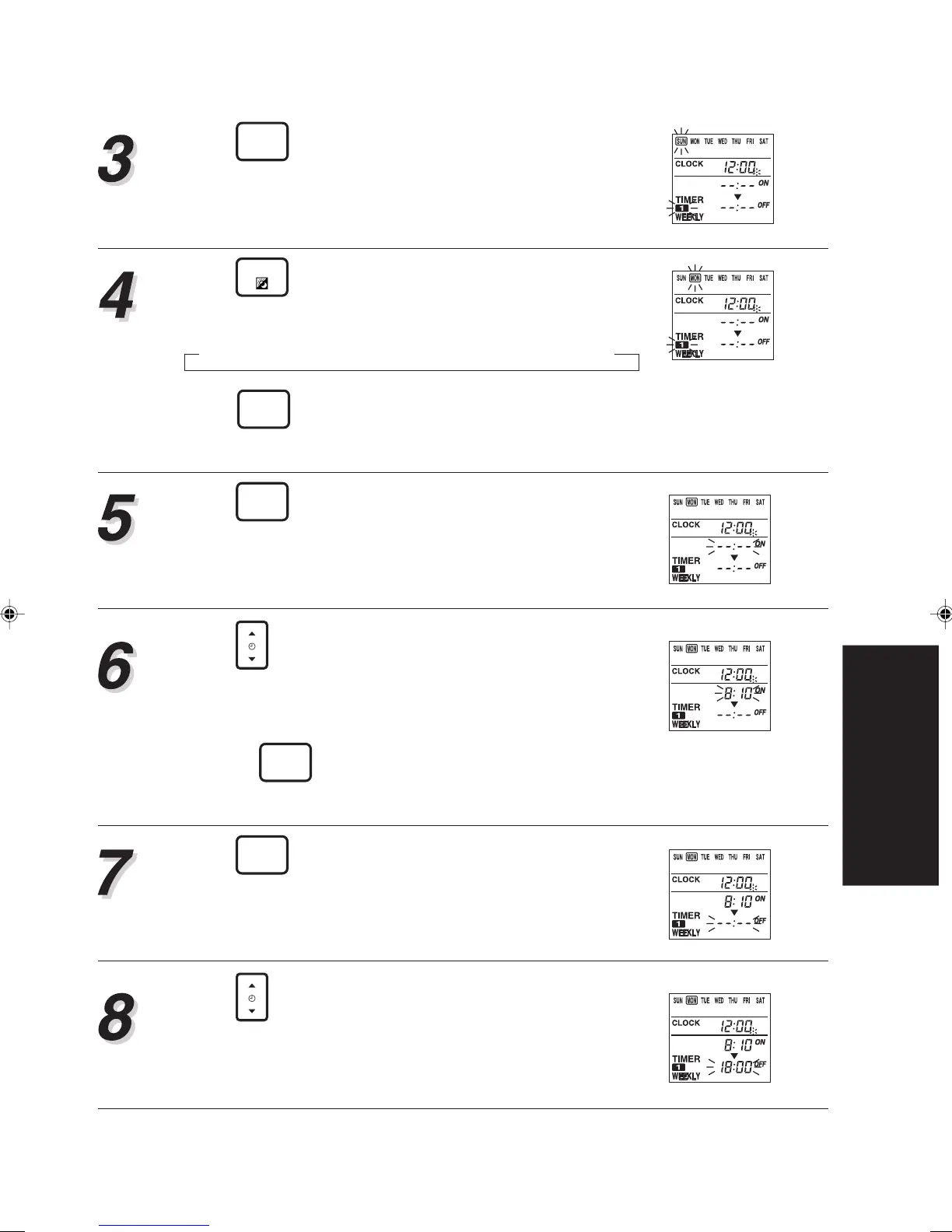
Press
TIMER
SET
for 2 seconds.
Enters WEEKLY setting mode.
Press
DAY
to select the day that you want to set
up.
Press
TIMER
DELETE
to delete the time set for the current
day.
Press
TIMER
SET
.
The “WEEKLY1” ON time starts flashing.
Press
TIME
to adjust the “WEEKLY1” on time.
▲: Press to advance time.
▼: Press to reverse time.
• Press once to move the time 10 minutes.
• Press
TIMER
DELETE
and the currently set time will be
deleted.
Press
TIMER
SET
to store the “WEEKLY1” on time.
As this is done, the on time segments stop flashing
and the “WEEKLY1” OFF time starts flashing.
Press
TIME
to adjust the “WEEKLY1” off time.
The earliest OFF time you can set is 10 minutes af-
ter the ON time. The latest OFF time is 23:50 on the
subsequent day.
SUN → MON → TUE → WED → THU → FRI → SAT
▲








 To Next Page