62
6. TIMER SETTING
METHOD
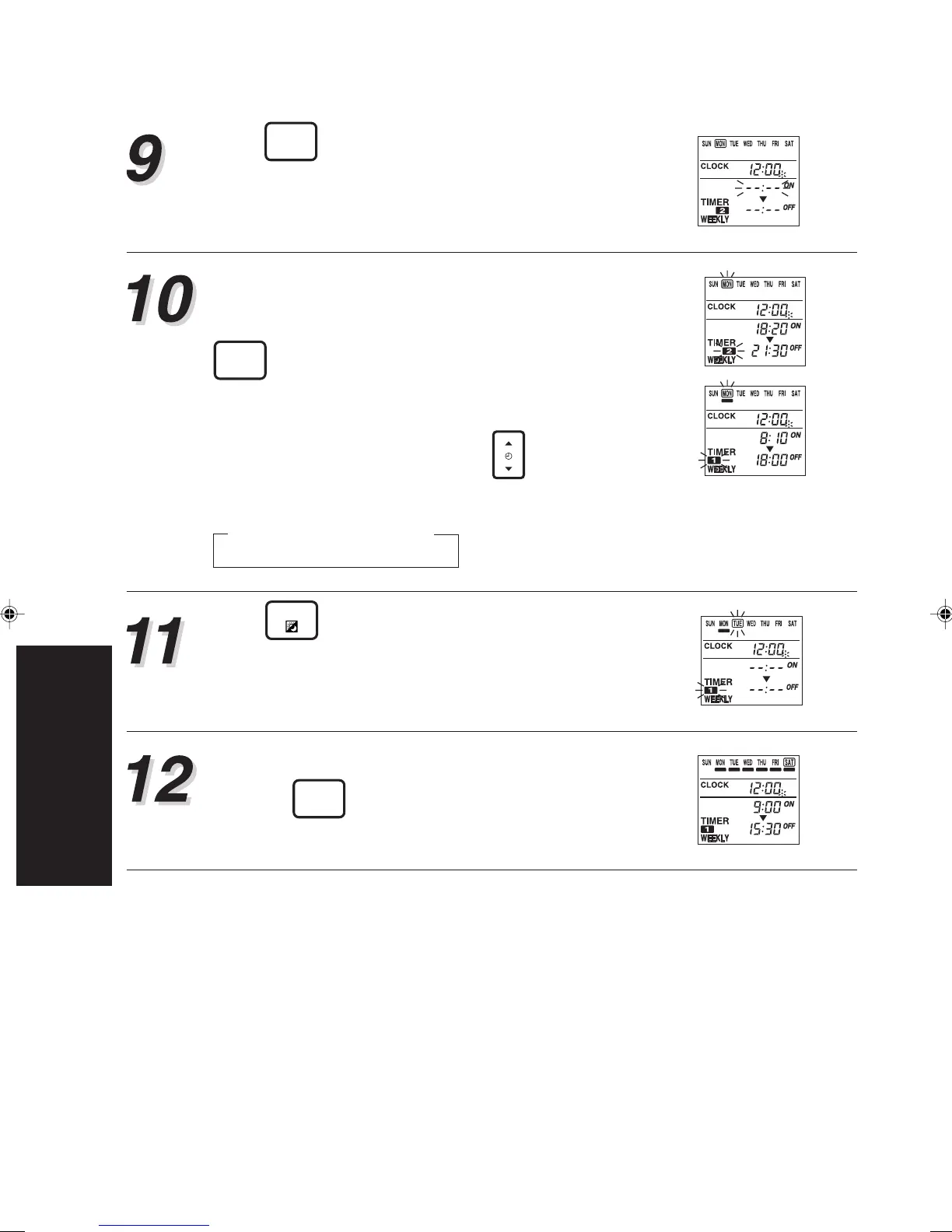
Press
TIMER
SET
to store the “WEEKLY1” off time.
The setting of the “WEEKLY1” timer is completed
and it automatically switches to the “WEEKLY2” set-
ting. The “WEEKLY2” on time starts flashing.
Repeat the operations described in steps 6 to 9 to
set the “WEEKLY2” ON and OFF time.
After setting the “WEEKLY2” OFF time, press the
TIMER
SET
to store the “WEEKLY2” OFF time. At the
moment, the setting of “WEEKLY2” is also com-
pleted. You will be brought back to the step 4. You
can review your setting by pressing
TIME
. Each press
moves you to the next setting, as follow.
Press
DAY
to select another day for set up. The
procedures are to repeat steps 5 to 10 mentioned
above.
When you have finished setting all of the time, hold
down the
TIMER
SET
for 2 seconds.
WEEKLY1 → WEEKLY2
ON / OFF ON / OFF
▲









 To Next Page