EasyManua.ls Logo

Fusion FusionServer 5288 V5 - Drive Backplane

Fusion FusionServer 5288 V5
110 pages
Print Icon
To Next Page IconTo Next Page
To Previous Page IconTo Previous Page
Loading...
FusionServer 5288 V5 Server
Technical White Paper
5 Hardware Description
Issue 07 (2023-04-30)
Copyright © xFusion Digital Technologies Co., Ltd.
60
45
Screw-in RAID controller
card connector (RAID
CARD/J48)
46
PCIe riser 2 slot
(corresponding to
CPU2/J155)
a: "10GE optical port" corresponds to the mainboard (BOM: 03024AFQ and
03026NEA) integrated with two 10GE optical ports and two GE electrical ports.
"10GE electrical port" corresponds to the mainboard (BOM: 03024CXS and
03029JRP) integrated with two 10GE and two GE electrical ports.
b: The port is reserved.
c:COM_SW(ON) is used to change the connection direction of the physical
serial port. BMC_RCV(ON) is used to restore the default iBMC configuration (for
iBMC V350 and later versions, restoring the default iBMC configuration through
a jumper is not supported).
5.10.2 Drive Backplane
Front-Drive Backplanes
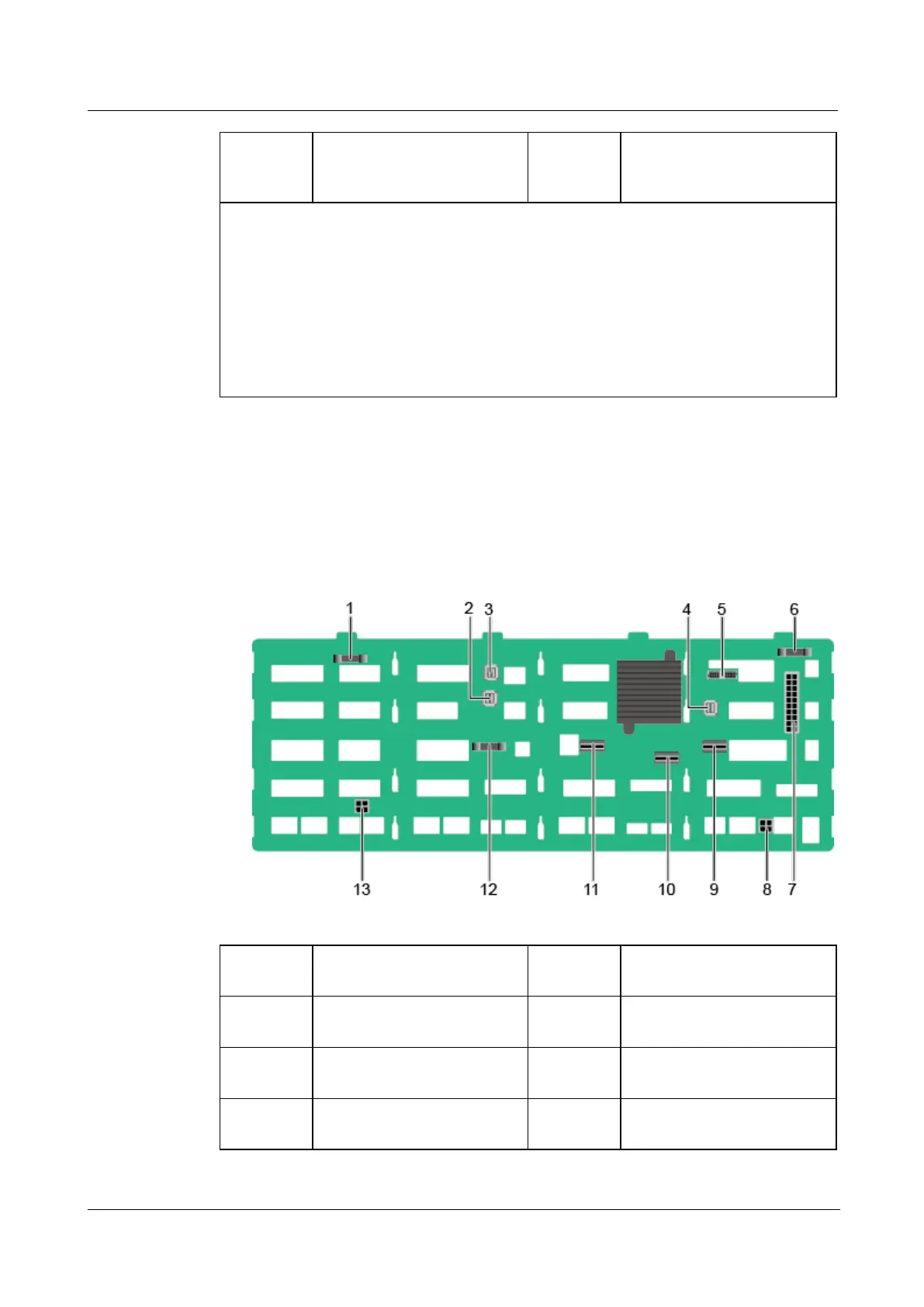
24 x 3.5" drive backplane
Figure 5-41 24 x 3.5" drive backplane (BOM: 03024QEK, 03029TSF, 0302Y155)

1
Signal connector (REAR
BP0/J32)
2
Mini-SAS HD connector
(PORT B/J29)
3
Mini-SAS HD connector
(PORT A/J28)
4
Mini-SAS HD connector
(REAR PORT/J31)
5
Signal connector (MAIN
BOARD/J1)
6
Signal connector (REAR
BP1/J35)
7
Power connector
(POWER/J61)
8
Power connector 3
(POWER3/J68)

Related product manuals