FusionServer 5288 V5 Server
Technical White Paper
Copyright © xFusion Digital Technologies Co., Ltd.
⚫
Power output overcurrent or short-circuit
⚫
Output overvoltage
⚫
Short-circuit protection
⚫
Device failure (excluding failure of all devices)
The UID indicator helps identify and locate a device.
⚫
Off: The device is not being located.
⚫
Blinking or steady blue: The device is being located.
NOTE
You can turn on or off the UID indicator by pressing the UID
button or remotely running a command on the iBMC CLI.
Data transmission
status indicator of the
management network
port
⚫
Off: No data is being transmitted.
⚫
Blinking yellow: Data is being transmitted.
Connection status
indicator of the
management network
port
⚫
Off: The network port is not connected.
⚫
Steady green: The network port is properly connected.
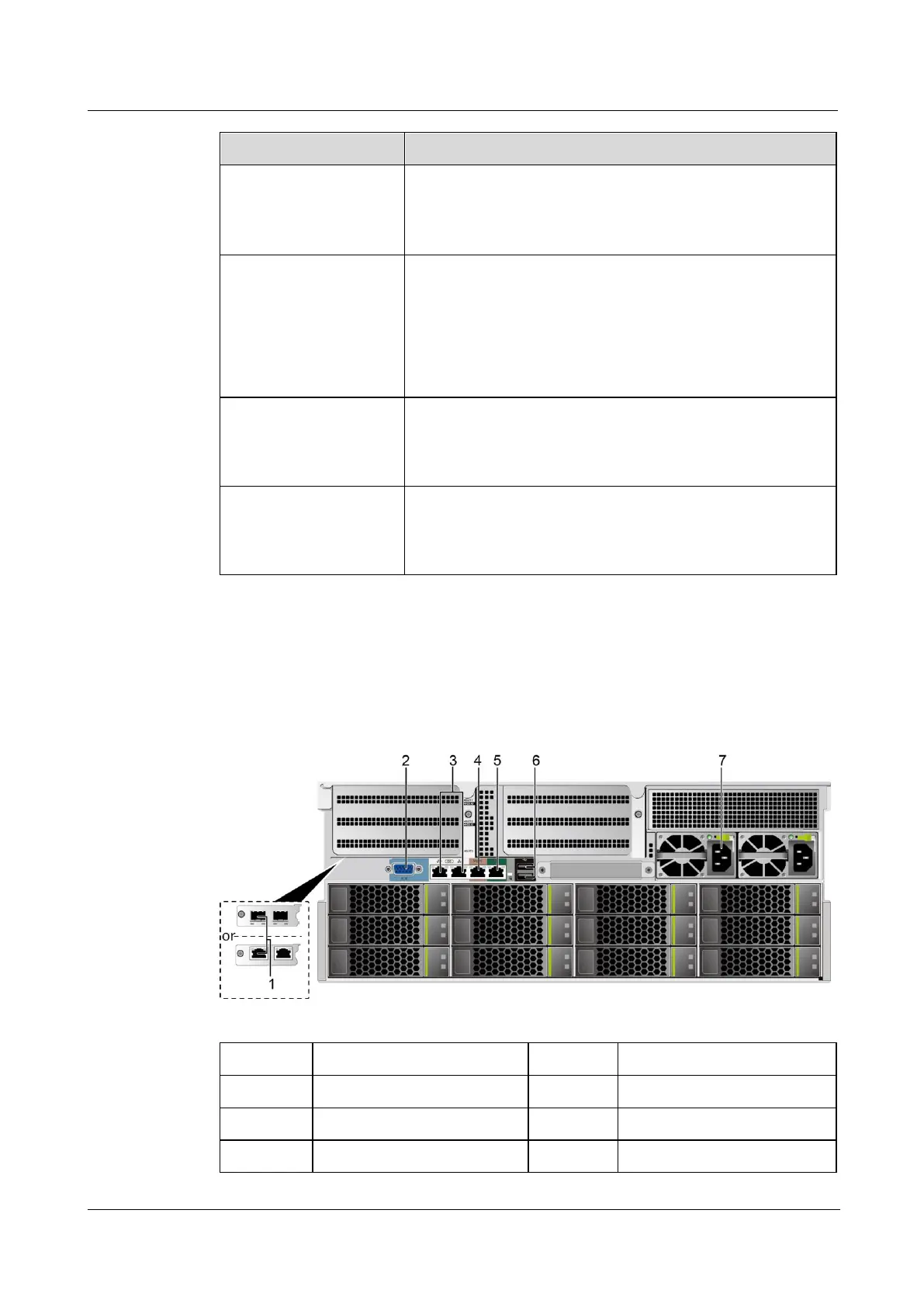
5.2.3 Ports
Port Positions
Figure 5-6 Ports on the rear panel


 To Next Page