Garmin G1000 Pilot’s Guide for the Piper PA-32 Saratoga
190-02692-00 Rev. A212
FLIGHT MANAGEMENT
SYSTEM
OVERVIEW
FLIGHT
INSTRUMENTS
EIS
AUDIO PANEL
& CNS
FLIGHT
MANAGEMENT
HAZARD
AVOIDANCE
AFCS
ADDITIONAL
FEATURES
APPENDICESINDEX
An along track offset distance cannot be modified once entered. If the along track offset distance must be
changed, the existing along track offset waypoint must be deleted and a new one created with the new offset
distance.
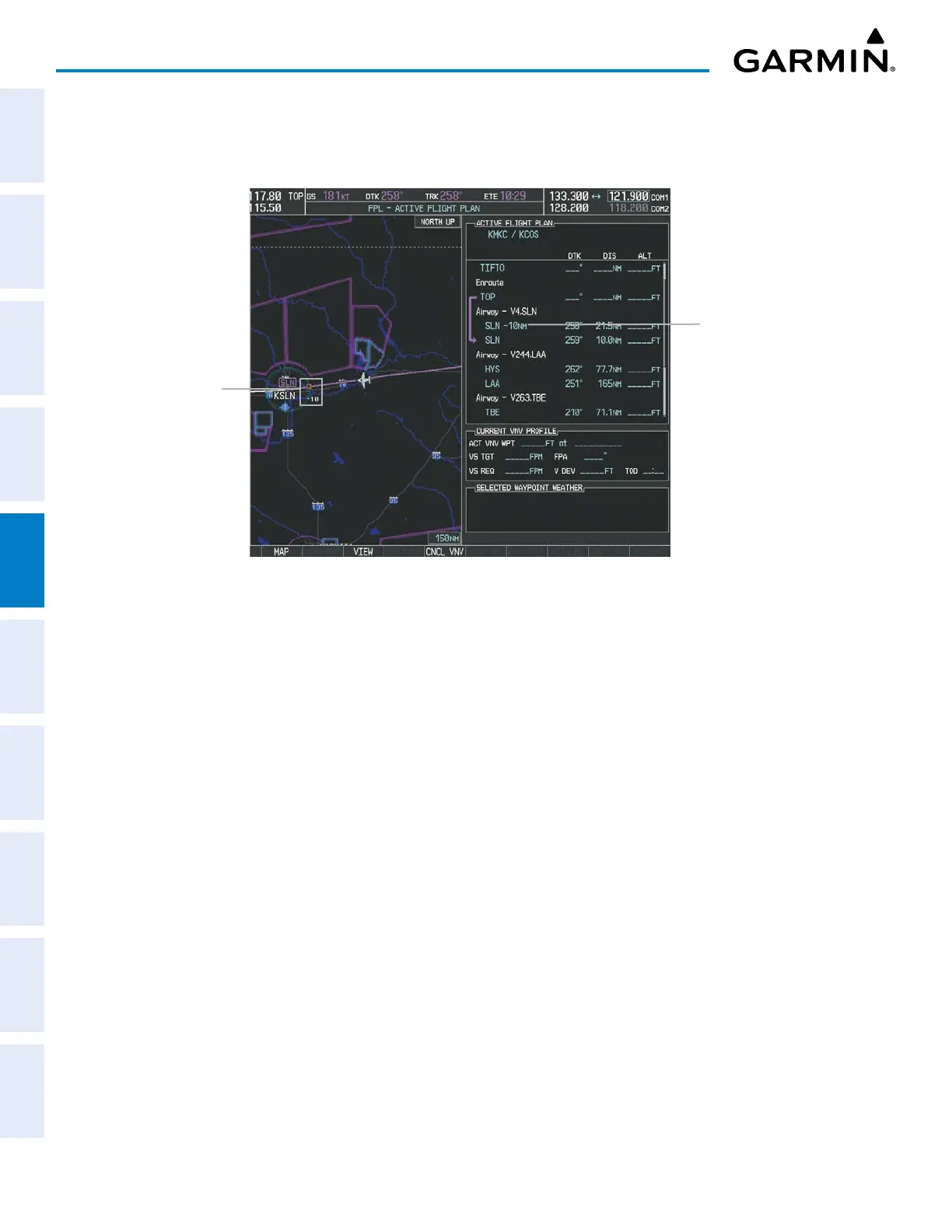
Figure 5-62 Along Track Offset
Along Track Offset
Waypoint and
Distance
Along Track Offset
Waypoint and Distance
from Flight Plan Waypoint
Entering an along track offset distance:
1) Press the FPL Key.
2) Push the FMS Knob to activate the cursor (not required on the PFD) and turn the large FMS Knob to highlight
the waypoint for the along track offset.
3) Press the ATK OFST Softkey (MFD only); or press the MENU Key, highlight ‘Create ATK Offset Waypoint’, and
press the ENT Key.
4) Enter a positive or negative offset distance in the range of +/ – 1 to 999 nm (limited by leg distances).
5) Press the ENT Key to create the offset waypoint.
6) Push the FMS Knob to remove the flashing cursor.


 To Next Page